
The Golden Age of Piracy has officially returned. Launched this week, Assassin's Creed Black Flag Resynced brings Edward Kenway's beloved Caribbean adventure into the modern era. This is far more than a simple remaster. Ubisoft has completely rebuilt the 2013 classic using the latest version of its Anvil engine.
Players can enjoy heavily upgraded character models, overhauled environments, and modern graphics, all of which make navigating the high seas more breathtaking and more demanding than ever before. To find out just how demanding, we've spent countless hours testing as many GPU configurations as our sanity would allow before going full Jack Sparrow.
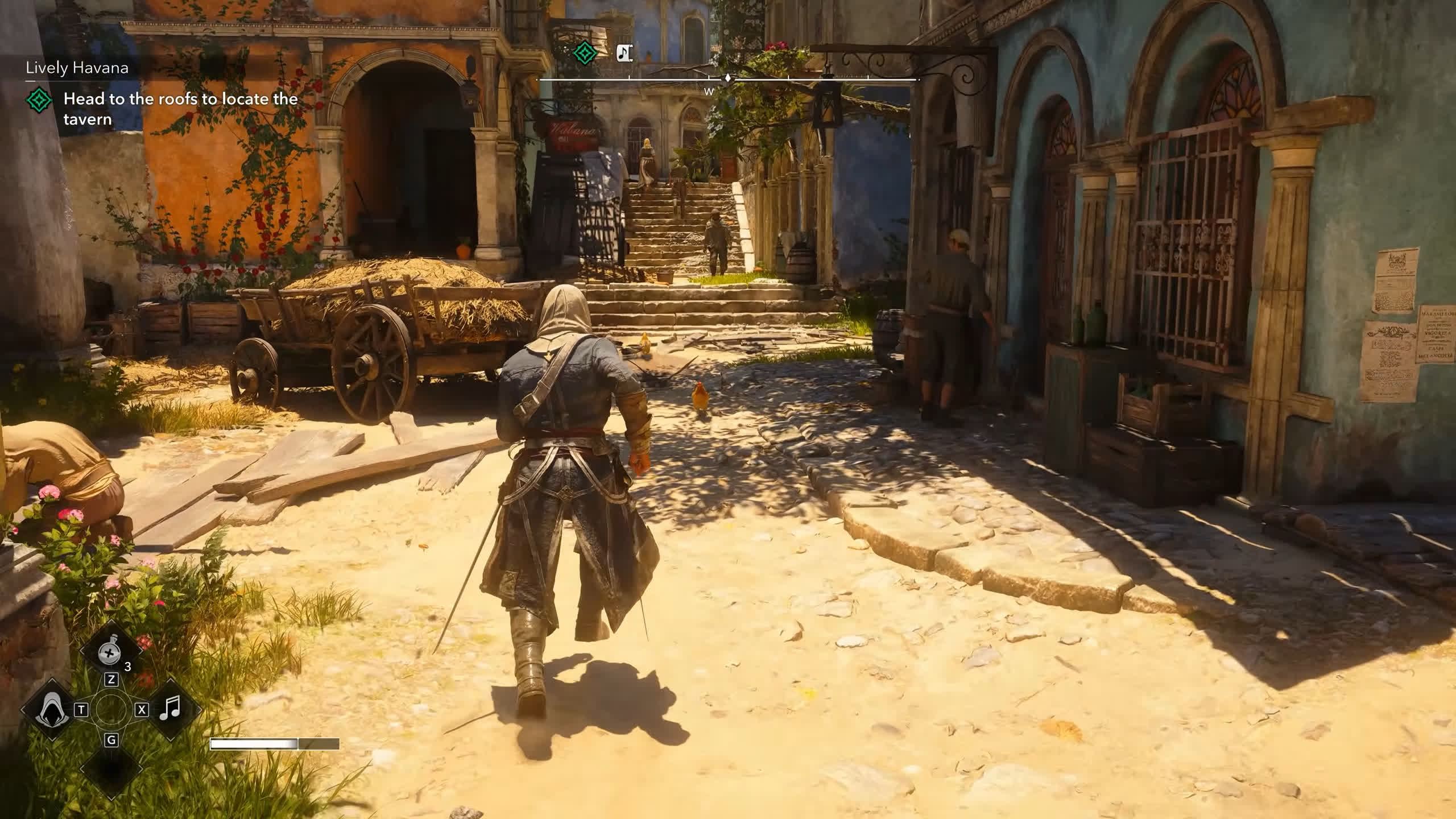
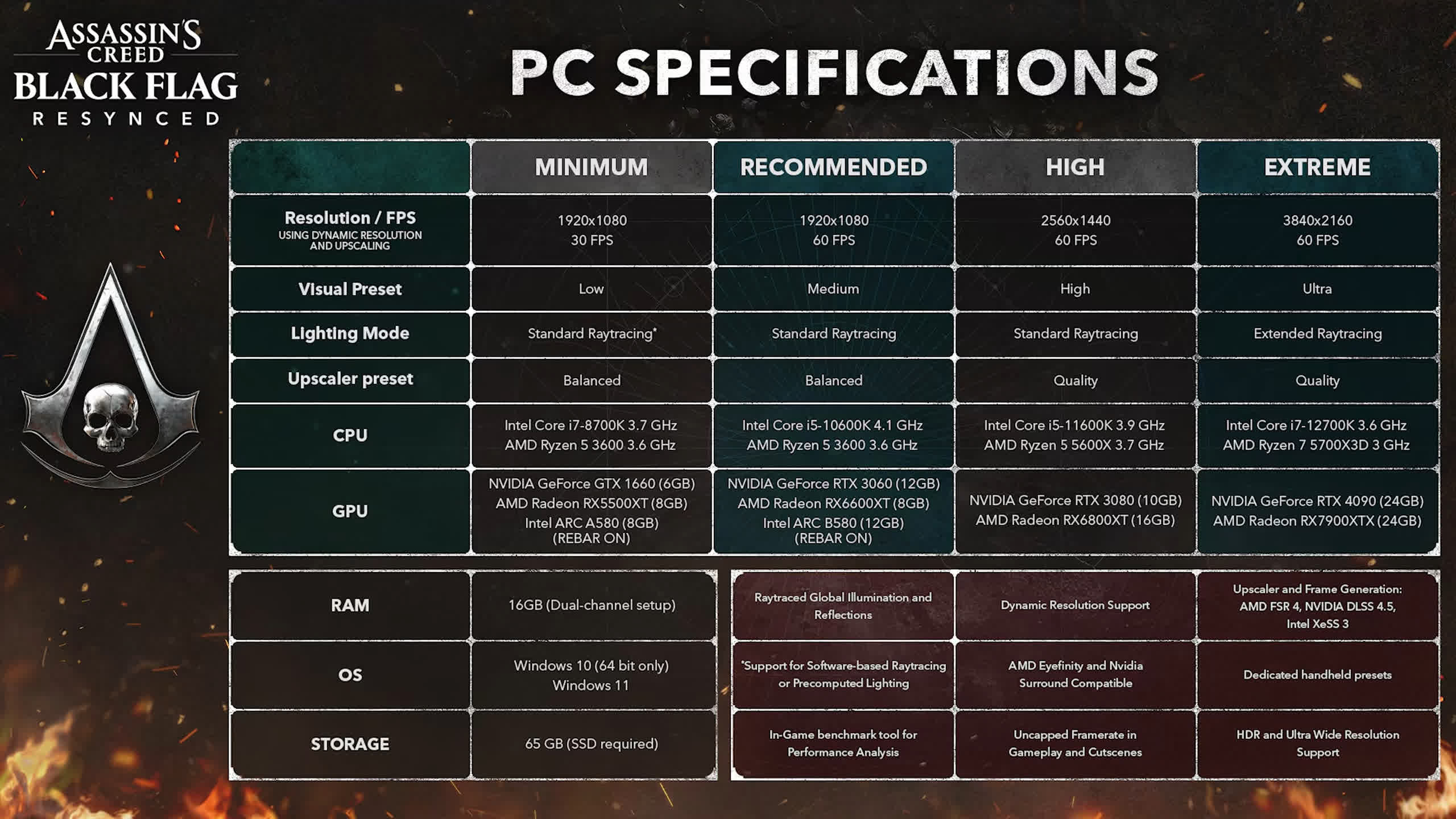
With sweeping visual enhancements comes a renewed tax on PC hardware. While the tropical storms, dense jungles, and bustling pirate havens such as Nassau are stunningly immersive, achieving smooth frame rates requires the right firepower under the hood. Upgrading the Jackdaw is one thing, but making sure your PC is ready for the voyage is another. To speed-run that process, we've tested 50 different graphics cards.
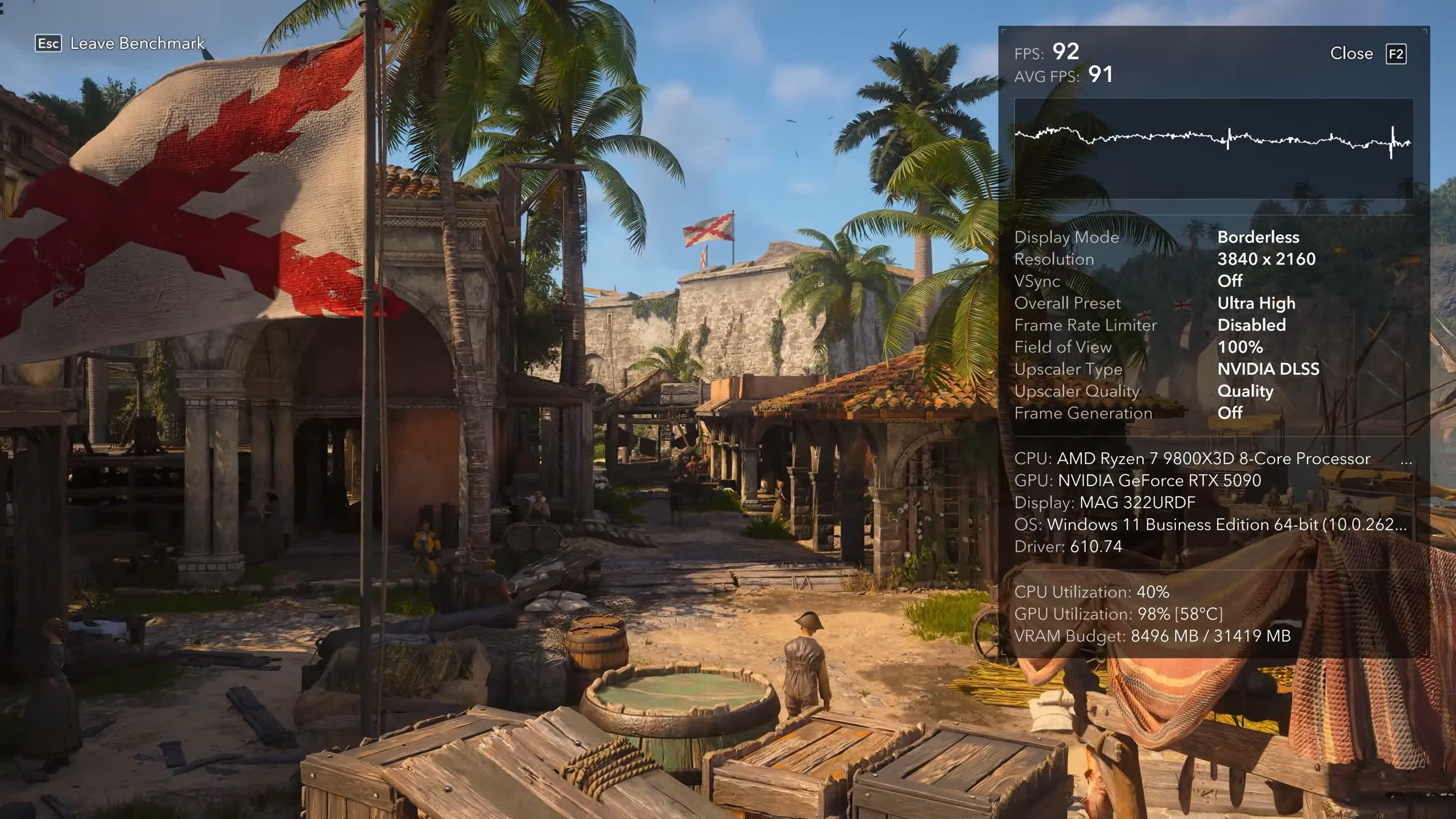
Using Black Flag Resynced's built-in benchmark tool, we've gathered extensive performance data across multiple resolutions and quality presets to see how several generations of PC hardware handle the updated engine. Whether you're sailing with a budget GPU or looking to push a flagship card to its absolute limits, this comprehensive benchmark breakdown will show you exactly where your system stands.
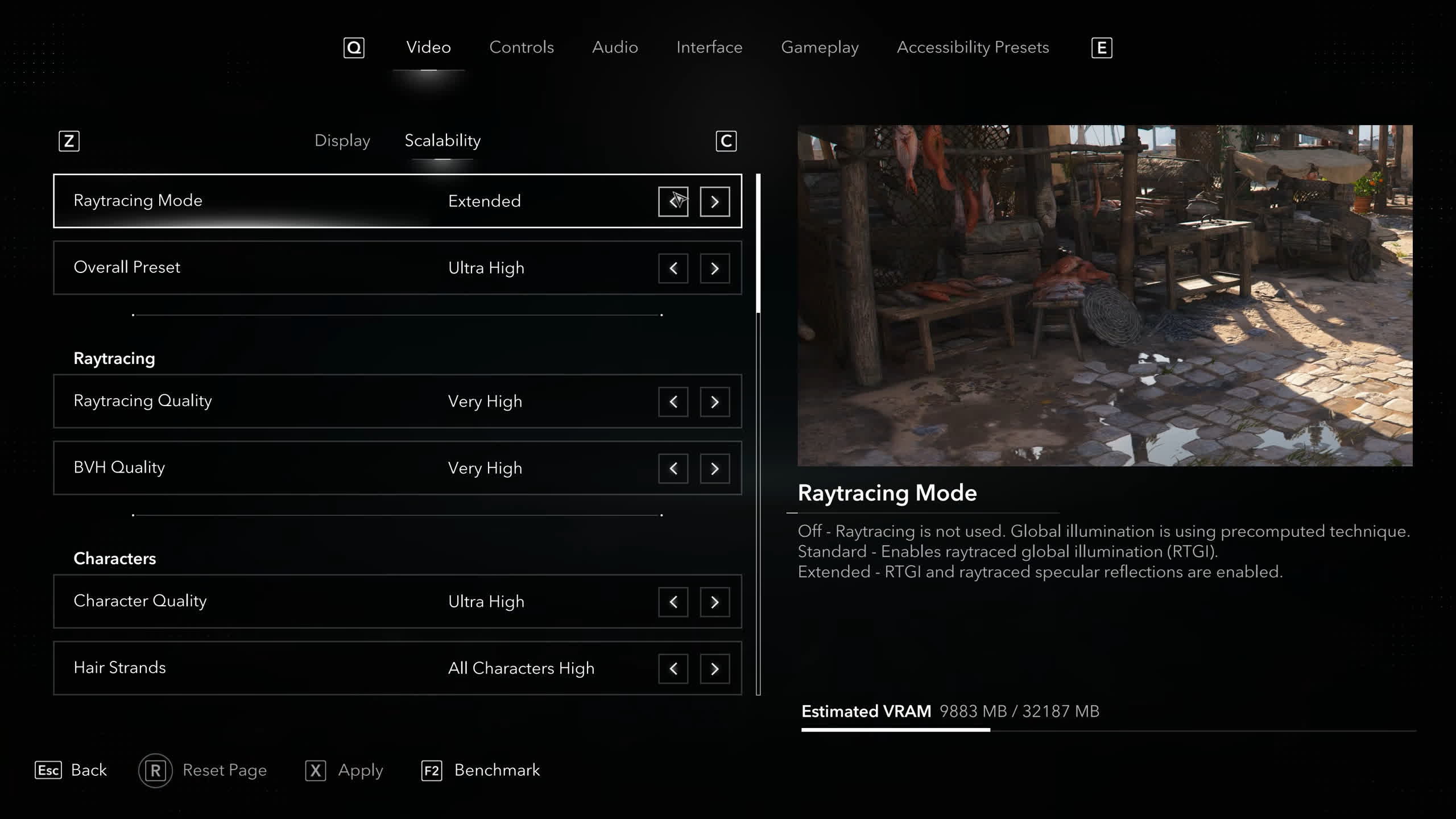
The revamped game supports ray tracing and offers both hardware- and software-based implementations. This means that when ray tracing is enabled, non-RT GPUs can still simulate advanced lighting effects to a degree. There are also two ray-tracing quality settings.
The standard option enables Ray-Traced Global Illumination, replacing the original baked lighting system with real-time precomputed diffuse indirect lighting. This helps eliminate light bleed and creates more realistic shadowing. The highest ray-tracing setting, labeled "Extended," also enables Ray-Traced Reflections, which simulate accurate indirect specular lighting and replace traditional screen-space reflections.
The game also supports upscaling and frame generation. Nvidia users can take advantage of DLSS 4.5 along with DLSS Frame Generation and Multi-Frame Generation. AMD users get FSR 4.1 ML Upscaling and FSR Frame Generation, while Intel users have access to XeSS 3 and XeSS Frame Generation.
Beyond that, the game incorporates a wide range of modern rendering technologies, including Micropolygon Virtual Geometry, Physically Based Rendering, advanced shaders, a dynamic weather system, and modernized water rendering, which we have to say looks incredibly good.
The ocean has been completely rebuilt with advanced foam simulation, improved light scattering, and reworked water physics, making sailing the Jackdaw feel more dynamic and lifelike.
There is a lot of data to get through, so let's get started...
Test System Specs
| CPU | AMD Ryzen 7 9800X3D |
| Motherboard | MSI MAG X870E Tomahawk Max (BIOS 7E59v5A32) |
| Memory | G.Skill Trident Z5 RGB 32GB DDR5-6000 CL30 |
| ATX Case | MSI Prospect 700R |
| Power Supply | Kolink Regulator Gold ATX 3.0 1200W |
| Storage | TeamGroup T-Force Cardea A440 M.2 PCIe Gen4 NVMe SSD 4TB |
| Operating System | Windows 11 25H2 |
| Display Drivers | Nvidia GeForce Game Ready Driver 610.74 WHQL AMD Radeon Adrenalin Edition 26.6.4 WHQL Intel Arc Graphics Driver 32.0.101.8861 |
Benchmarks
Preset Scaling
Starting with some preset scaling data comparing the Radeon RX 9070 XT and GeForce RTX 5070 Ti at 1440p, we see that when using the Ultra High preset with ray tracing enabled, the results are very close. With the game fully maxed out, the Radeon GPU was 6% faster, and when we reduced ray tracing to the Standard mode, that margin increased to 9%.
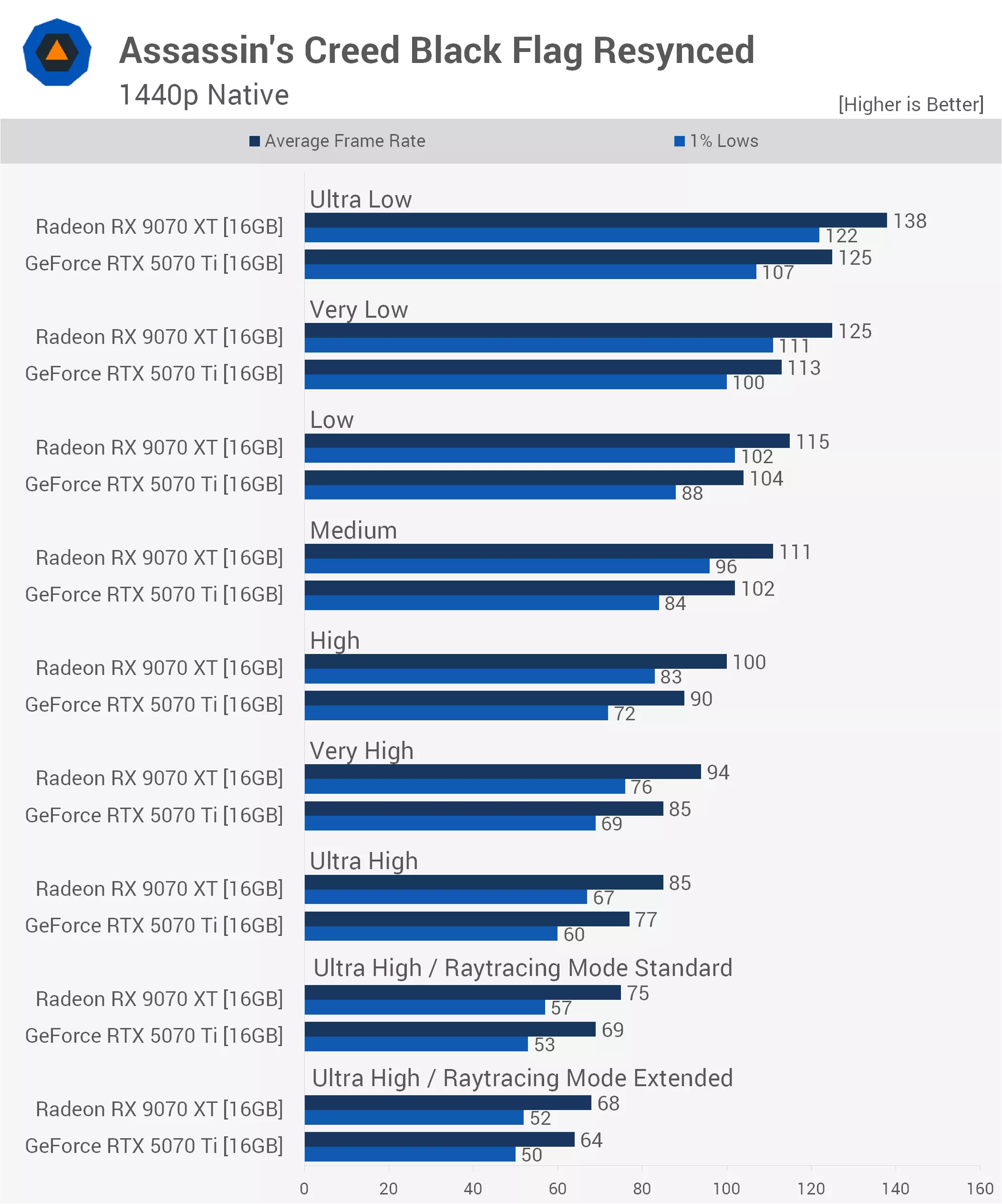
Once we disabled ray tracing entirely, the 9070 XT enjoyed a 10% lead over the 5070 Ti. We're also looking at a 25% performance increase with RT disabled compared to fully enabled for the 9070 XT, while the GeForce GPU saw a 20% increase.
Once we disabled ray tracing entirely, the 9070 XT enjoyed a 10% lead over the 5070 Ti. We're also looking at a 25% performance increase with RT disabled compared to fully enabled for the 9070 XT, while the GeForce GPU saw a 20% increase.
Both GPUs delivered a further 10% performance uplift when dropping from the Ultra High preset to Very High, followed by just a 6% gain when moving from Very High to High. Then, from High to Medium, performance increased by another 11% to 13%, while the Low preset offered only a modest 4% improvement.
Moving from Low to Very Low yielded an additional 9% performance increase, while dropping from Very Low to Ultra Low provided another 10% uplift. Overall, the game scales very well across its quality presets.
Upscaling Scaling
Next, here's a quick look at upscaling performance at 1440p. The Quality mode delivered a 28% to 30% performance increase, while Balanced boosted performance by 45% for the 5070 Ti. The 9070 XT saw an even larger 54% gain.
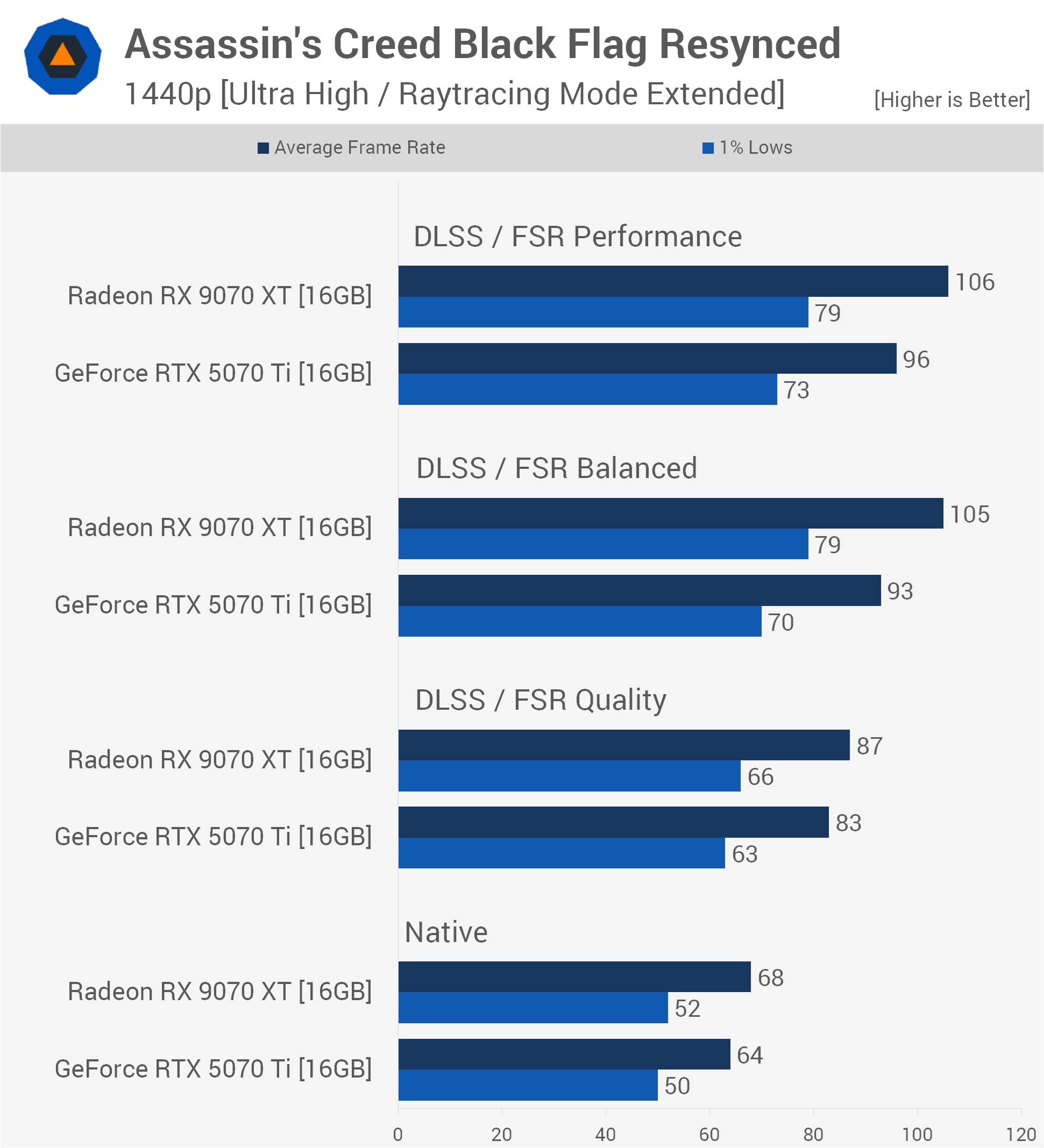
That said, the Performance mode didn't provide any meaningful additional uplift for either GPU, as performance remained largely unchanged. This could be the result of the game using different upscaling models for the various quality modes.
Ultra High / Ray Tracing Extended
1080p
For this test, we're using the Ultra High preset along with the maximum ray tracing quality setting, labeled "Extended," and we're testing at the native resolution, starting with 1080p.
Here, the RTX 5090 was able to render 119 fps, making it 25% faster than the RTX 4090, which unexpectedly was only a few percent faster than the 7900 XTX. In fact, the previous-generation Radeon flagship performed well above expectations, beating both the RTX 5080 and RX 9070 XT.
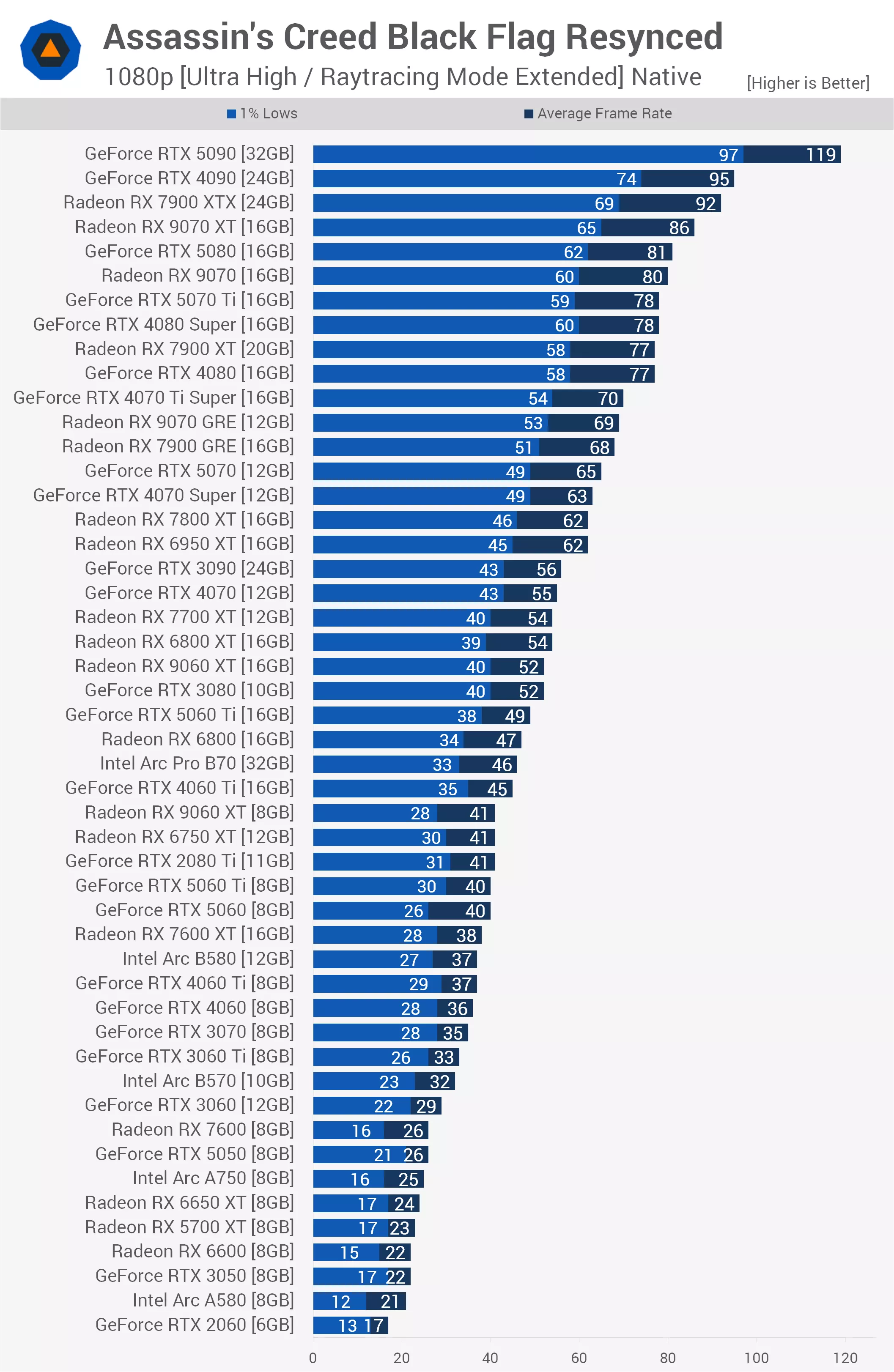
Despite using ray tracing, this game clearly favors Radeon GPUs, and we're seeing that reflected in several matchups. Not only that, but Nvidia's latest-generation Blackwell GPUs don't perform noticeably better than the previous-generation Ada Lovelace models. The RTX 5080, for example, was just 5% faster than the RTX 4080.
We also see that the standard RX 9070 was a few frames faster than the RTX 5070 Ti, making it an impressive 23% faster than the RTX 5070. In fact, the RTX 5070 was only able to edge out the previous-generation 7800 XT, which is a very unusual result.
Dropping below 60 fps, we find the RTX 3090, which only matched the RTX 4070 and RX 7700 XT. The current-generation RX 9060 XT 16GB was a massive 27% faster than its 8GB counterpart, strongly indicating that these quality settings require more than 8GB of VRAM. The 9060 XT also beat the RTX 5060 Ti by a 6% margin, while the 8GB models were all bottlenecked to roughly the same level of performance.
This was true of other 8GB GPUs as well. For example, the 8GB RTX 5060 Ti and RTX 5060 delivered similar performance and, in fact, weren't much faster than the typically slower RX 7600 XT. Beyond that, frame rates drop into the 30s, and at that point we would recommend lowering the quality settings in search of better performance.
It's worth noting that the 5700 XT is using software-based ray tracing here, so this isn't an apples-to-apples comparison. Visual quality is likely not as good, though this isn't something we've had time to investigate yet. We simply wanted to point that out.
1440p
Stepping up to 1440p, as expected, the strain on the GPUs increases significantly, yet Radeon's strong showing remains a defining characteristic of this title.
The RTX 5090 averaged 102 fps, making it roughly 23% faster than the RTX 4090 at 83 fps. Meanwhile, the RX 7900 XTX continued to overperform, rendering 72 fps, which allowed the previous-generation Radeon flagship to comfortably outpace Nvidia's newer RTX 5080. The RX 9070 XT was also hot on its heels at 68 fps, edging past both the RTX 4080 Super and standard RTX 4080.
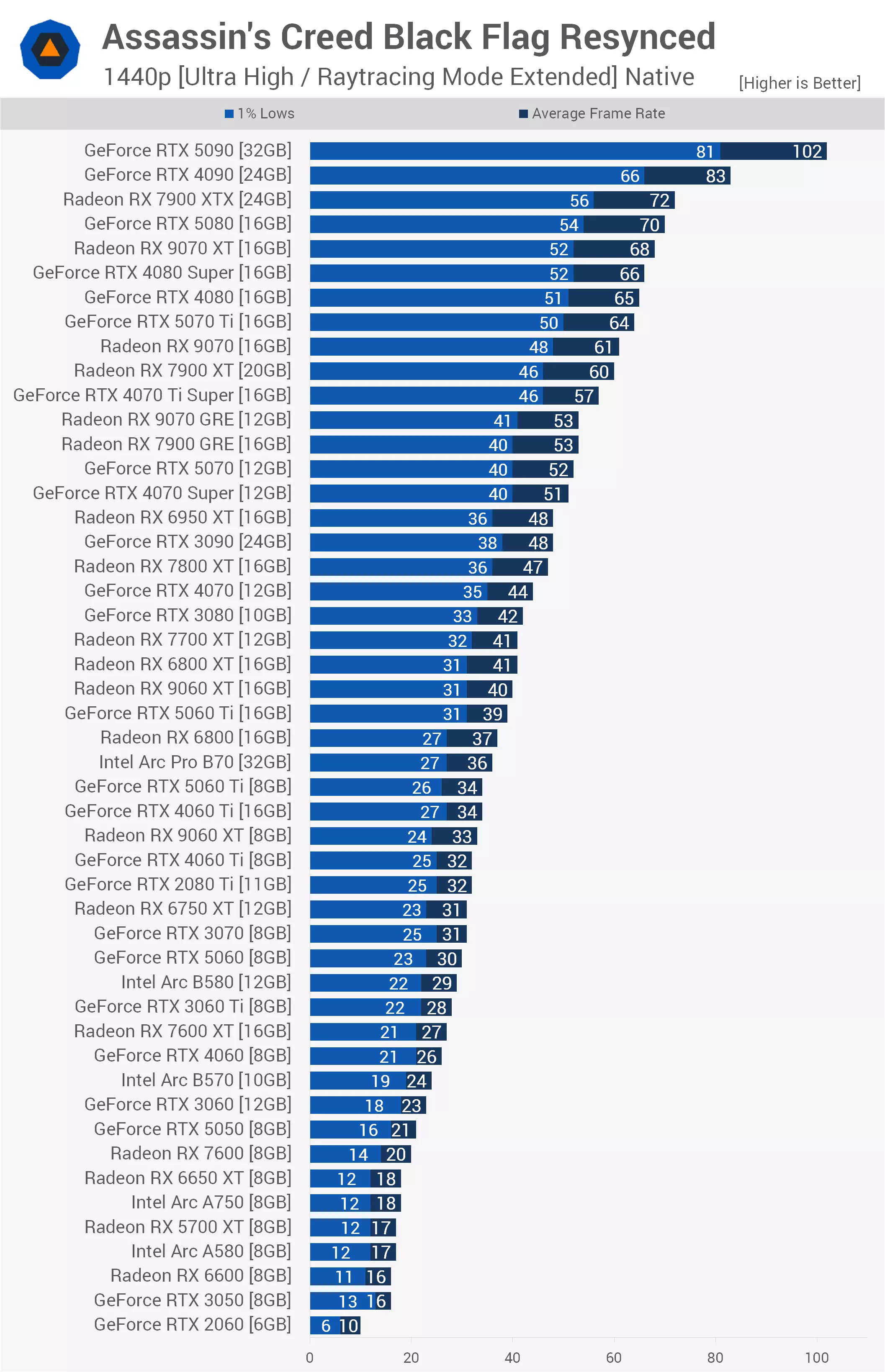
The mid-range Blackwell cards struggle to show meaningful generational scaling here. The RTX 5070 Ti managed 64 fps, but the standard RTX 5070 fell well behind at 52 fps, making the 5070 Ti 23% faster than its sibling. The RTX 5070 only narrowly outpaced the previous-generation RX 7800 XT.
The 8GB VRAM bottleneck turns into a significant performance cliff at 1440p. We see this clearly with the RX 9060 XT and RTX 5060 Ti. For example, the RX 9060 XT 16GB delivered 40 fps, while its 8GB counterpart dropped to 33 fps, giving the higher-capacity model a 21% performance advantage.
Meanwhile, the RTX 5060 Ti 16GB managed 39 fps, whereas the 8GB version dropped to 34 fps.
In an interesting twist, the RTX 4060 Ti 16GB matched the newer RTX 5060 Ti 8GB, clearly demonstrating that additional VRAM can entirely erase a generational architectural advantage under these extreme settings. Below 40 fps, the mid-range and lower-tier cards begin dropping into the 30s and 20s, requiring reduced quality settings for a smooth experience.
4K
Moving up to the demanding 4K resolution, we see that rendering more than 8 million pixels alongside Extended ray tracing creates a scenario where very little hardware can deliver truly satisfactory performance.
Here, the RTX 5090 stands alone as the only card capable of breaking the 60 fps barrier, averaging 71 fps and making it roughly 34% faster than the RTX 4090, which managed 53 fps. Below that, we find another unexpected result, with the RTX 5080 and RX 7900 XTX somehow ending up deadlocked at 45 fps.
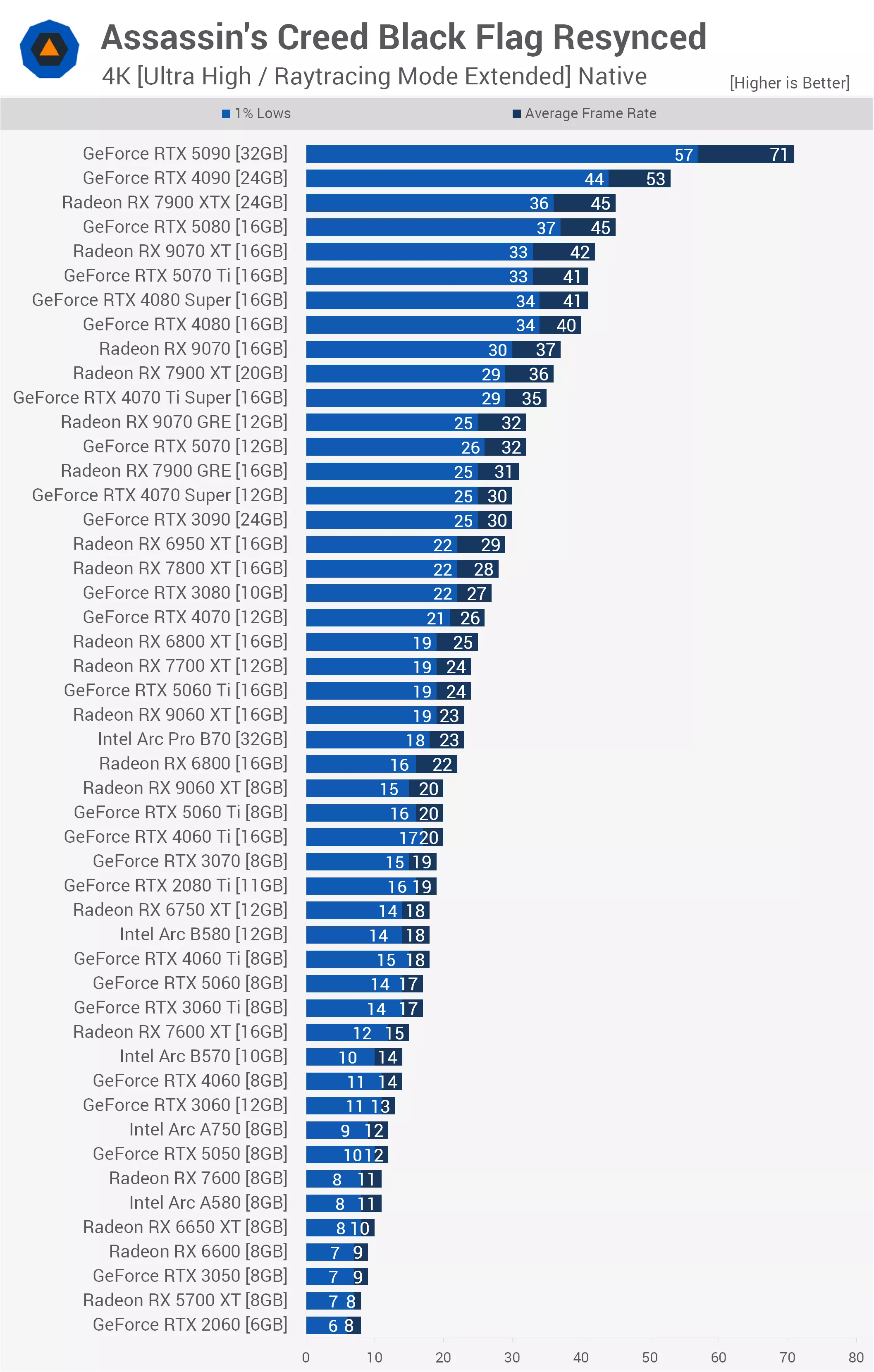
Blackwell's gen-on-gen improvements are also slim at this resolution, with the RTX 5080 clearing the older RTX 4080 by a mere 5 fps. We see a similar trend further down the stack, where the RX 9070 XT managed 42 fps, barely edging past the RTX 5070 Ti and RTX 4080 Super, which both tied at 41 fps. Meanwhile, the standard RTX 5070 delivered a modest 32 fps, matching the RX 9070 GRE and finishing just two frames ahead of the aging RTX 3090 flagship.
The 8GB VRAM cliff observed at lower resolutions turns into an absolute brick wall at 4K. The 16GB version of the RTX 5060 Ti carved out a 20% lead over its 8GB sibling, while the 16GB model of the RX 9060 XT pulled roughly 15% ahead of the 8GB variant.
More tellingly, a major choke point forms around 20 fps, where the 8GB versions of the RTX 5060 Ti, RTX 4060 Ti, and RX 9060 XT are all bottlenecked to virtually the same level of performance, failing to outperform older mid-range hardware such as the RTX 3070.
Below this point, the chart collapses into unplayable territory, with budget GPUs like the RX 6600 and RTX 3050 dragging performance into single-digit slideshow territory. Ultimately, native 4K with maximum ray tracing is extremely demanding, proving that unless you own a top-tier flagship GPU, upscaling or substantial preset reductions are essential.
Ultra High / Ray Tracing Extended + Upscaling
1080p
Now we're going to go over the Ultra High Ray Tracing Extended results, but this time with upscaling enabled: DLSS for GeForce GPUs and FSR for Radeon and Arc GPUs.
Starting with 1080p using the Quality upscaling mode, we immediately run into a performance ceiling among the top-tier GPUs. The RTX 5090 leads at 135 fps, making it 17% faster than the RTX 4090, but below that things become incredibly competitive. The RX 7900 XTX continues to punch well above its weight at 113 fps, once again outperforming the RTX 5080, which managed just 99 fps.
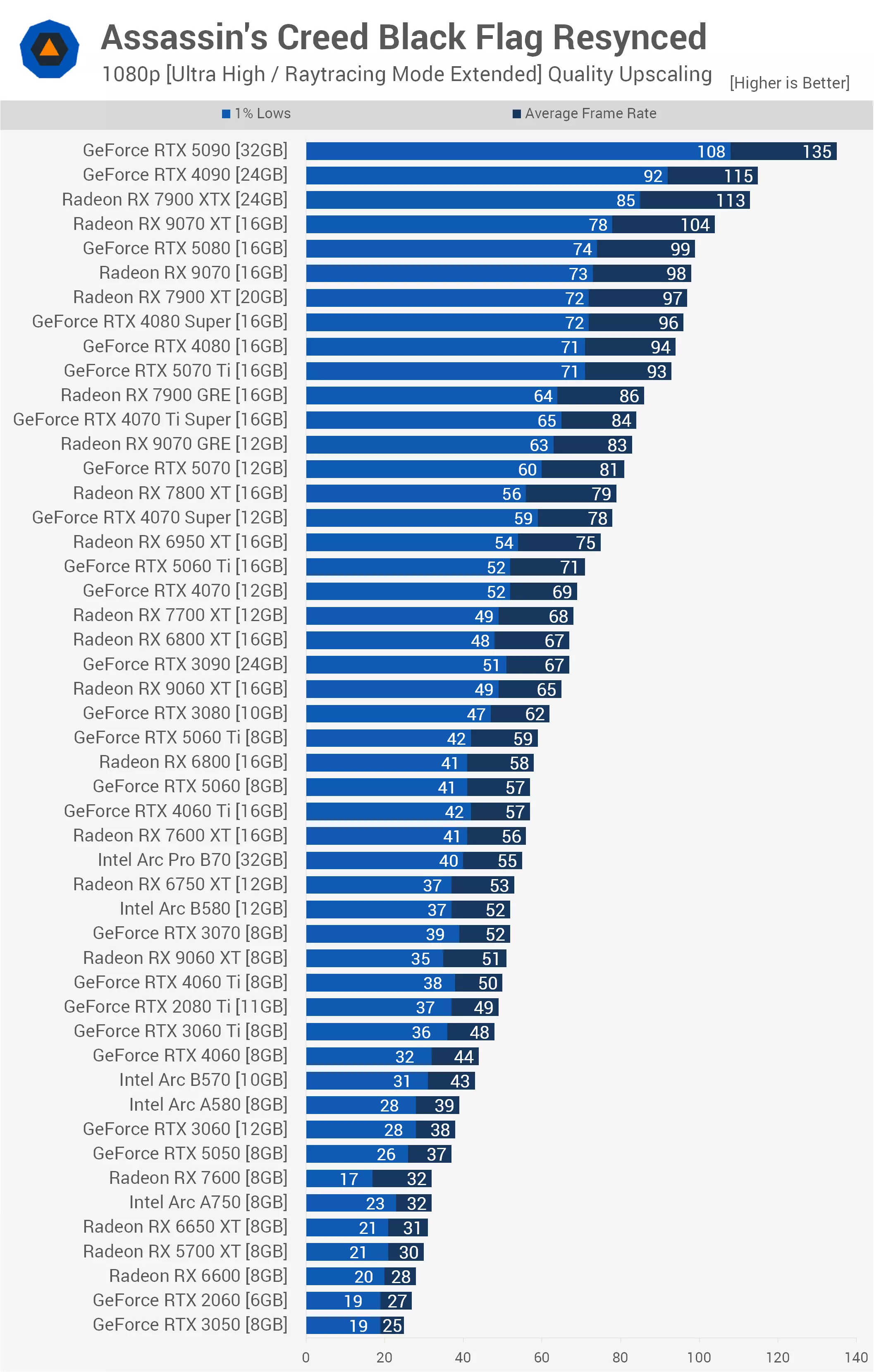
Despite using upscaling, VRAM capacity still plays a major role. The 16GB version of the RX 9060 XT carved out a substantial 27% lead over its 8GB counterpart, showing that even at 1080p, maximum ray tracing settings can severely penalize smaller frame buffers.
Even with Quality upscaling enabled, you'll still need an RTX 3080, RX 9060 XT 16GB, RX 6800 XT, RX 7700 XT, or RTX 4070 to achieve 60 fps or better.
1440p
Moving up to 1440p using the Balanced upscaling preset, we see a very similar performance profile because the internal rendering resolution remains relatively manageable for these GPUs.
The RTX 5090 remains dominant at 136 fps, while the RTX 4090 and RX 7900 XTX are locked in a close battle at 116 and 115 fps, respectively.
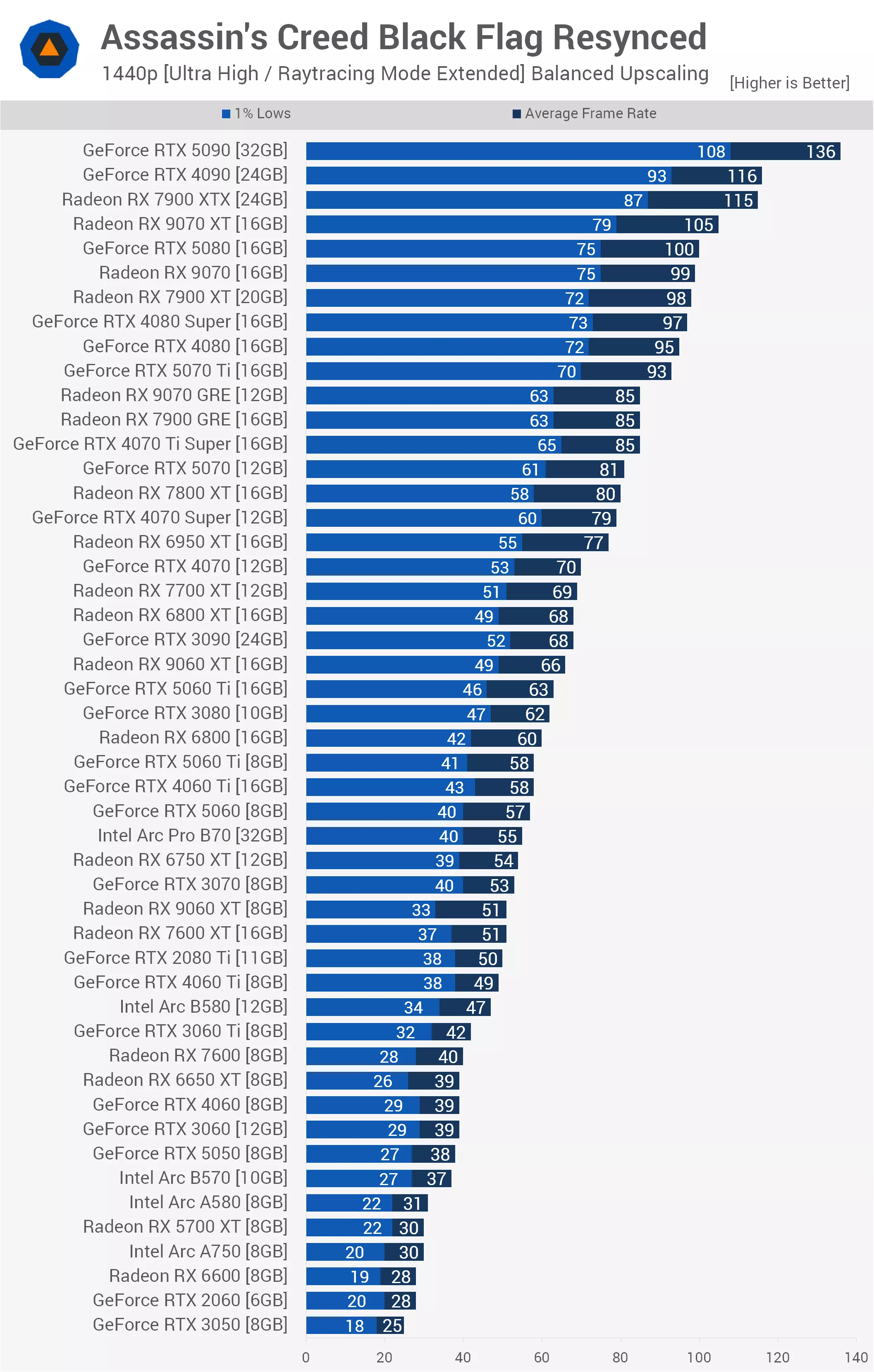
The RTX 5080 is then only able to match the average frame rate of the RX 9070 at 100 fps, while outperforming the previous-generation RTX 4080 Super by a modest 3%.
Further down the stack, 8GB memory limitations continue to hurt performance. The RX 9060 XT 16GB holds a commanding 29% advantage over the 8GB model, while the RTX 5060 Ti 16GB comfortably outpaces its 8GB counterpart. If you're running a mid-range 8GB card at this level, upscaling can keep performance in the playable 40 to 50 fps range, but you're clearly running into a hardware limitation.
4K
Finally, at 4K using the Balanced upscaling preset, the RTX 5090 stretches its legs to reach 126 fps, making it 20% faster than the RTX 4090, which averaged 105 fps. The RX 7900 XTX delivers another impressive result at 91 fps, successfully maintaining its lead over the RTX 5080, which managed 88 fps.
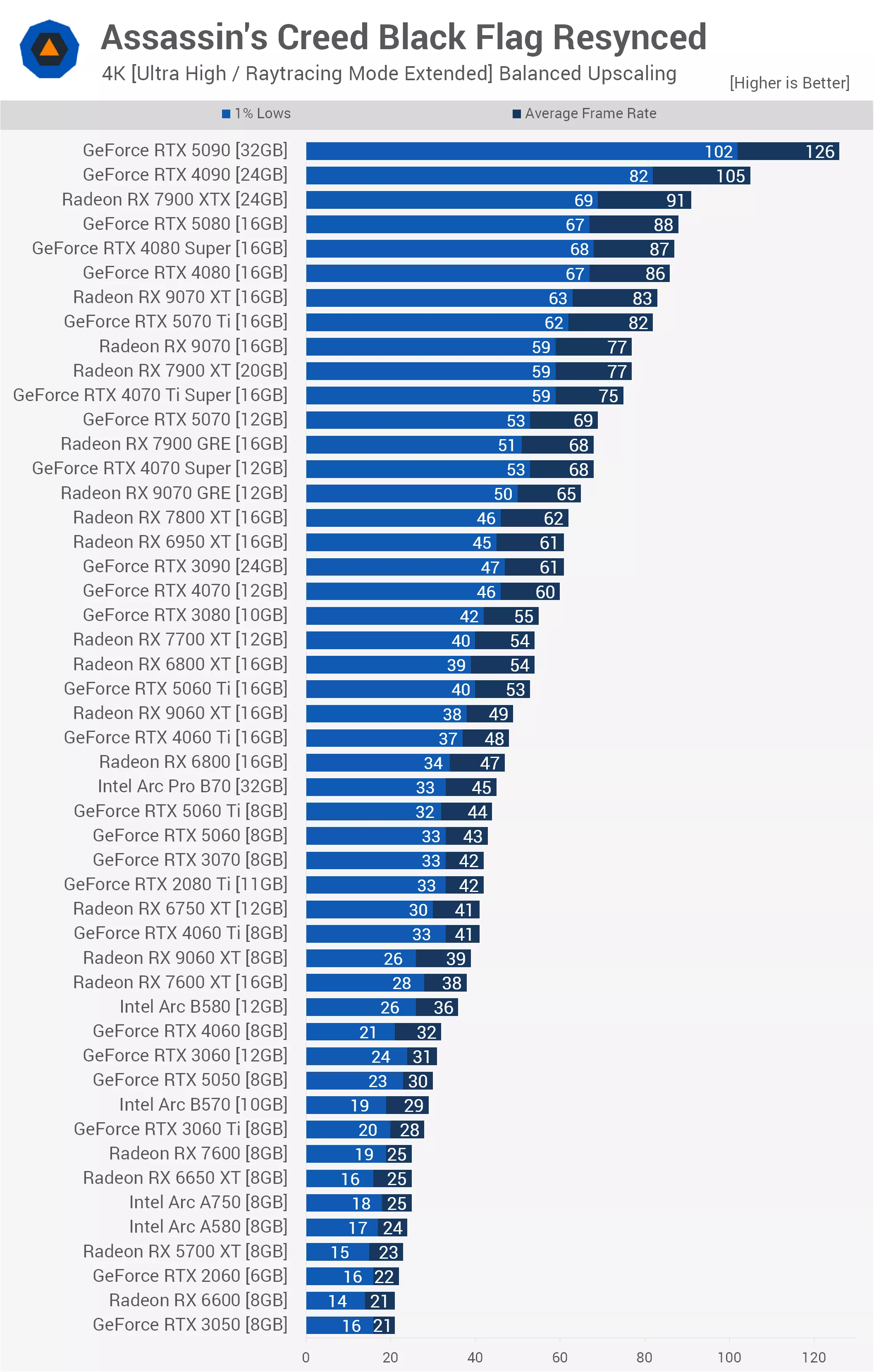
At this demanding resolution, mid-range GPUs show a pronounced performance divide based almost entirely on memory capacity. For example, the RX 9060 XT 16GB rendered 49 fps, leaving the 8GB model well behind at 39 fps, a substantial 25% performance deficit caused entirely by limited VRAM. The same pattern appears with the RTX 5060 Ti, where the 16GB version managed 53 fps while the 8GB model dropped to 44 fps.
Overall, upscaling proves to be a major asset for 4K gaming in this title, transforming what was previously a slideshow at native settings into a highly playable experience for upper-tier hardware. That said, many budget-oriented 8GB GPUs are still left struggling in the low 20s and 30s.
Ultra High / Ray Tracing = Off
1080p
For this test, we're using the Ultra High preset with ray tracing completely disabled, and we'll begin with the native 1080p results.
Here, the RTX 5090 rendered 144 fps, making it 18% faster than the RTX 4090, which itself held just an 8% lead over the 7900 XTX. In fact, the previous-generation Radeon flagship continued to perform exceptionally well, beating both the current-generation RX 9070 XT and the RTX 5080, which managed just 101 fps.
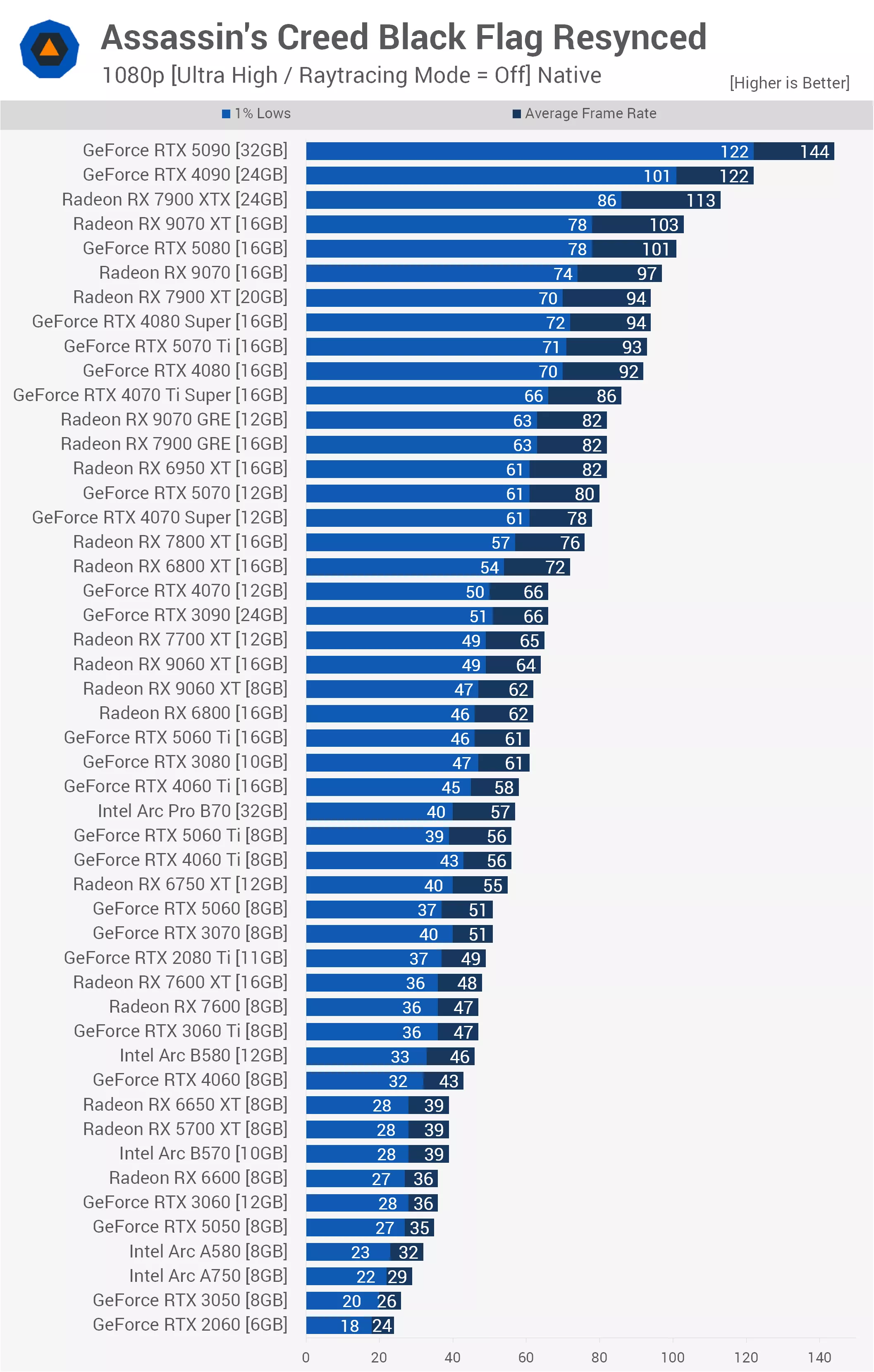
With ray tracing disabled, the game favors Radeon GPUs even more strongly, and we're seeing that reflected across several matchups. Not only that, but Nvidia's latest-generation Blackwell GPUs continue to show relatively modest generational gains over the previous-generation Ada Lovelace models. The RTX 5080, for example, was only 10% faster than the RTX 4080.
We also see that the standard RX 9070 was a few frames faster than the RTX 5070 Ti, making it an impressive 21% faster than the RTX 5070. In fact, the RTX 5070 was only able to match the older RX 6950 XT and barely edge out the RX 7800 XT, further highlighting AMD's architectural advantage in this title.
Dropping further down the stack, disabling ray tracing has relieved some of the VRAM pressure, but not all of it. The 16GB RTX 5060 Ti was roughly 9% faster than its 8GB counterpart, and interestingly, the 8GB RTX 5060 Ti actually suffered a generational regression, matching the older 8GB RTX 4060 Ti in average frame rate while trailing noticeably in 1% lows.
We also see a clear anomaly near the bottom of the chart, where the budget Intel Arc A580 inexplicably outperformed the higher-tier Arc A750. Beyond that, frame rates fall into the low 30s and 20s, and at that point we would recommend lowering the quality settings or enabling upscaling to improve performance.
1440p
Stepping up to 1440p with no ray tracing, we see the RTX 5090 deliver an impressive 123 fps, providing a substantial 24% performance uplift over the RTX 4090. The 7900 XTX held up well once again at 92 fps, continuing to flex its muscles against Nvidia's newer RTX 5080, which managed just 82 fps. In fact, AMD's newer RX 9070 XT also joins the party with 85 fps, outperforming the RTX 5080 by 3 fps.
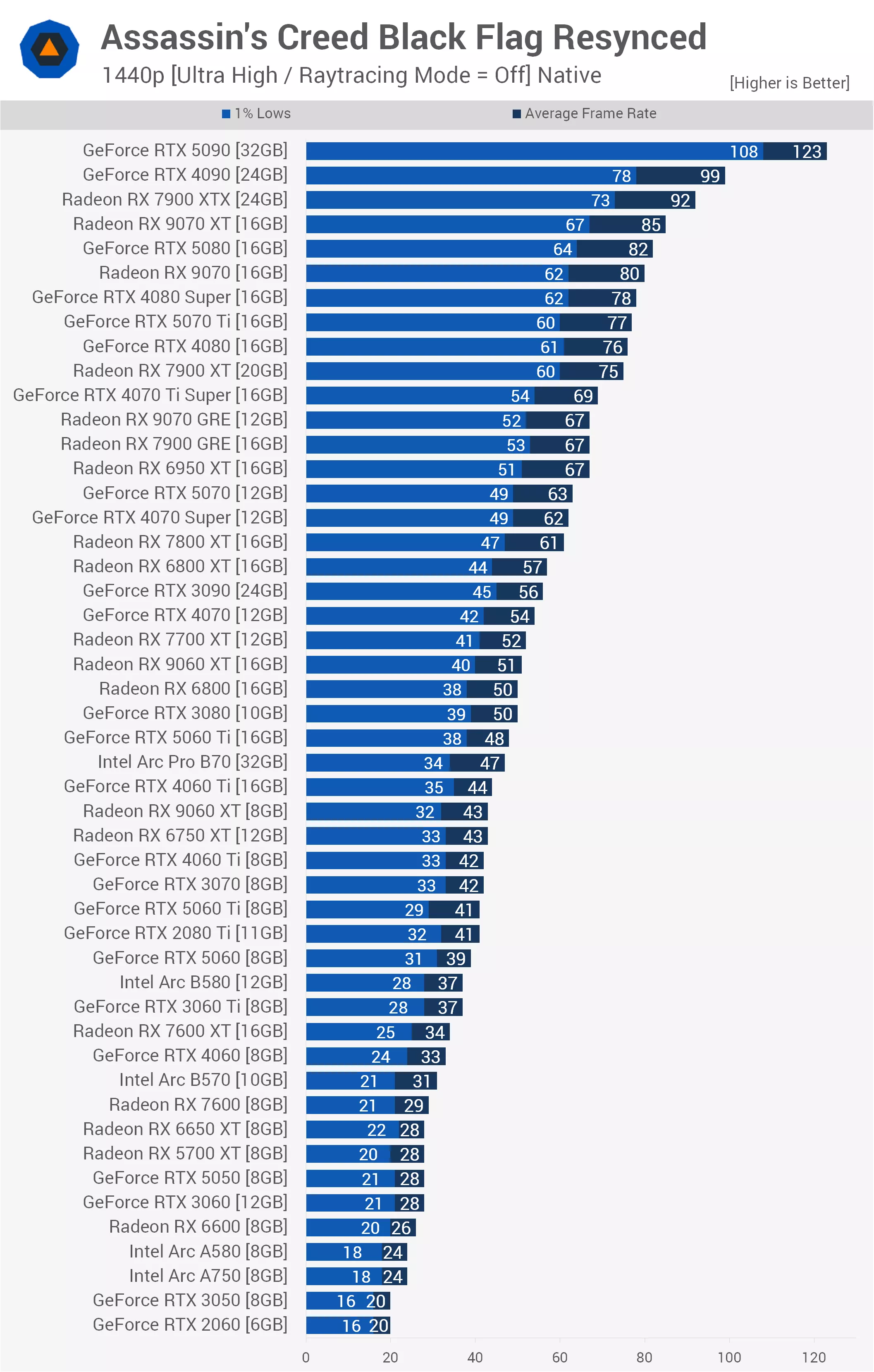
The RTX 5080 barely managed an 8% lead over the standard RTX 4080, which finished at 76 fps. The mid-range Blackwell lineup also faces stiff competition, as the standard RX 9070 slices through with 80 fps to beat the RTX 5070 Ti. This creates a substantial 27% performance gap over the RTX 5070, which rendered just 63 fps. That leaves the RTX 5070 in a difficult position, trailing the previous-generation RX 6950 XT at 67 fps and only narrowly staying ahead of the RX 7800 XT.
Even with ray tracing completely turned off, 1440p using the Ultra High preset proves that 8GB of VRAM is no longer sufficient. The 16GB version of the RX 9060 XT averaged 51 fps, leaving the 8GB variant behind at 43 fps, making the higher-capacity model nearly 20% faster.
We see a very similar story play out with the RTX 5060 Ti, where the 16GB version managed 48 fps while the constrained 8GB variant dropped to 41 fps, matching older hardware such as the RTX 2080 Ti.
Further down the ranks, performance rapidly sinks below the 30 fps threshold, where GPUs like the RX 6600 and other older hardware begin to struggle, requiring gamers to either lower quality settings or rely on upscaling.
4K
At 4K, the RTX 5090 flexes its muscles with 88 fps, carving out a substantial 31% lead over the RTX 4090, which averaged 67 fps. Once again, AMD continues to show a significant advantage in this game engine, as the previous-generation flagship 7900 XTX climbs to 61 fps, comfortably outperforming the newer RTX 5080, which averaged just 56 fps.
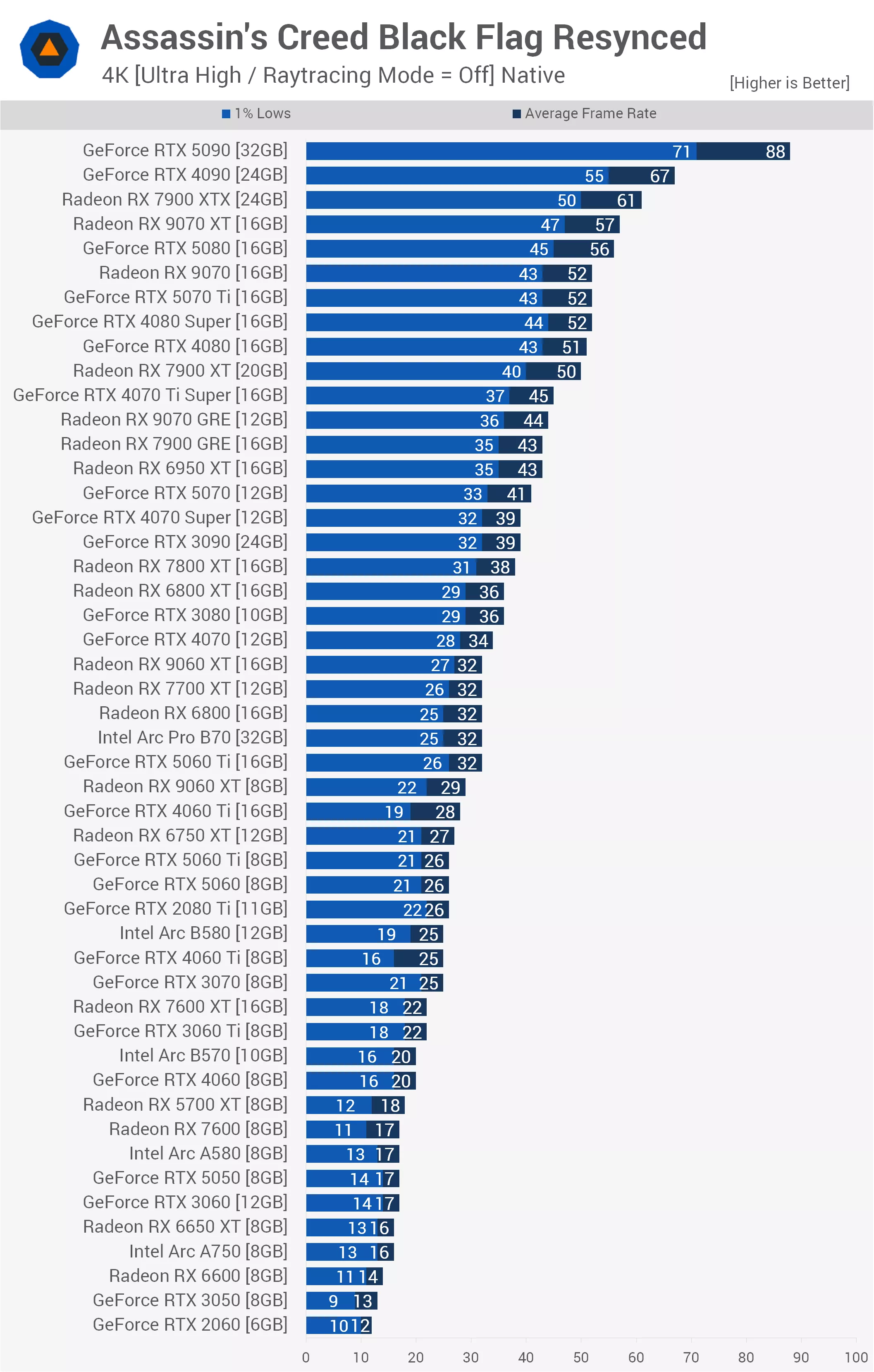
Nvidia's newest architecture continues to look remarkably stagnant in this title, with the RTX 5080 only managing to outperform the RTX 4080 by a modest 10% margin. We see a similarly disappointing showing from the mid-range Blackwell cards, as the standard RX 9070 matched the more expensive RTX 5070 Ti at 52 fps, placing it a substantial 27% ahead of the RTX 5070. The RTX 5070 continues to struggle here, losing out to the aging RX 6950 XT.
We also see that even with ray tracing disabled, an 8GB frame buffer remains a major liability. The 16GB version of the RTX 5060 Ti demonstrates this perfectly, rendering 32 fps to outperform its 8GB counterpart by a sizable 23% margin. In fact, a hard wall appears at around 26 fps, effectively bottlenecking the 8GB RTX 5060 Ti and RTX 5060 into a dead tie, where they fail to separate themselves from older hardware such as the RTX 2080 Ti.
Below that point, performance plunges into unplayable territory, with entry-level GPUs like the RX 6600 and RTX 3050 unable to clear even the 15 fps mark.
High / Ray Tracing = Off
1080p
For this set of data, we're using the High preset with ray tracing turned off, and we're testing at the native resolution, starting with 1080p.
Here, the RTX 5090 rendered 170 fps, making it 20% faster than the RTX 4090, which, as we've come to expect in this title, was only 3% faster than the 7900 XTX. In fact, the previous-generation Radeon flagship performed exceptionally well under these settings, beating the RTX 5080 by a remarkable 15% margin.
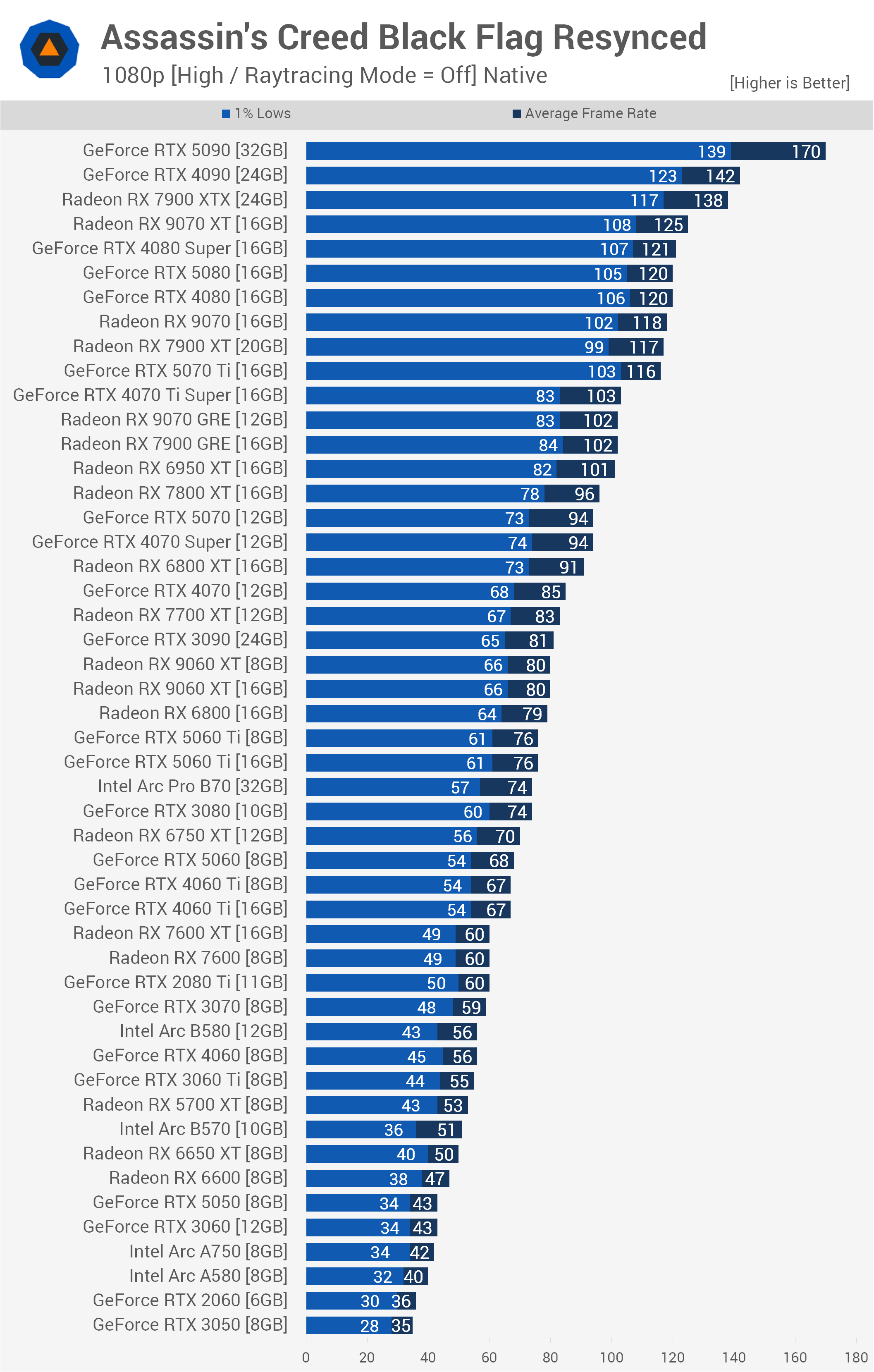
Once again, Nvidia's latest-generation Blackwell GPUs don't perform noticeably better than the previous-generation Ada Lovelace models. The RTX 5080, for example, was only able to match the older RTX 4080 at 120 fps.
We also see that the standard RX 9070 was a few frames quicker than the RTX 5070 Ti, making it an impressive 23% faster than the RTX 5070. In a surprising twist, the RTX 5070 was actually beaten by the previous-generation RX 7800 XT, which averaged 96 fps.
Looking further down the stack, dropping the preset to High completely eliminates the VRAM bottlenecks we observed with the Ultra High preset. The current-generation RX 9060 XT 16GB delivered identical performance to its 8GB counterpart at 80 fps, strongly indicating that these quality settings no longer require more than 8GB of VRAM. The same was true of the RTX 5060 Ti, where the 16GB and 8GB versions were perfectly tied at 76 fps.
Beyond that, performance drops into the 40s and 30s, and at that point we would recommend lowering the quality settings further in search of better performance.
1440p
Upping the resolution to 1440p, we see that the RTX 5090 rendered 144 fps, making it 20% faster than the RTX 4090, which held just a 7% lead over the 7900 XTX. Once again, the previous-generation Radeon flagship performed exceptionally well, outperforming the RTX 5080, which managed only 100 fps.
We also see that the standard RX 9070 was a few frames quicker than the RTX 5070 Ti, making it an impressive 25% faster than the RTX 5070. In fact, the RTX 5070 was only narrowly ahead of the previous-generation RX 7800 XT and RTX 4070 Super, which were both tied at 76 fps.
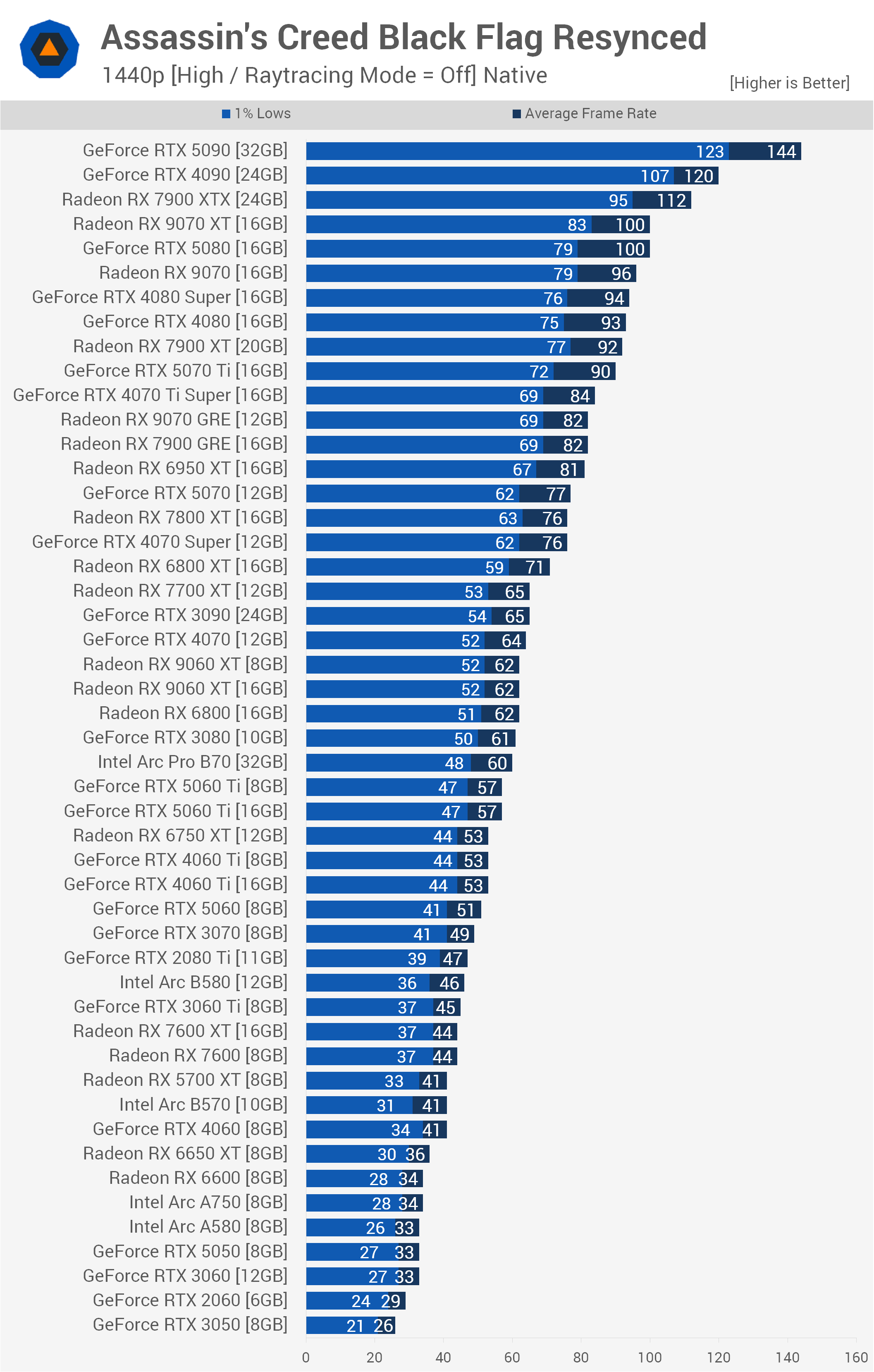
Further down the stack, the 16GB and 8GB versions of both the RX 9060 XT and RTX 5060 Ti perform identically at 62 fps and 57 fps, respectively, proving that the High preset completely removes any VRAM bottlenecks at 1440p. We also see an interesting battle in the mid-range, where the current-generation RTX 5060 at 51 fps was only 4% faster than the older RTX 3070.
Most surprisingly, a three-way dead heat forms at 41 fps between the RTX 4060, the aging RX 5700 XT, and Intel's Arc B570. Beyond that, performance falls into the 30s and 20s, and at that point we would recommend lowering the quality settings further in search of better performance.
4K
The RTX 5090 rendered 103 fps at 4K, making it 32% faster than the RTX 4090, which maintained an 8% lead over the 7900 XTX. That meant the older Radeon flagship was still faster than the RTX 5080, which managed only 68 fps, making the 7900 XTX 6% faster.
We also see that the standard RX 9070 rendered 61 fps, making it slightly faster than both the RTX 4080 Super and the RTX 5070 Ti. In fact, the RTX 5070 was matched by the older RX 7900 GRE at 50 fps, and both were edged out by the RX 6950 XT, which scored 51 fps.
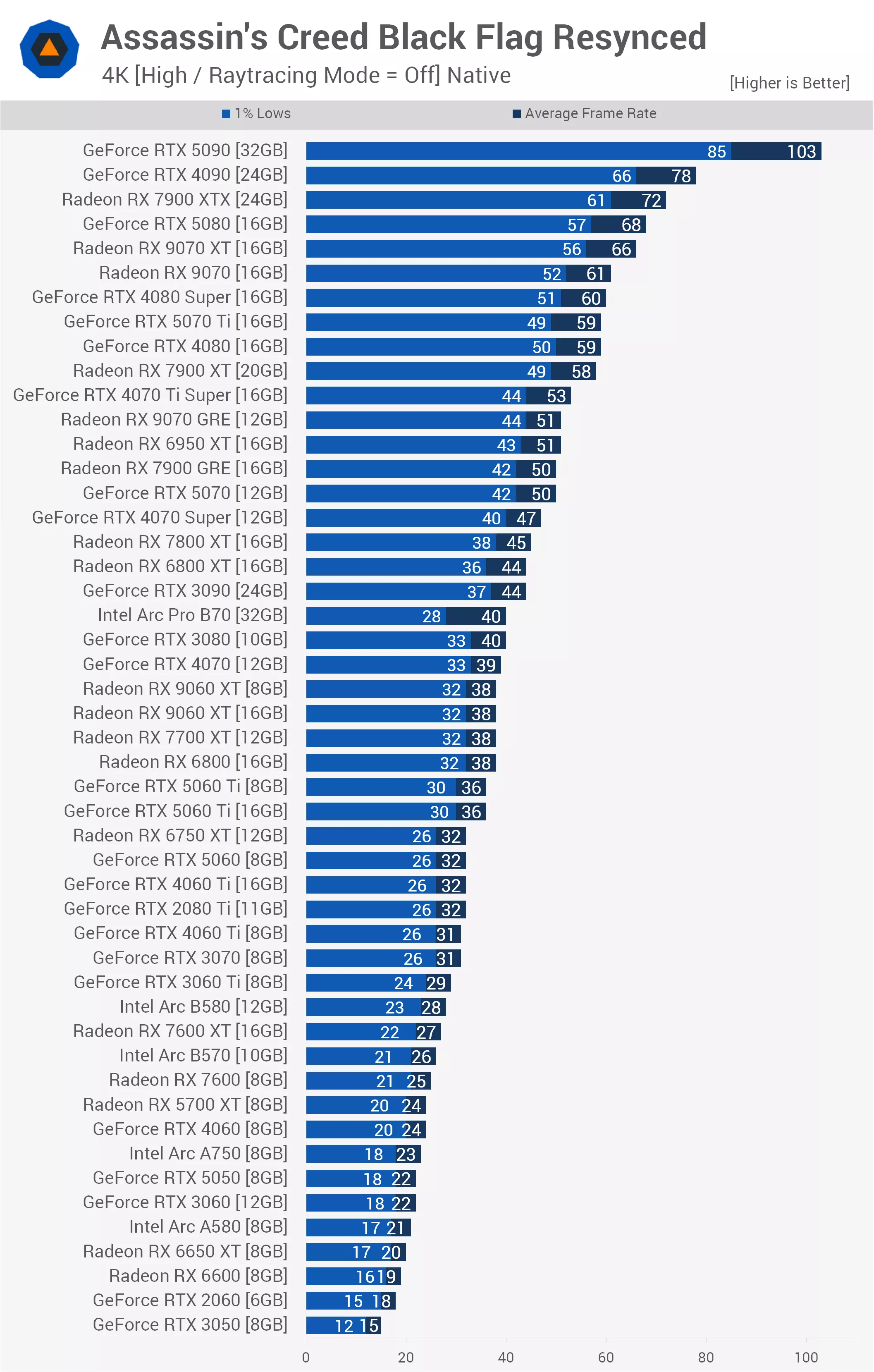
Moving down the stack, we find the aging RTX 3090 perfectly tied with the RX 6800 XT at 44 fps. Further down, an interesting four-way dead heat forms at exactly 38 fps between the 8GB and 16GB versions of the RX 9060 XT, the RX 7700 XT, and the older RX 6800.
Finally, it's worth noting that the RTX 2080 Ti is still hanging on, matching the current-generation RTX 5060 and the 16GB RTX 4060 Ti at 32 fps. Beyond this cluster, performance quickly deteriorates into the 20s and teens, making upscaling effectively mandatory for the bottom half of the chart.
How Demanding is Black Flag Resynced?
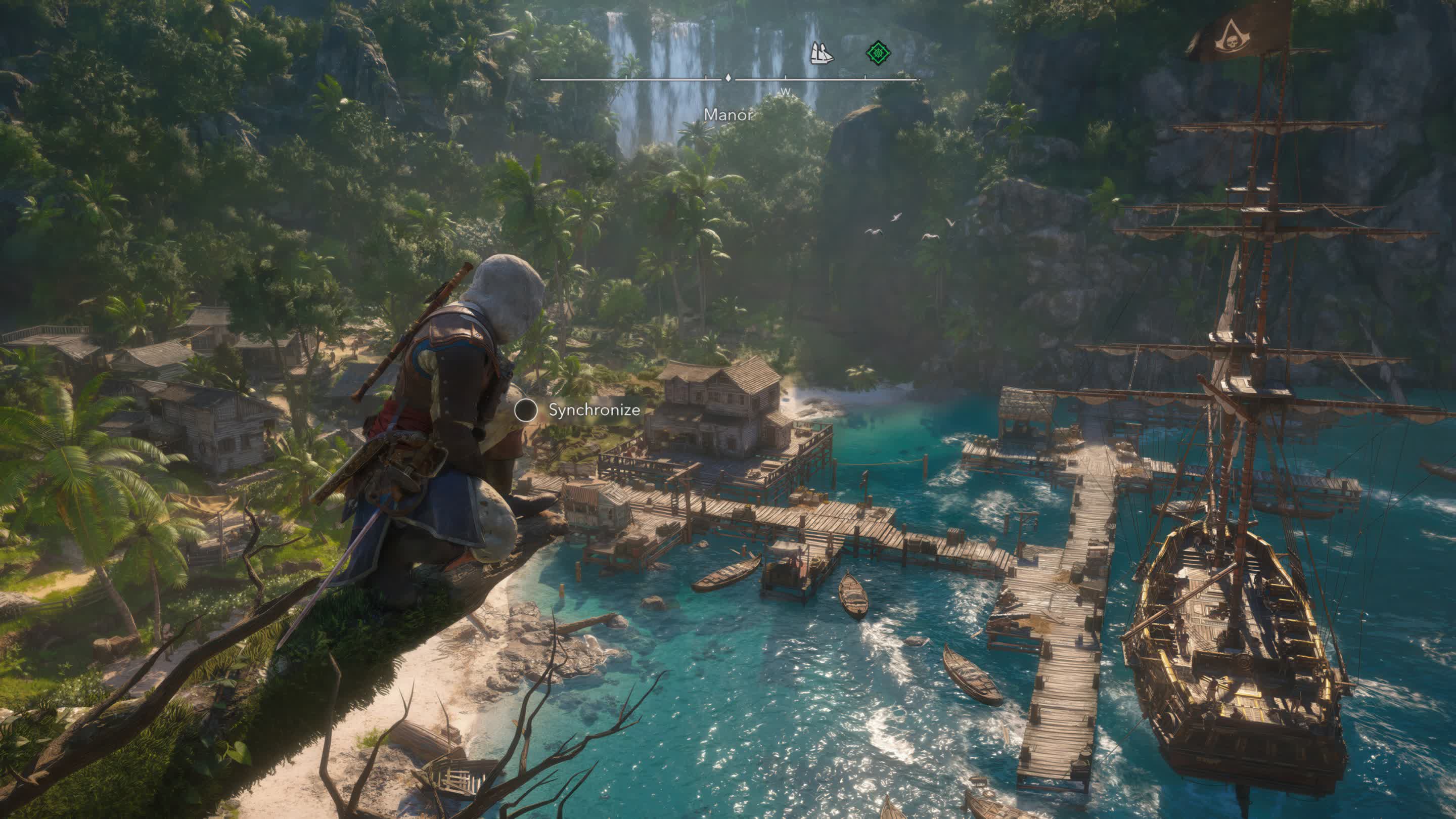
Assassin's Creed Black Flag Resynced is a great looking game that we don't think relies heavily on nostalgia, though for some players that will undoubtedly be a major factor. Beyond the massive visual overhaul, a number of gameplay and technical elements have been added, updated, or enhanced.
As for how it performs on PC, those hoping to play with all the ray tracing bells and whistles enabled will be pleased to know that the experience is quite reasonable, provided you're willing to use upscaling, which we believe makes sense in a title like this.
At 1440p with Balanced upscaling enabled, you're looking at around 60 fps with GPUs such as the 8GB RTX 5060 Ti, 16GB RTX 4060 Ti, or RX 6800. For performance comfortably above 60 fps, the RX 9060 XT 16GB does a great job.
Previous-generation GPUs such as the RTX 4070 and RX 7700 XT also delivered a very smooth experience, though those chasing high refresh rate gaming will still require top-tier hardware.
It's worth noting that all testing was conducted using the latest AMD and Nvidia drivers. We don't necessarily expect GeForce performance to improve significantly through future driver updates, as these results are broadly in line with what we observed in Assassin's Creed Shadows. It simply appears that Radeon GPUs perform exceptionally well in games based on Ubisoft's Anvil engine.
Even so, it was impressive to see just how well previous-gen Radeon GPUs performed, with models like the 7900 XTX consistently outperforming the RTX 5080. The RX 9070 series also looked extremely strong, and we frequently saw the RX 9070 XT matching or even beating the considerably more expensive RTX 5080.

As things currently stand, the RX 9070 costs roughly the same as the RTX 5070, yet in this title it was often more than 20% faster. We were also surprised by how well the aging RX 5700 XT performed. Using the High preset at 1080p, it averaged 53 fps, making it an impressive 47% faster than the RTX 2060.
By comparison, the RTX 2060 was unusable at these settings, averaging just 36 fps with 1% lows of 30 fps. While technically playable, the experience was significantly less enjoyable than what the 5700 XT delivered.
Of course, quality settings can be reduced further, and we found that moving from the High preset to Medium increased performance by roughly 15%. That would push the RTX 2060 to just over 40 fps while boosting the 5700 XT to a little over 60 fps.
And that wraps up our initial look at GPU performance in Assassin's Creed Black Flag Resynced. We hope you enjoyed the testing and found the results useful.