
It's that point in the hardware cycle where it's worth taking a fresh look at how much system memory modern games actually use – and, more importantly, how much you really need. With DRAM pricing still in flux, most people aren't exactly rushing out to buy a brand-new 32GB DDR5 memory kit. That uncertainty has pushed a familiar question back into the spotlight: can you still get away with 16GB? That's what we set out to answer here.
Let's start with how we're testing. We're using our personal gaming system, which is equipped with 64GB of DDR5 memory. The reason for using this system is that it's a three-year-old Windows 11 installation with a healthy collection of games and everyday applications already in place, making it far more representative of a real production system than a freshly imaged test bench.

While testing each game, we have Chrome open in the background with six tabs, alongside Discord and our usual hardware monitoring tools. In the past, we've tried to source similar-spec memory kits across multiple capacities and then manually adjust all primary, secondary, and tertiary memory timings.
Also check out: Anatomy of RAM
For this review, however, we've taken a different approach. All testing is done using the same 64GB memory kit, but we modify how much memory Windows 11 can address by using MSConfig. The maximum memory option allows us to simulate lower memory configurations, which lets us accurately test 8GB, 16GB, and 32GB setups while keeping identical memory timings, frequency, and ranks.

Finally, the CPU of choice is the Ryzen 7 9800X3D, paired with the GeForce RTX 5090. All benchmarks are run at 4K resolution, typically using maximum quality settings. With that groundwork laid, it's time to get into the results.
Benchmarks
Arc Raiders
Arc Raiders is quite impressive. Even with just 8GB of system memory, the game remains playable with only minimal stuttering. That said, 16GB is enough to deliver an optimal experience in this title.

Battlefield 6
Like Arc Raiders, we were surprised to find that Battlefield 6 runs reasonably well with just 8GB of system memory. This is despite the game using around 11GB in the 16GB configuration and up to 14GB when 64GB is available. The game does consume a large amount of DRAM, though, so if you're using a graphics card with less than 16GB of VRAM, system memory usage is going to be heavily taxed when playing Battlefield 6 with the Extreme preset.

Marvel Rivals
In Marvel Rivals we see virtually identical performance when using 16GB, 32GB, or 64GB of system memory. It's worth noting that around 18GB of memory was used in the 32GB and 64GB configurations. The game can offload some data to the pagefile – likely background tasks such as Chrome tabs – which helps explain why the 16GB configuration still performed well. With just 8GB of memory, however, the experience is very poor, with frequent frame stutters.

Borderlands 4
Moving on to 2025's most optimized title for frame generation enthusiasts, Borderlands 4. This is another case where up to 18GB of DRAM was used, yet 16GB still worked quite well – roughly on par with the 32GB and 64GB configurations. As expected, performance with just 8GB was awful. While average frame rates appeared similar, the 1% lows suffered heavily due to very inconsistent frame times.

Mafia: The Old Country
Mafia: The Old Country is the first game we've tested where 16GB of system memory isn't quite enough. As a result, it suffers from poor frame time performance. In this case, around 20GB of system memory is required for a smooth experience, meaning a 24GB to 32GB kit is recommended. The experience with 16GB was genuinely bad, and needless to say, 8GB simply isn't viable here.

Warhammer 40,000: Space Marine 2
The Space Marine 2 results are interesting. At first glance, the game appears to run reasonably well with just 8GB of system memory, but the frame rate and frame time data are misleading. The game isn't rendering correctly at this capacity – many high-resolution textures are replaced with low-resolution, muddy assets. As a result, 16GB of DRAM should be considered the minimum. There's little to no difference between 16GB and 32GB, making this yet another title that runs perfectly fine with 16GB.

Black Myth: Wukong
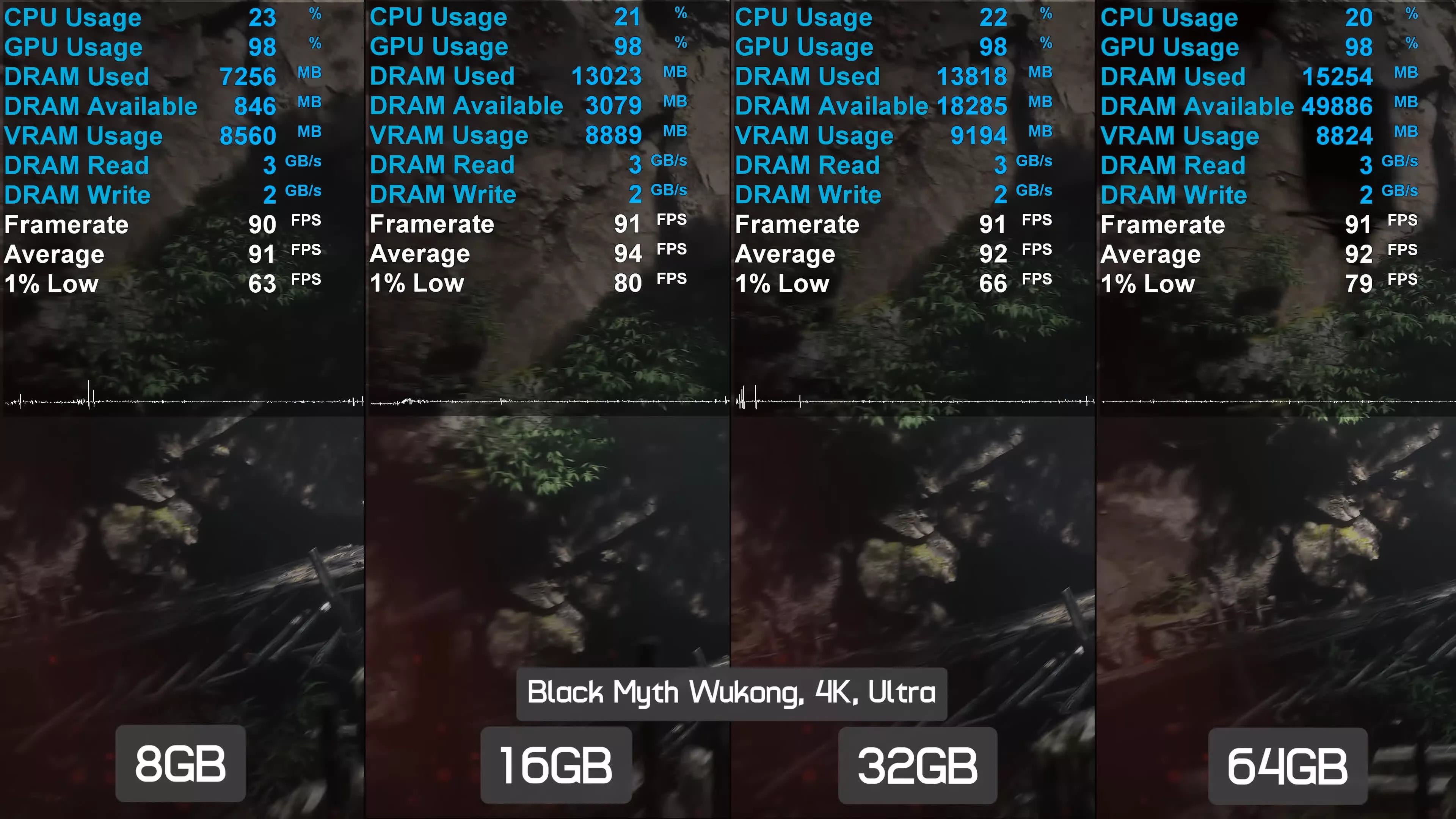
Black Myth: Wukong runs perfectly fine with 16GB of DRAM, and in this test we saw no performance improvements from moving to 32GB or 64GB. The game is somewhat playable with just 8GB, but frequent frame time stuttering is to be expected. While it's not completely broken, the experience is far from ideal – 16GB is strongly recommended.
Stalker 2: Heart of Chornobyl
Next up is Stalker 2. In this test, we again saw peak memory usage of around 18GB, though the 32GB configuration topped out just under 17GB, while the 16GB configuration peaked at 14GB. Performance using 16GB, 32GB, or 64GB of system memory was largely the same, with comparable average frame rates and 1% lows. Once again, it was only the 8GB configuration that struggled, suffering from poor frame time consistency.

Clair Obscur: Expedition 33
For an optimal experience in Clair Obscur: Expedition 33, 16GB of DRAM is recommended. Anything beyond that is unnecessary, as we observed a maximum usage of just 13GB during gameplay. The game is technically playable with only 8GB, though noticeable stuttering does occur. While 16GB is clearly the better choice, it is somewhat surprising that the game can still run on just 8GB.

Cyberpunk 2077: Phantom Liberty (Ultra)
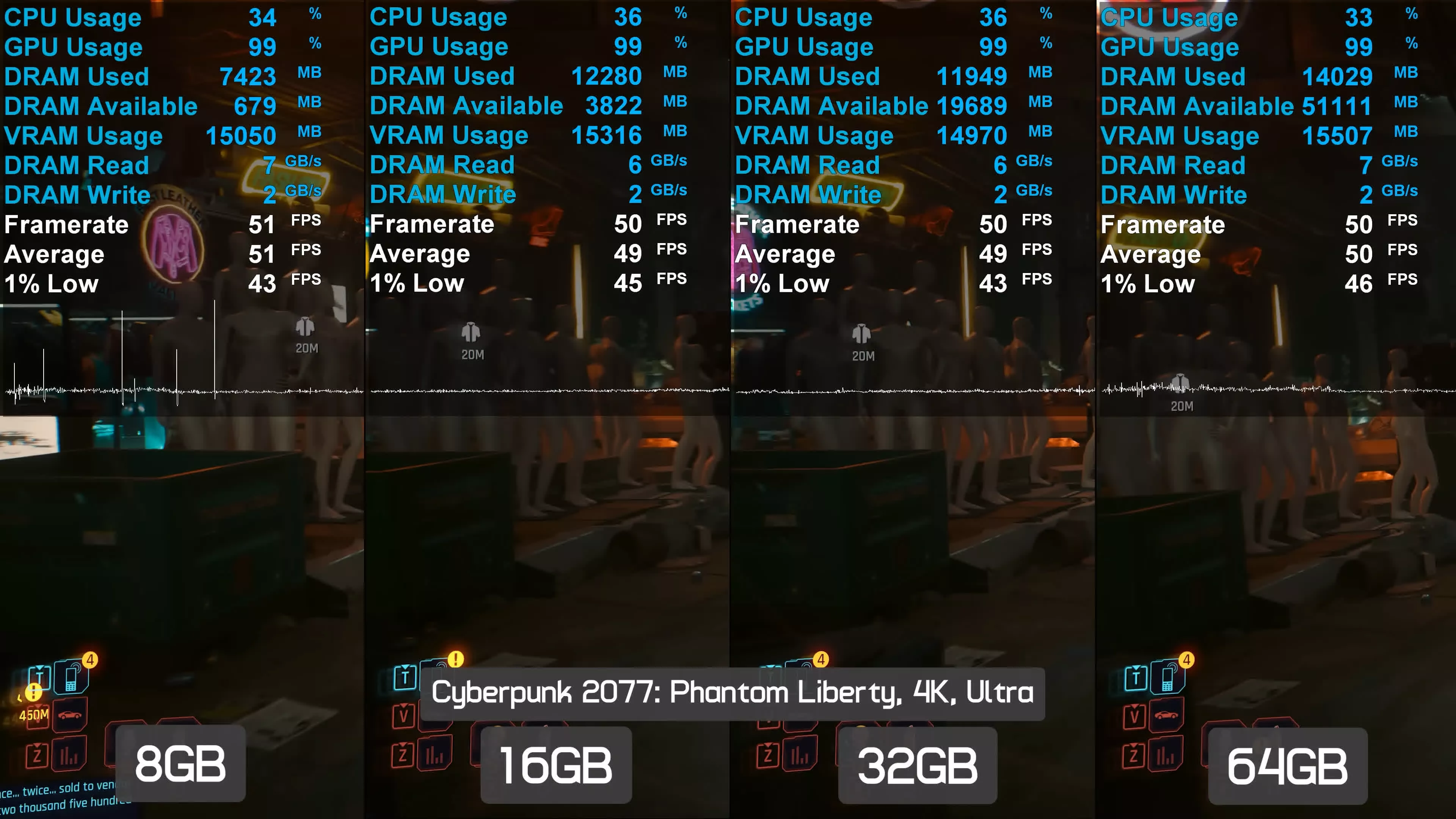
We found a similar situation when playing Cyberpunk 2077: Phantom Liberty. This game only requires 16GB of DRAM, as we never saw memory usage reach 15GB – even when all 64GB of system memory was available. As a result, the game was mostly playable with just 8GB of DRAM, although we did observe occasional frame pacing issues. Overall, 16GB is ideal here and delivers an excellent experience.
Cyberpunk 2077: Phantom Liberty (Medium)
Frame rates in Cyberpunk 2077 using the Ultra preset at 4K were very low, so we dropped down to the Medium preset to see whether the performance trends remained the same. The good news is that they do. Once again, 16GB of DRAM works perfectly well and enables full performance without any frame time issues. The game is also playable with just 8GB of DRAM, though you should expect increased frame stuttering in this configuration.

Doom: The Dark Ages
Doom: The Dark Ages is yet another new title that runs perfectly well with 16GB of system memory. With peak usage of around 13.5GB, the 32GB and 64GB configurations offer no real advantage. While 16GB performs very well, 8GB is effectively a non-starter for this game, suffering from constant frame time issues that make it unpleasant to play.

Kingdom Come: Deliverance II
Kingdom Come: Deliverance II also runs well with 16GB of DRAM. In this test, we observed up to 13.5GB of usage in the 32GB and 64GB configurations. The game is technically playable with just 8GB, but this setup suffers from frequent frame pacing issues, which significantly hurt the 1% lows.

The Outer Worlds 2
Even a newly released title like The Outer Worlds 2 runs perfectly well with just 16GB of system memory. Although we saw usage peak at around 15.5GB in the 32GB and 64GB configurations, the game played without issue on a 16GB system. It was also playable for the most part with 8GB, though – as we've often seen – this configuration suffers from noticeable frame time issues.

Using a GPU with 8GB of VRAM
Marvel Rivals feat. RTX 5090
Next, we're going to look at what happens when using a graphics card with just 8GB of VRAM. As a quick refresher, this is how Marvel Rivals performed on the RTX 5090. In short, 16GB of VRAM was more than sufficient, with 32GB or more being extreme overkill.

Marvel Rivals feat. 8GB 9060 XT
That changes significantly when you only have 8GB of VRAM. In this case, game assets that would normally reside in local video memory are pushed into system memory instead. As a result, DRAM read bandwidth increases by roughly 70%. With just 16GB of system memory available, data is then offloaded to the pagefile, leading to terrible frame time performance.

Where 8GB of DRAM was previously somewhat usable, pairing it with an 8GB GPU makes it completely unworkable.
While we still can't entirely eliminate frame time issues with 32GB of system memory, performance is dramatically improved. As a result, anyone using an 8GB GPU to play modern games should ensure they have a surplus of high-speed system memory to help reduce severe frame pacing problems.
8GB vs 16GB GPU VRAM on Spider-Man 2
16GB RAM
Finally, here's a look at how the 8GB and 16GB versions of the Radeon RX 9060 XT compare in Spider-Man 2 when using 16GB of system memory. In this example, the 16GB RX 9060 XT delivered 35% higher average frame rates and a 70% improvement to the 1% lows, resulting in far smoother and more consistent performance. The 16GB model also averaged just 15GB/s of DRAM read bandwidth, whereas the 8GB version was 73% higher at 26GB/s.

32GB RAM
When increasing system memory to 32GB, performance of the 16GB RX 9060 XT remains largely unchanged. However, the 8GB model sees an improvement of more than 60% to the 1% lows, dramatically reducing stuttering.

This improvement comes from the ability to store assets spilling over the 8GB VRAM buffer in system memory, consuming a total of 23GB – just over 30% more than the 16GB graphics card.
The Memory Question, Answered
So there you have it. How much system memory you need for gaming can depend on how much VRAM you have available. Those using cheaper 8GB graphics cards will typically require more system memory if they want to avoid the worst effects of exceeding the VRAM buffer.
However, if you have sufficient VRAM or can avoid running out, then most games will still run perfectly well with 16GB of system memory. It's also worth remembering that this testing was not done on a fresh Windows 11 installation with nothing installed. Instead, these results reflect a well-maintained real production system.
"32GB is the sweet spot for gamers."

In a normal market, we wouldn't be steering anyone toward 16GB memory kits, especially DDR5. But due to the current DRAM pricing situation, there is significant money to be saved by opting for 8GB modules instead of 16GB ones, making 16GB configurations worth considering.
DRAM apocalypse aside, the ideal answer is still 32GB. This is the sweet spot for gamers: it provides enough capacity to ensure optimal performance across all titles and should continue to do so for the foreseeable future.

The silver lining for anyone upgrading today is that most games still run perfectly well with 16GB, particularly multiplayer titles with a lot of replayability. At the time of writing, two 8GB modules can be found for around $200, while a comparable 32GB kit sits closer to $350 – that's nearly twice the price.

For higher-end builds, it generally makes sense to absorb the pain of current DRAM pricing and invest in a solid 32GB kit. For budget-focused builders looking to save as much money as possible, though, 16GB remains a perfectly viable option – and a practical way to cut costs until this situation improves... probably once the AI bubble bursts, resulting in a global financial crisis, at which point buying DRAM will be the least of your worries. Plenty to look forward to.