
PSA: PC enthusiasts downloading tools like Display Driver Uninstaller, CrystalDiskInfo, or similar utilities should take a closer look at where those downloads are actually coming from. Microsoft has uncovered an active cryptocurrency mining campaign targeting the kinds of high-end machines most likely to run benchmarking and maintenance software.
The Windows Defender security team is alerting users with dedicated GPUs about scammers manipulating search engine results to distribute remote monitoring and cryptomining payloads. The hackers are manipulating not only search engine results but also AI chatbot responses.
Scammers are using SEO poisoning techniques to direct users to fraudulent copycat sites when they search for CrystalDiskInfo, HWMonitor, Display Driver Uninstaller, FurMark, K-Lite Codec Pack, PDFgear, and other tools.
Most cryptojacking campaigns cast as wide a net as possible, but the operation Microsoft identified in April takes a more deliberate approach: it specifically targets people looking for GPU analysis, driver maintenance, and benchmarking software – precisely the class of hardware that's most capable of mining cryptocurrency.
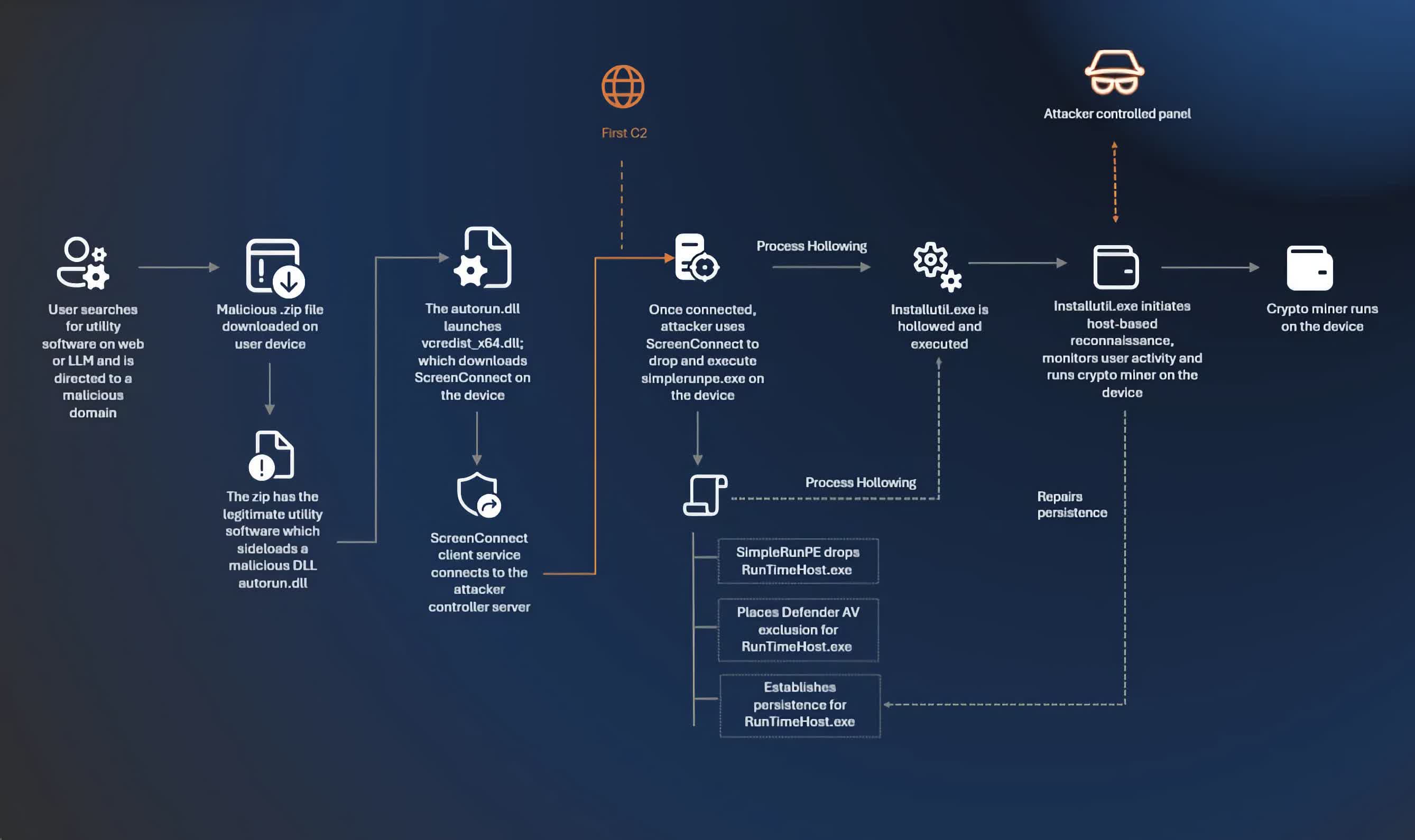
Hijacking search engine results is nothing new, but reports on Reddit, along with traffic metadata, suggest that hackers are also tricking AI chatbots into giving users fraudulent links.
One user reported that his device was infected after ChatGPT provided an incorrect URL for downloading CrystalDiskMark. The fraudulent site used a .io domain, while the legitimate download lives at a .info address.
The malicious files arrive as zipped archives but don't tip their hand immediately. Instead, they download ScreenConnect, a legitimate remote management tool popular with IT administrators, to monitor target devices and expand their malware payload. The hackers also attempt to avoid detection by waiting until the target device is idle before mining cryptocurrency and pausing upon detecting user activity.
Microsoft recommends enabling cloud-delivered protection in Microsoft Defender and turning on both network and web protection in Microsoft Defender for Endpoint. The company also advises using SmartScreen to detect fraudulent copycat websites when web browsing.
The simplest defense, though, may be to skip search engines and chatbots altogether when downloading utilities. TechSpot and other enthusiast sites maintain curated, safe software repositories, and many popular tools are also available directly through the Microsoft Store. Wikipedia pages for well-known applications typically link to official sources as well.