

Nvidia Profile Inspector is a Windows tool for editing Nvidia driver profiles through the Nvidia Driver Settings API. It exposes the driver profile database used by the Nvidia Control Panel, adds access to many hidden or undocumented profile settings, and makes it easy to create, adjust, export, import, and restore per-application profiles.
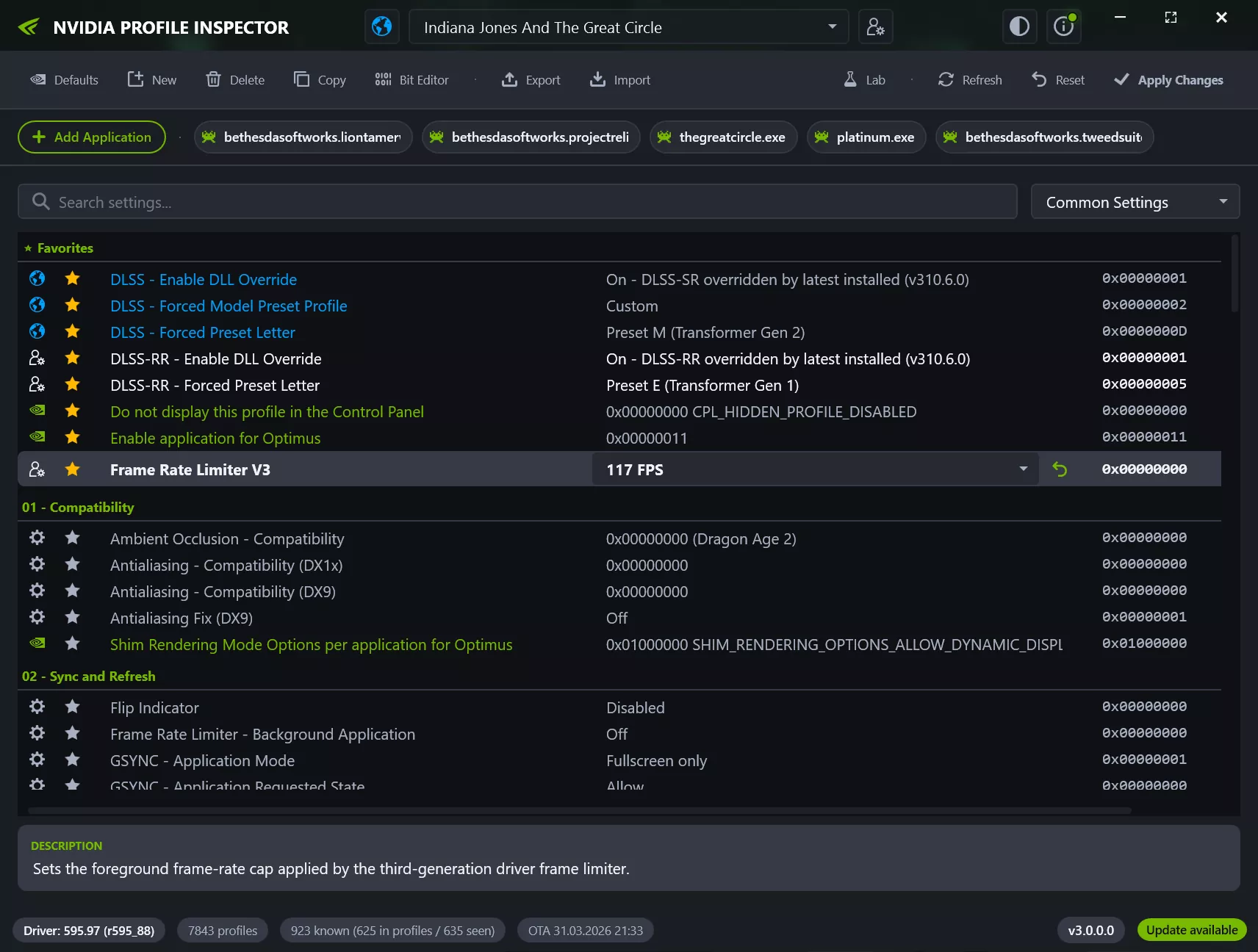
The tool is intended for advanced users who want precise control over game and application profiles, compatibility flags, frame-rate limiters, synchronization options, texture filtering, SLI settings, Optimus behavior, DLSS overrides, and other driver-level switches that are not always available in the standard control panel.
Is Nvidia Profile Inspector developed by Nvidia?
No, Nvidia Profile Inspector is a third-party utility that uses Nvidia's public driver APIs to access and modify driver profiles. It is not developed, maintained, or officially supported by Nvidia.
Can Nvidia Profile Inspector improve game performance?
It can in some cases. Advanced users may adjust driver profile settings to enable specific features, improve compatibility, or fine-tune performance, though results vary depending on the game, GPU, and driver version.
Is Nvidia Profile Inspector an overclocking tool?
No, while it exposes many advanced driver options, Nvidia Profile Inspector is primarily a driver profile editor. It does not provide GPU core, memory, or voltage controls like dedicated overclocking utilities. For GPU overclocking, tools such as MSI Afterburner or the Nvidia App (on supported GPUs) provide dedicated controls for clock speeds, fan curves, and power limits.
Can I back up my Nvidia profiles?
Yes, the utility supports importing and exporting driver profiles, making it easy to back up your custom settings or transfer them to another system.
Does Nvidia Profile Inspector work with the latest Nvidia drivers?
Yes, the application is regularly updated to support newer Nvidia drivers, graphics settings, and technologies, including recent DLSS-related options and other driver profile parameters.
Features
- View and edit global and per-application NVIDIA driver profiles.
- Add or remove applications assigned to a profile.
- Create custom profiles for games or applications missing from the driver database.
- Search and filter profile settings quickly.
- Switch between common, known, and extended driver settings.
- Mark frequently used settings as favorites.
- Inspect and edit bitmask-style settings with the built-in Bit Editor.
- Export and import .nip profile backups.
- Export and import NVIDIA text-format profile dumps.
- Restore individual settings, whole profiles, or driver defaults.
- Use modern DLSS, DLSS Ray Reconstruction, and DLSS Frame Generation override entries where supported by the installed NVIDIA driver.
- Choose from multiple UI themes, with optional Windows 11 backdrop effects.
- Check GitHub releases from inside the app.
What's New
Version 3.0.2.1 is the first major 3.x release and summarizes the final feature set introduced since 2.4.
Highlights
- Modernized user interface with a redesigned window and title bar layout, updated About dialog, splash screen, status bar, and in-app notifications.
- Built-in update functionality with GitHub release checking, Release and Pre-release channel selection, and a prepared in-place updater.
- Greatly expanded settings browser with more flexible filters, improved metadata resolution, and better visibility of relevant values and changes.
- Enhanced import/export workflows for .nip profiles and Nvidia text formats, including Merge/Replace strategies and multi-file import.
- Updated driver and settings data with support for newer Nvidia settings, modern DLSS overrides, and additional current profile parameters.
User Interface and Usability
- New modern visual style with multiple themes
- Switchable display density for either a more compact or more spacious layout.
- Windows backdrop support with matching options for Windows 10 and Windows 11
- Improved status display with additional information such as driver version, profile count, setting count, and update status.
- Update indicator directly in the UI.
- Optional startup splash screen toggle.
- Better visual feedback for actions such as Apply, Restore, Import, and profile selection.
Settings and Editing
- New filtering logic for setting sources and value sources, replacing the older coarse-grained mode switching.
- Optional Modified only filter to focus on changed or active entries.
- Favorites support for frequently used settings.
- Grouped and collapsible settings sections.
- Search now also supports hexadecimal setting IDs.
- Optional display of the setting ID directly in the setting name.
- Optional display of the raw value alongside named common values.
- Improved resolution of names, types, and value lists from multiple sources, with clearer prioritization of live driver-provided information.
- Improved friendly names and value presentation for scanned and reference-based entries.
- Proper support and validation for QWORD values.
Profiles, Import, and Export
- .nip import now supports multiple files in a single operation.
- Import can explicitly use either Merge or Replace.
- Interactive imports now prompt for the appropriate import strategy when existing profiles are affected.
- Improved export of all customized profiles.
- Expanded and restored CLI workflows for import/export scenarios.
- Additional import/export data such as FindFile application entries is now preserved and handled correctly.
Profiles and Applications
- Improved modified profiles handling with a dedicated selector and more consistent refresh behavior.
- More compact and clearer display of profile applications.
- Better handling of long application entries and overflow.
- FindFile support when adding applications.
- Improved resolution of Steam and Epic launcher shortcuts to the actual game executable.
- More robust behavior when deleting, restoring, and updating profiles and applications.
Driver Data and NVIDIA Settings
- Updated NVAPI/DRS constants and reference data for newer driver generations.
- Support for current DLSS, DLSS Ray Reconstruction, and DLSS Frame Generation-related override settings.
- Support for additional current Nvidia parameters such as RTX Dynamic Vibrance.
- New or updated Nvidia App Overlay flags and related overlay entries.
- Extensive updates to CustomSettingNames.xml and Reference.xml for more accurate names, descriptions, and values.
Performance, Stability, and Quality
- Noticeably improved performance when scanning profiles and settings.
- Fast response while filtering, navigating, and switching between profiles and settings.
- Dirty state and modified state handling.
- Improved validation for setting value input.
- More robust startup behavior when the Nvidia GPU is disabled or unavailable.
- Improved error handling and crash logging.
System Requirements
- Windows with a compatible Nvidia display driver installed.
- An Nvidia GPU supported by the installed driver.
- .NET Framework 4.8.
- Administrator privileges. Nvidia Profile Inspector must be started elevated to write changes to the Nvidia driver profile database.
