
AMD's FSR 4.1 upscaling is finally available for RDNA 3 GPUs, at least for Radeon RX 7000 series owners. Hallelujah, you can finally throw FSR 3.1 in the trash. Finally.
Today, we're taking a look at just how much of an upgrade this is. We've tested the official RDNA 3 release and will compare it with FSR 3.1 to see what Radeon owners are actually getting. We'll also compare it with the FP8 version running on RDNA 4 to find out whether AMD has made any meaningful compromises to bring the technology to older hardware. And, of course, there will be plenty of blue performance bar graphs.
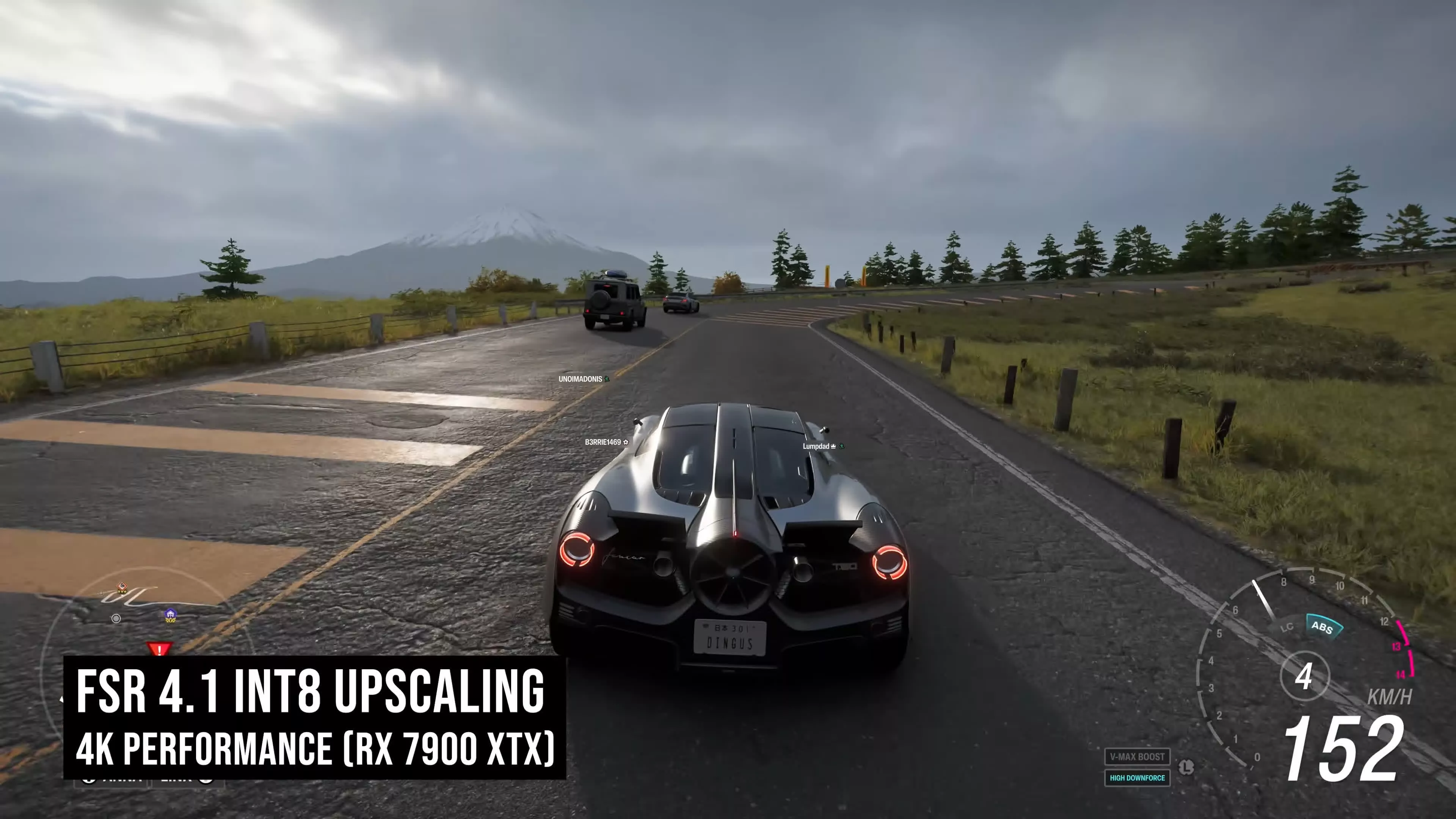
The entire FSR 4 saga has been bizarre from the start. When AMD launched FSR 4 in early 2025, it positioned the AI upscaler as an RDNA 4 exclusive. According to AMD, the technology relied on FP8 instructions only supported by the new architecture, effectively ruling out older Radeon GPUs.
For a while, it looked like that was the end of the story. RDNA 3 owners appeared destined to remain stuck with the crappy FSR 3.1, which, if you've ever tried using it at 1440p, is pretty bad.
But then AMD did an oopsie. In August 2025, the company accidentally published the full FSR 4 source code, and hidden inside was a version built to use INT8 instructions instead of FP8. A glimmer of hope! Both RDNA 3 and RDNA 2 support INT8 operations, raising the obvious question: could FSR 4 actually run on older GPUs after all? We confirmed that was the case when we tested this "leaked" version. It worked perfectly well on RDNA 3 and delivered a huge improvement over FSR 3.1.
Naturally, AMD immediately released FSR 4 for RDNA 3 owners... (long pause).
But no, AMD did not do that.
Instead, AMD sat on the INT8 version for months with little explanation. More months passed, and it really looked like it would never happen. Then, suddenly, AMD announced that it was actually coming, with a planned release in July, and here we are today. FSR 4.1 is available right now through the latest 26.6.2 driver update.
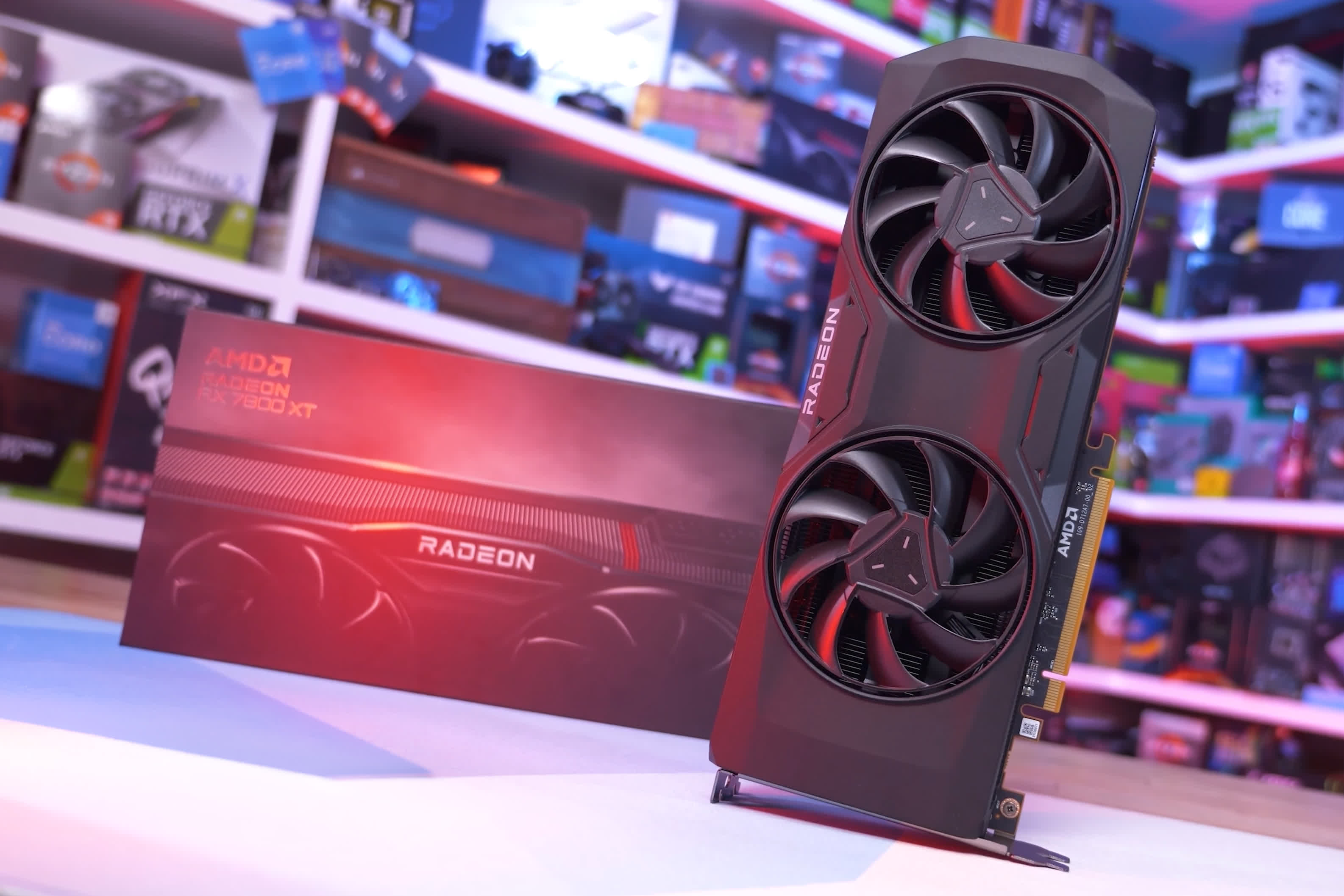
If you own a Radeon RX 7000 series graphics card, all you need to do to get FSR 4.1 working is install the driver. The driver-level override that converts existing FSR 3.1 integrations into FSR 4.1 is enabled by default, so as long as FSR is enabled in-game, you'll automatically get the INT8 version of FSR 4.
The experience is every bit as seamless as it is on an RDNA 4 GPU. With that out of the way, let's get into the testing.
Big Image Quality Improvements
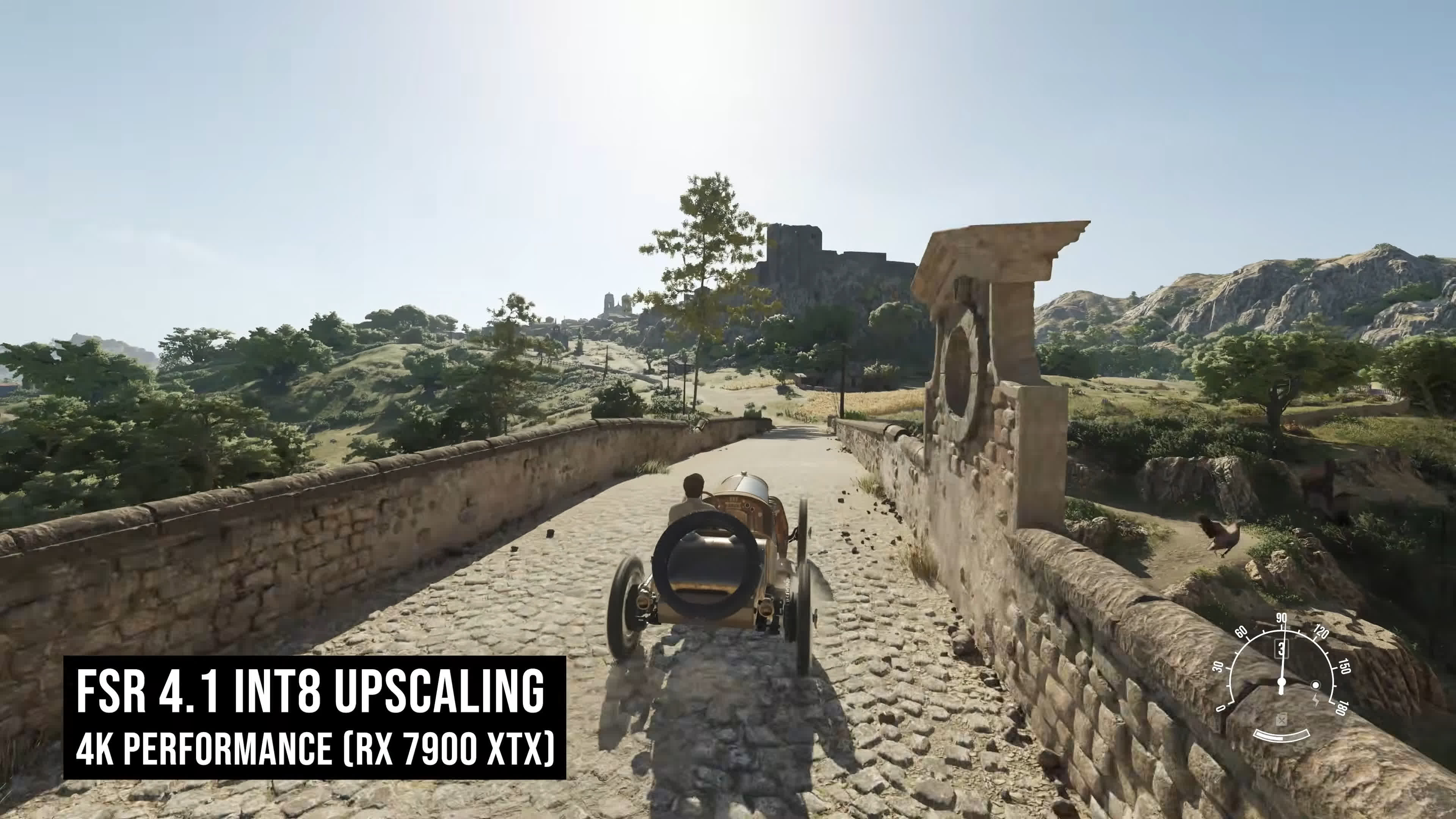
FSR 4.1 INT8 vs FSR 3.1 at 4K
It's no secret that FSR 3.1 sucks. It isn't competitive with modern AI-based upscaling solutions, and its image quality is very unimpressive, especially at lower resolutions and lower quality modes. In some situations, FSR 3.1 looks so bad that it's basically unusable. To make matters worse, DLSS often works just fine in those exact same scenarios.
The upgrade from FSR 3.1 to FSR 4.1 is enormous. It's difficult to overstate how significant the improvement is. The INT8 version of FSR 4.1 for RDNA 3 absolutely destroys FSR 3.1 in image quality. We would argue this is the single biggest software upgrade AMD has ever delivered to Radeon gamers after a product's launch. It's transformative, breathing new life into previous-generation GPUs.
For a better representation of image quality comparisons, check out the HUB video below:

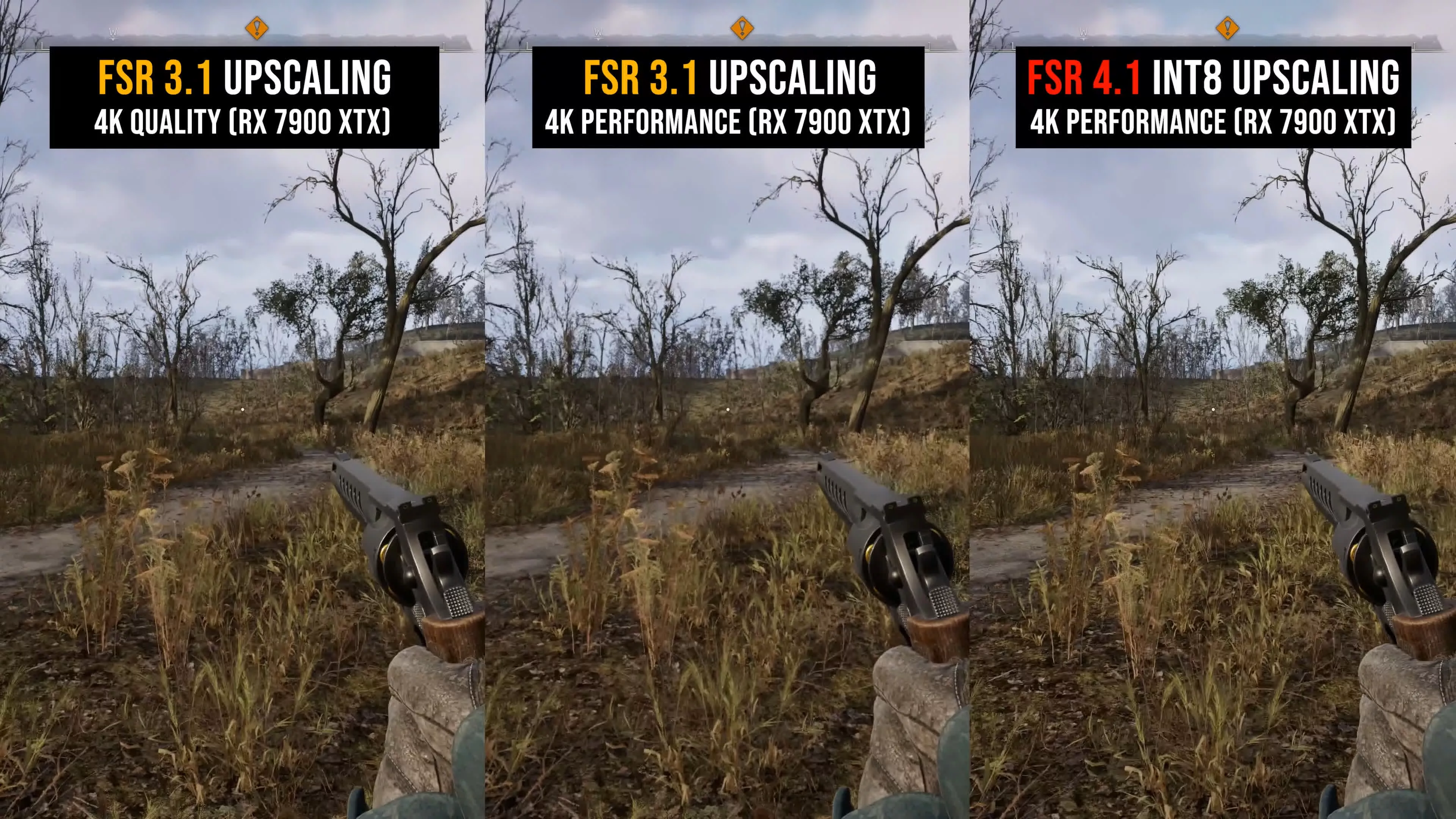
For these comparisons, we've put FSR 4.1 INT8 at 4K using the Performance mode against FSR 3.1 at 4K using both the Quality and Performance modes. It's difficult to know where to begin when describing all the FSR 3.1 issues that FSR 4.1 fixes or improves.
One obvious area is blur. FSR 4.1 is much sharper and less blurry than FSR 3.1, especially when comparing the Performance modes. This is noticeable in every example. FSR 4.1 upscaling from 1080p to 4K actually looks like a 4K image, whereas FSR 3.1 clearly produces an image that appears lower than 4K in resolution.
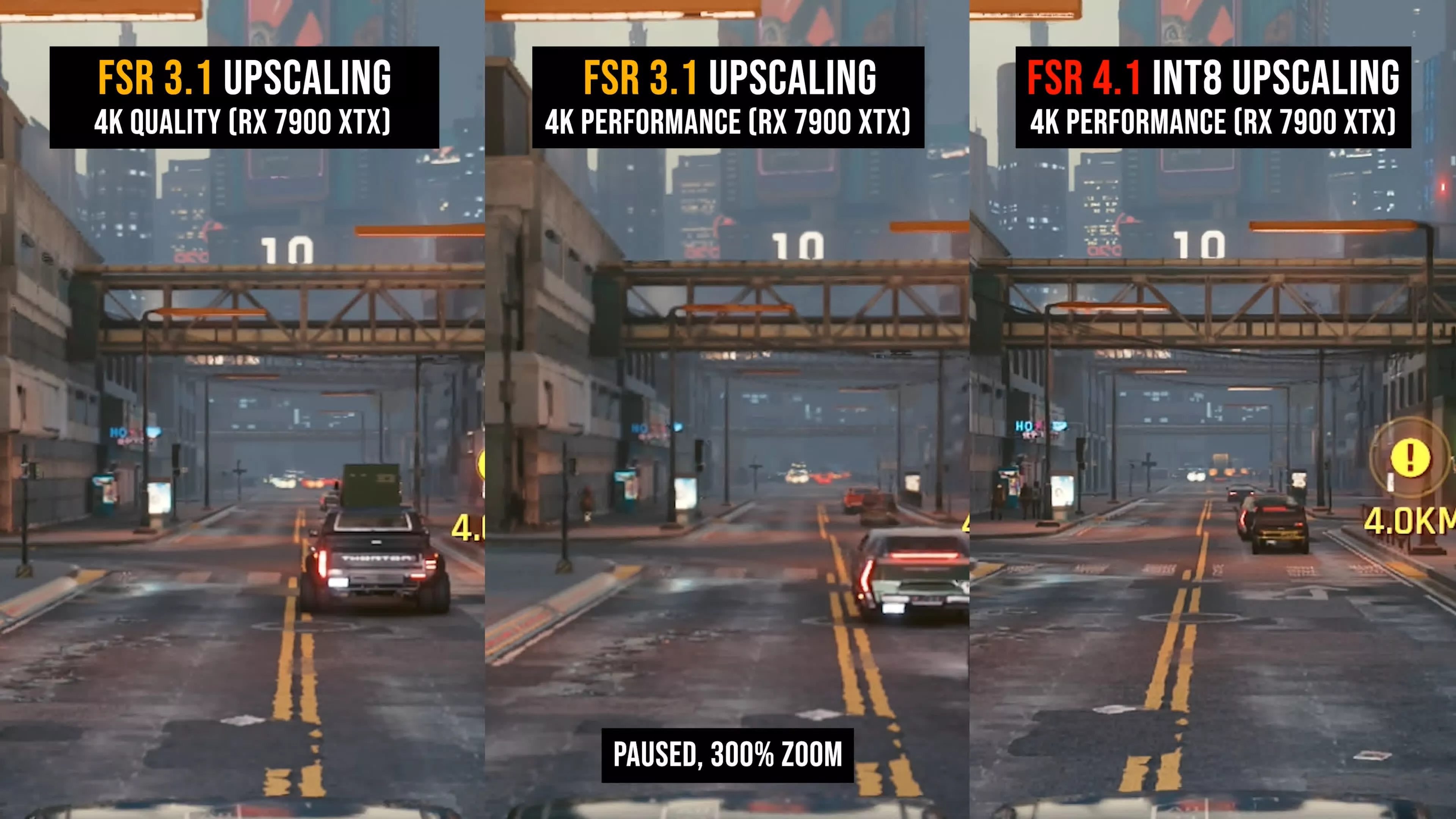
This improvement in sharpness does not come from a sharpening pass or a different sharpness slider setting. The improvement comes entirely from the upscaler doing a better job of processing the input data and preserving detail.
The other major advantage is that FSR 4.1 INT8 is significantly more stable. FSR 3.1 has numerous issues with edge stability. It's common to see sizzling, shimmering, aliasing, and other stability artifacts, both when stationary and in motion. FSR 4.1 cleans up a significant number of these problems, producing a much more consistent and stable image.
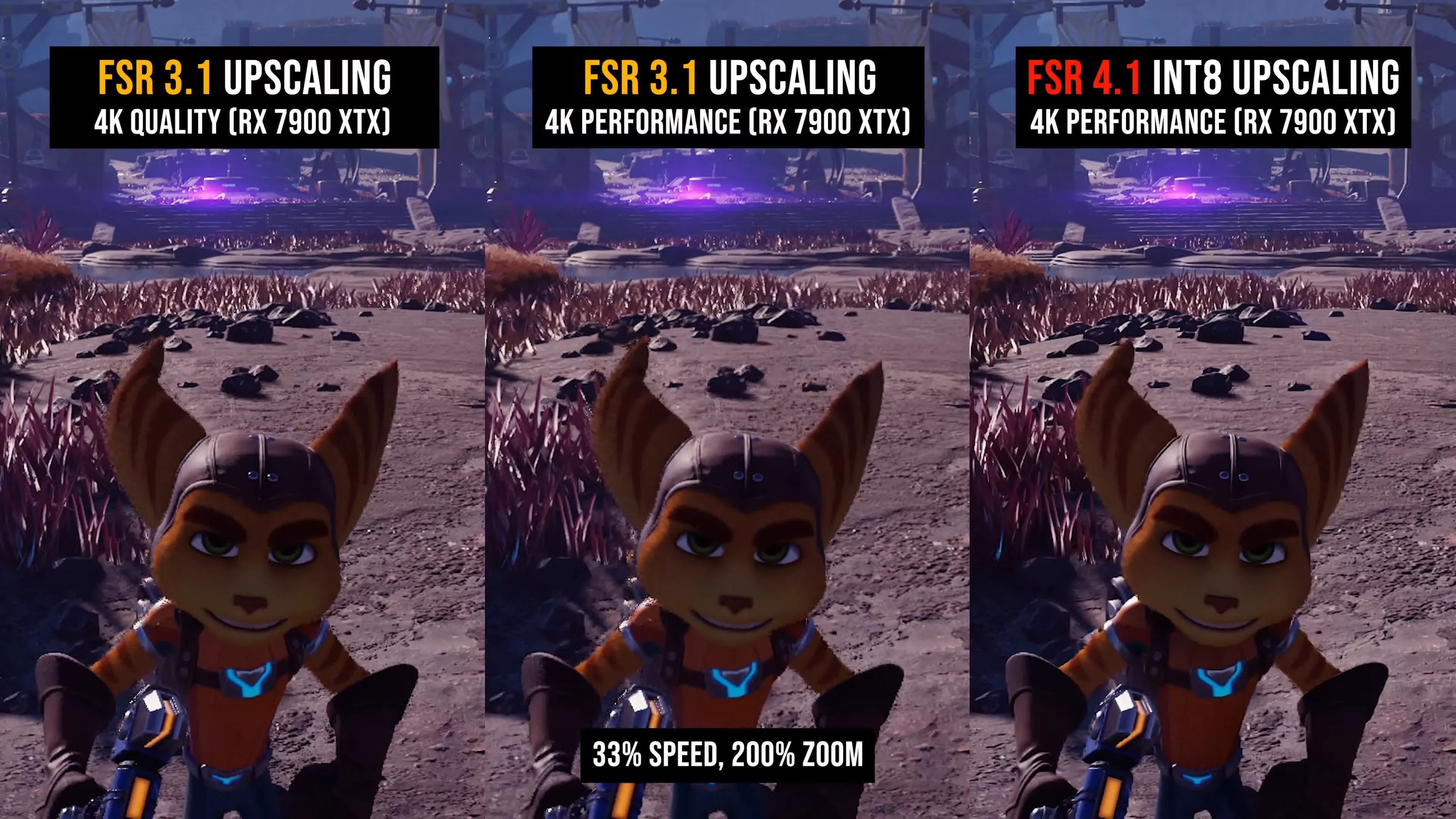
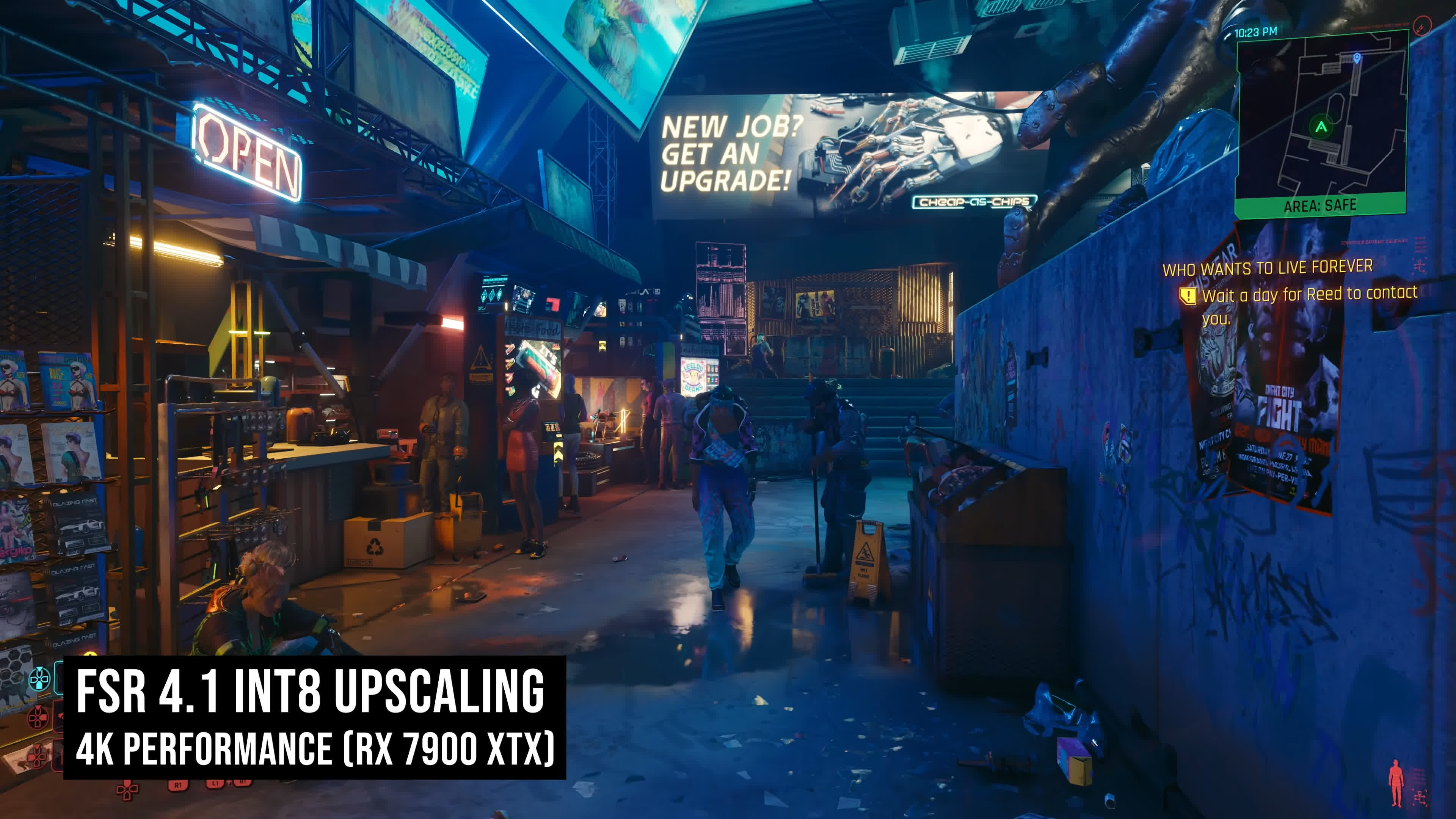
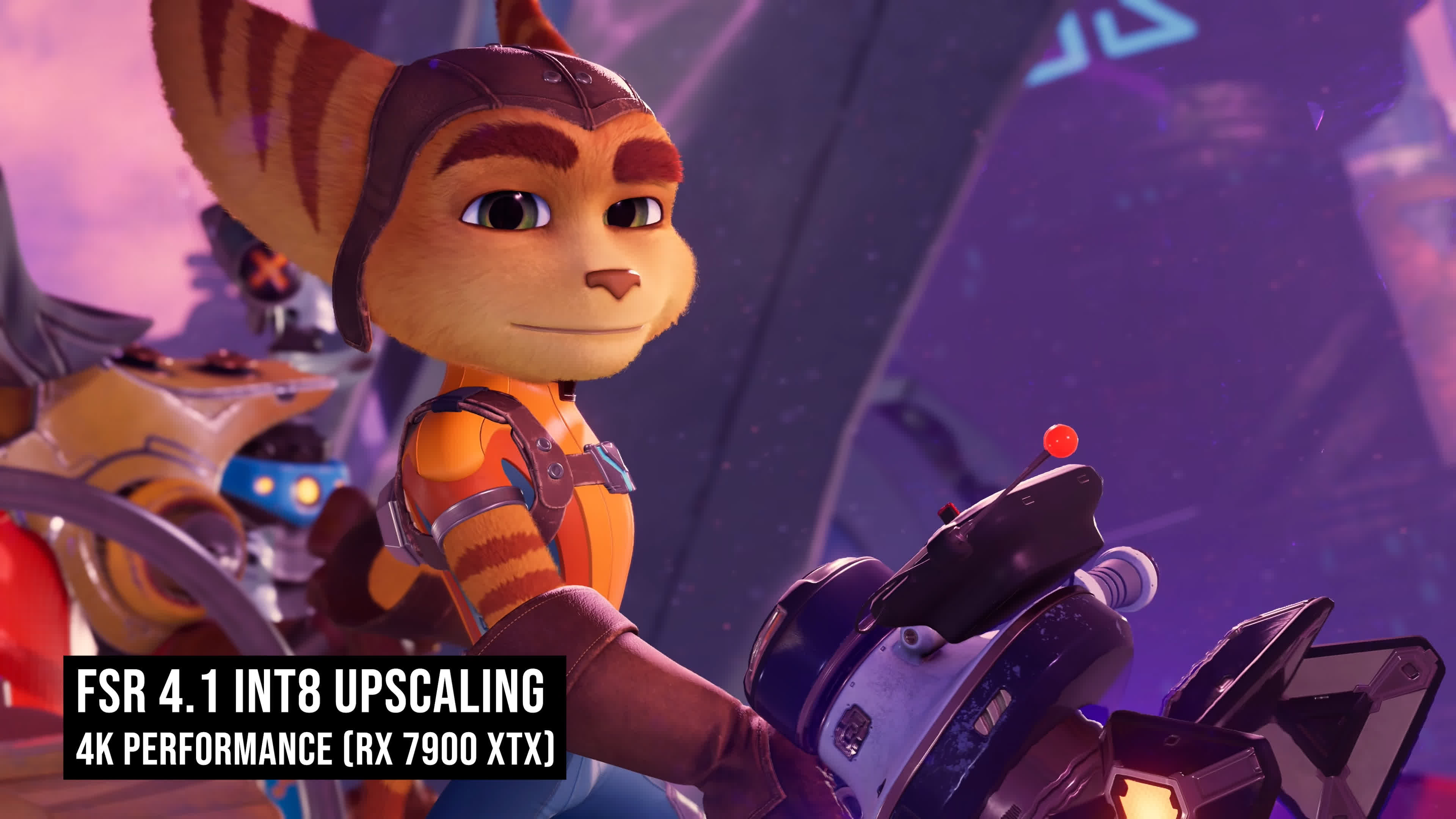
The improvement is so drastic that FSR 4.1 using the Performance mode is significantly more stable than FSR 3.1 using the Quality mode. Looking at the video example, see how FSR 4.1 handles the wood texture in the Mafia example. FSR 4.1 Performance easily beats FSR 3.1 Quality, and the same can be said for the samples in Ratchet & Clank. Even while standing still, we can see improvements in the stability of the confetti on the ground, Ratchet's fur, and Clank's fine line details.
For a better representation of image quality comparisons, check out the HUB video below:

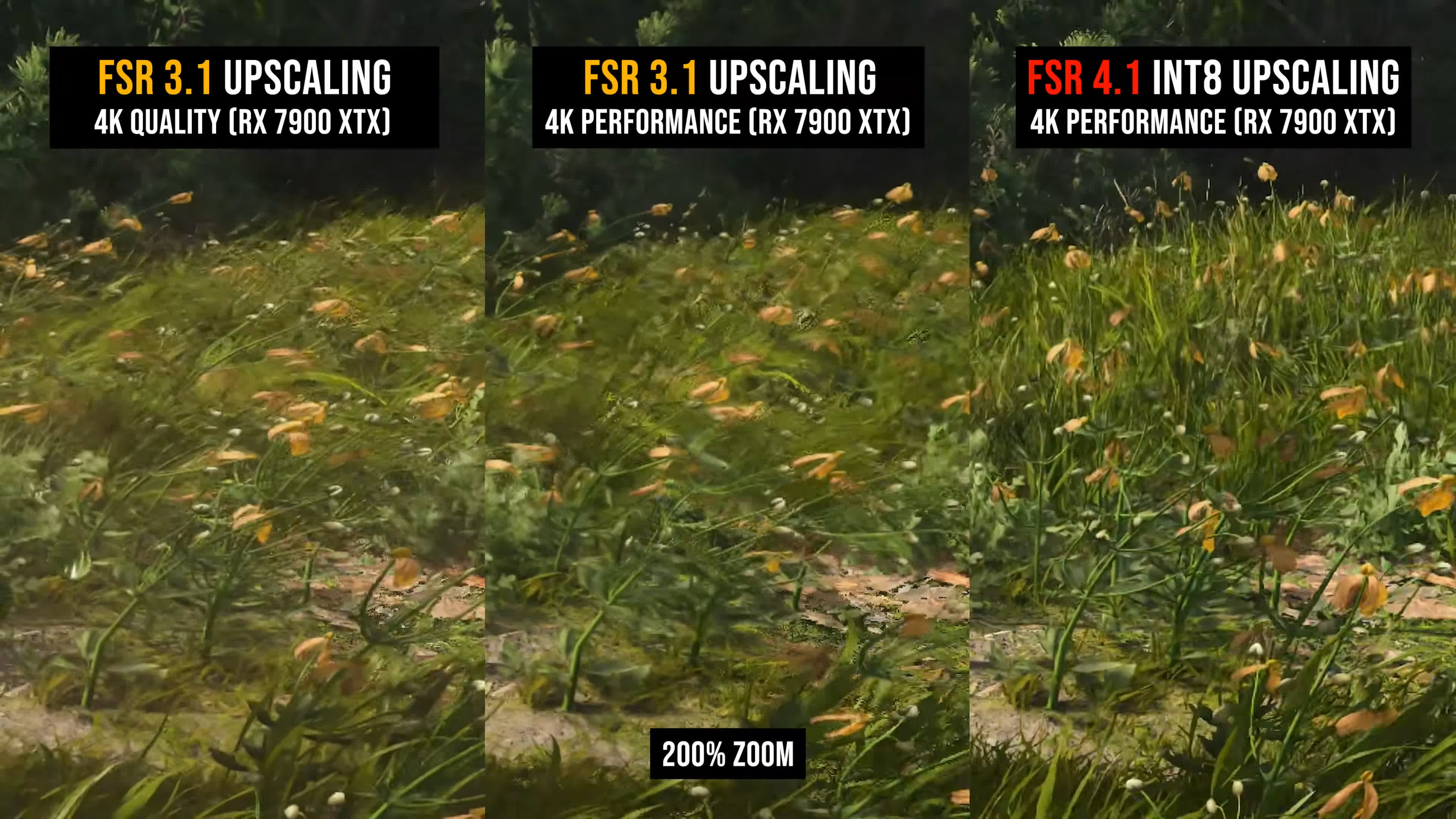
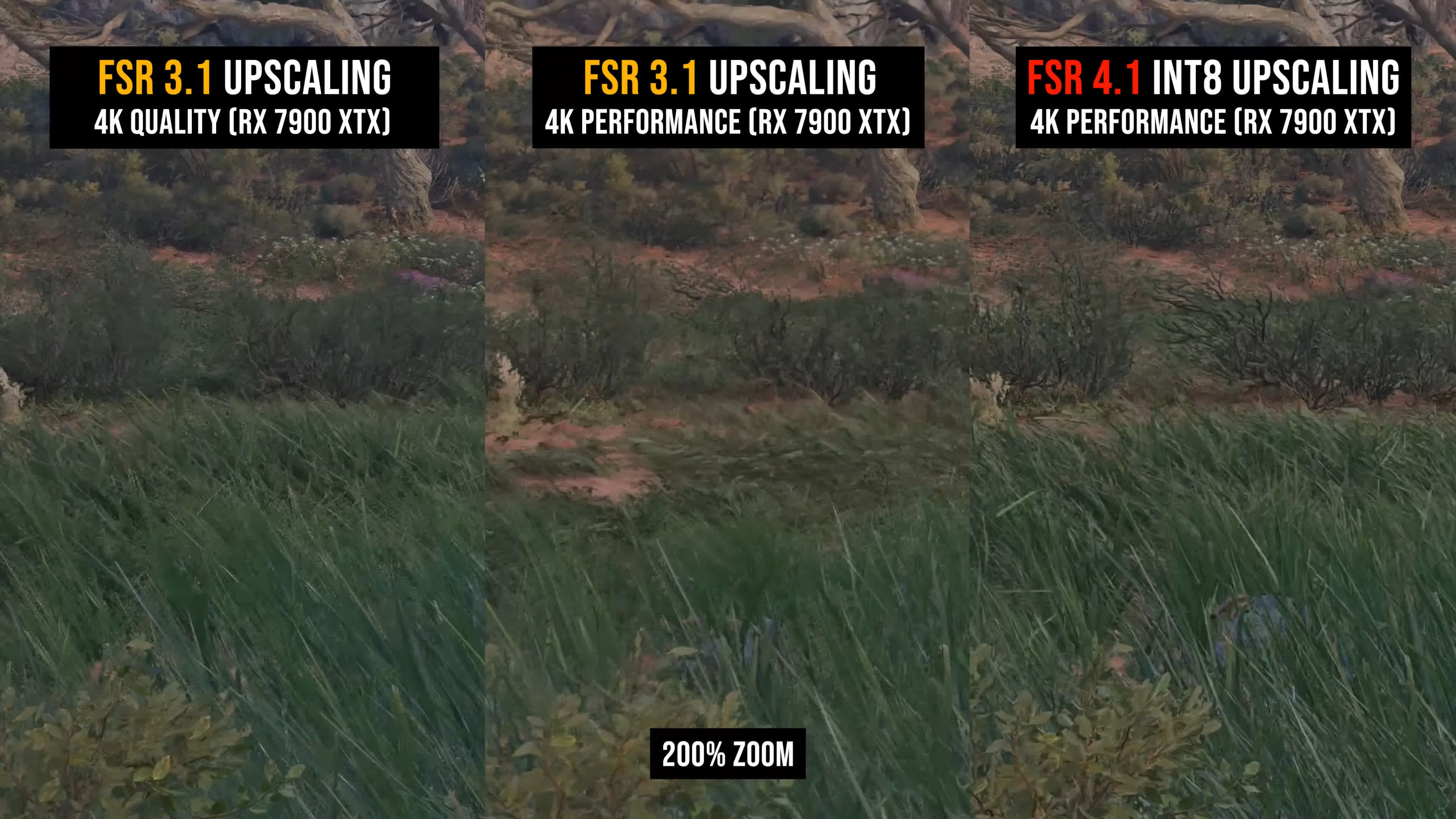
There are also several elements that FSR 3.1 handles particularly poorly. One is foliage, which is improved so dramatically in FSR 4.1 that you'll never want to use FSR 3.1 again.
In Assassin's Creed Shadows, the tall grass in the foreground is a blurry, horrible mess with FSR 3.1, even when using the highest Quality mode at 4K. With FSR 4.1 running at a much lower render resolution in Performance mode, the grass is significantly clearer, more detailed, more stable, and simply looks better.
You can see something similar in Star Wars Outlaws. FSR 3.1 looks grainy and lacks detail compared with FSR 4.1 INT8. Using FSR 4.1 looks like a resolution upgrade, even though we're either keeping the render resolution the same when comparing Performance mode against Performance mode, or reducing it when comparing FSR 3.1 Quality with FSR 4.1 Performance.
Water rendering is also noticeably improved. In Assassin's Creed Shadows, the water looks poor and pixelated with FSR 3.1 Performance compared with FSR 4.1. Fence quality is better as well, with FSR 4.1 delivering clearly superior stability in this challenging test.
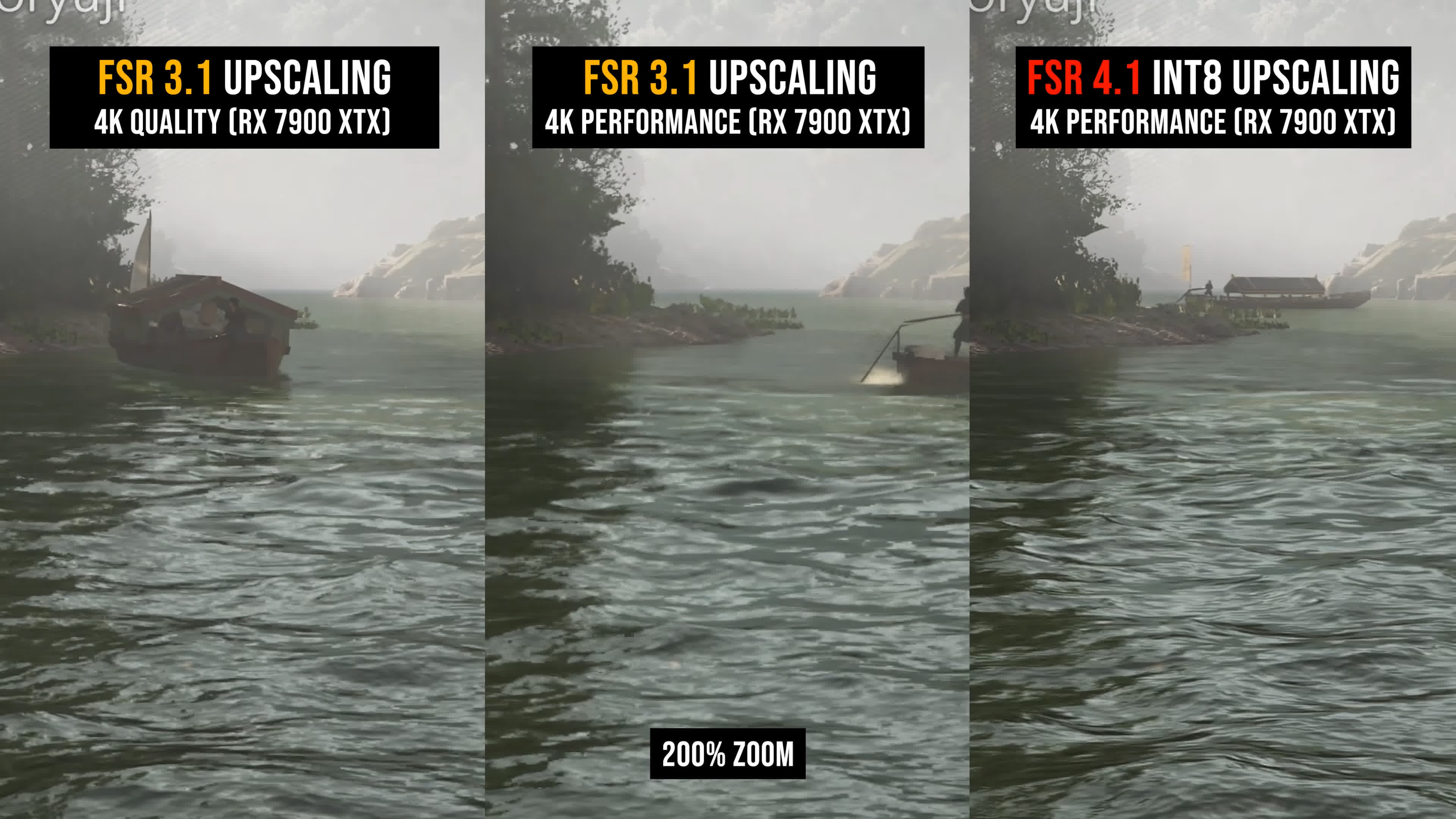
Particle quality is night-and-day different. FSR 4.1 absolutely smokes FSR 3.1 in this Horizon Zero Dawn snow test, even when comparing FSR 4.1 Performance with FSR 3.1 Quality. FSR 3.1 looks so bad here that it's almost funny.
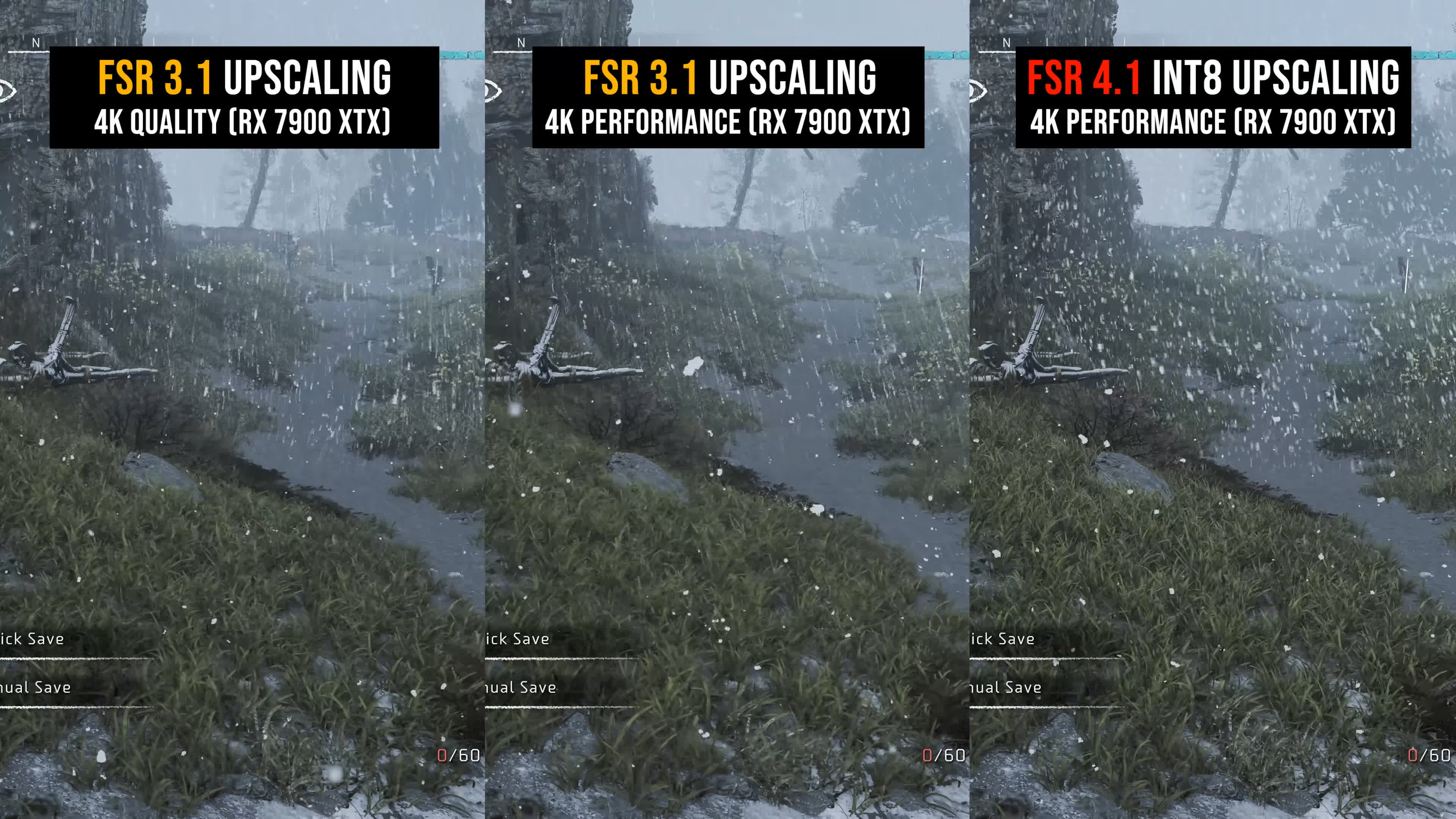
Transparent effects are hugely improved as well, as we can see with this fire effect in Horizon and some of the holograms in Ratchet & Clank. Disocclusion handling is also far better with FSR 4.1, which is evident in this example from The Last of Us Part I.
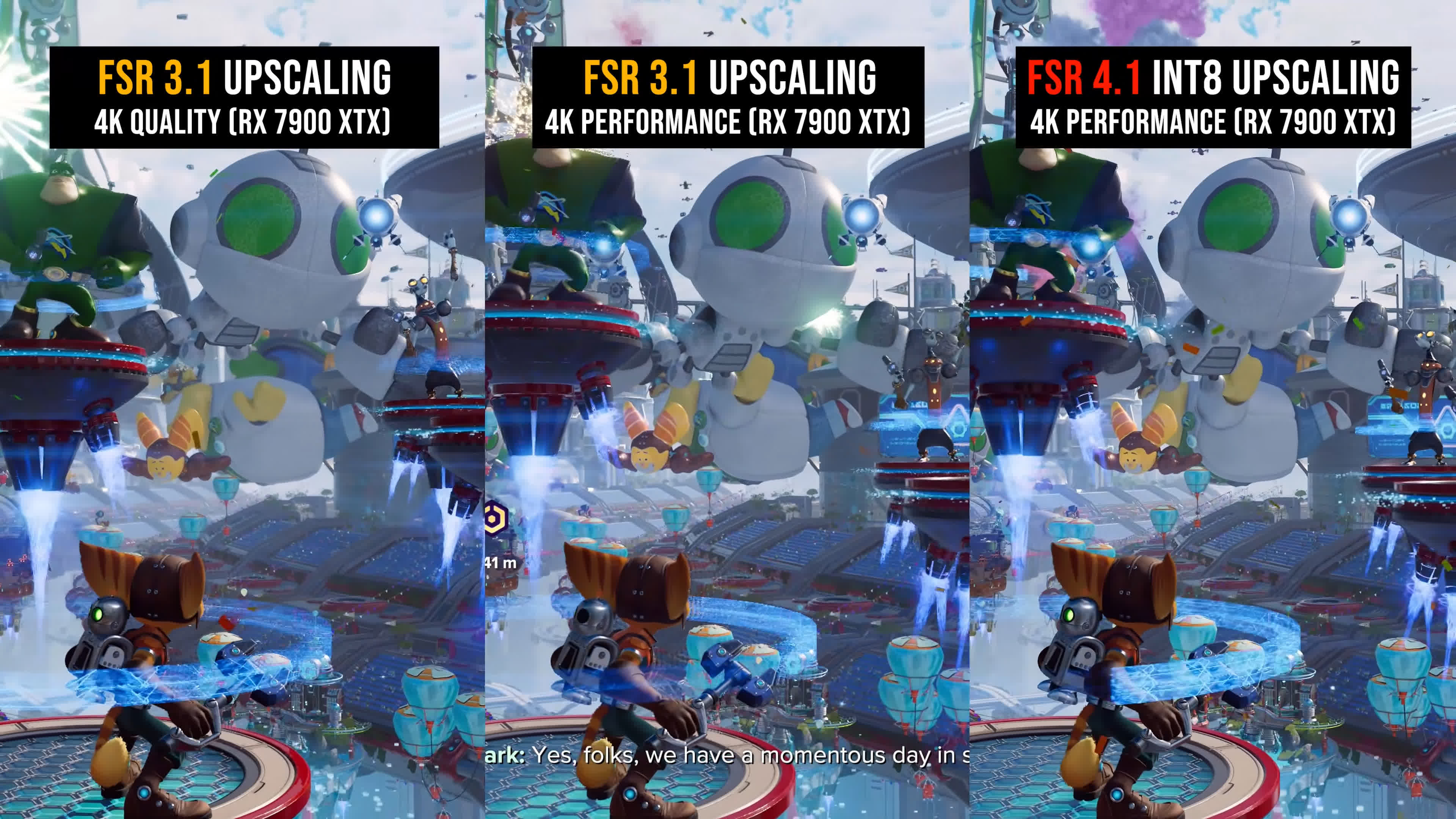
At no point did we find an example where FSR 4.1 was a downgrade from FSR 3.1 when using the same quality mode. In fact, the opposite was true: FSR 4.1 delivered a clear improvement every single time.
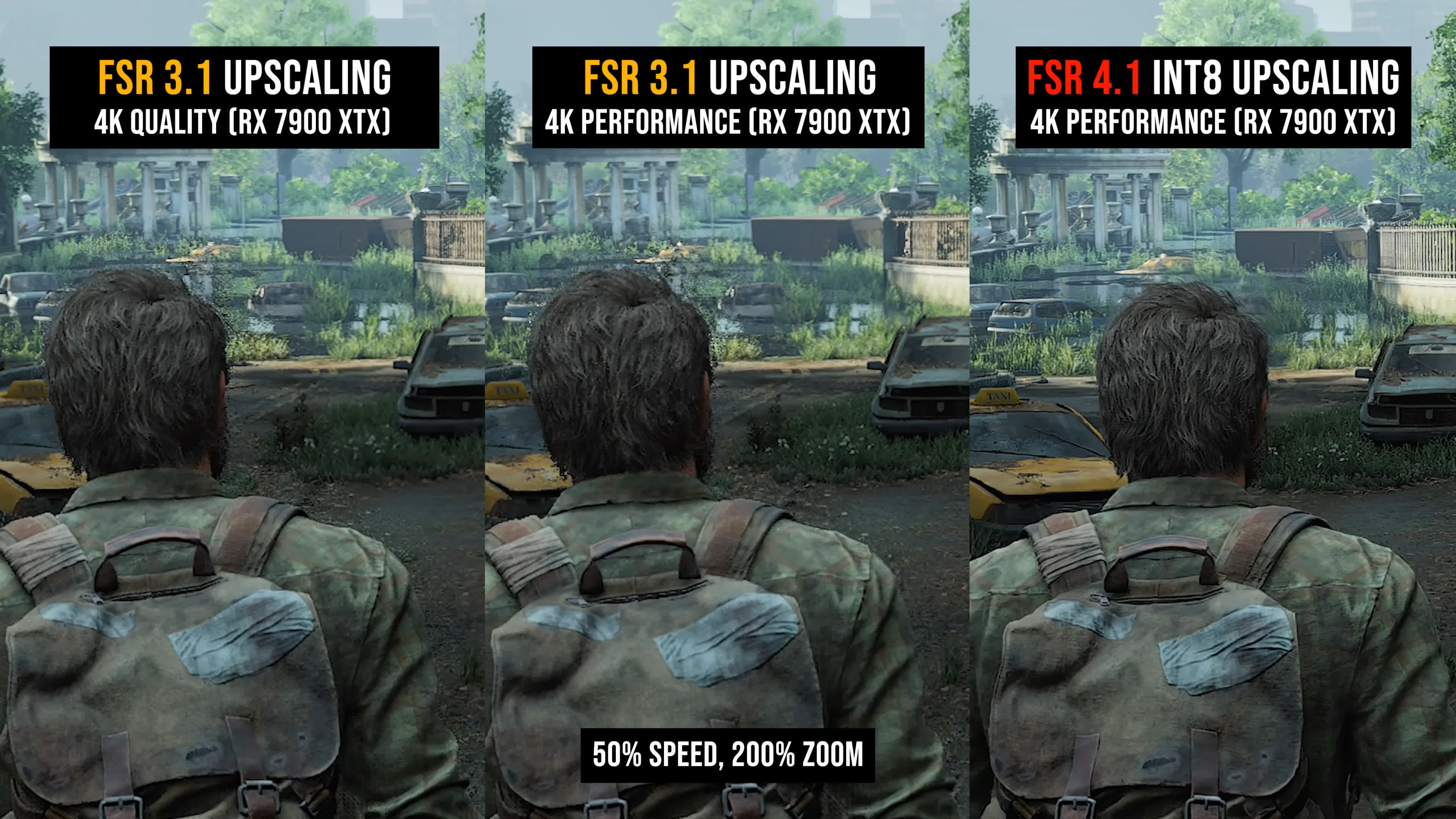
As many of these examples have shown, we also generally believe that FSR 4.1 Performance mode at 4K delivers much better image quality than FSR 3.1 Quality mode. It is sharper, more detailed, and more stable in most scenes.
FSR 4.1 INT8 vs FSR 3.1 at 1440p
The improvements are even greater at 1440p. For 1440p gamers, the FSR 4.1 INT8 update is transformative, regardless of whether you were already using upscaling.
For those previously using FSR 3.1 Quality mode on RDNA 3, FSR 4.1 INT8 delivers a huge improvement in image quality. For those who avoided FSR 3.1 at 1440p because its image quality was so poor, FSR 4.1 may finally be worth exploring. Quality mode is highly usable, and even Balanced mode is good enough in many situations.
For a better representation of image quality comparisons, check out the HUB video below:

In the vast majority of the scenes we examined, FSR 4.1 Balanced mode was significantly better than FSR 3.1 Quality mode at 1440p. FSR 3.1 is simply too blurry at this resolution. With FSR 4.1, you can reduce the render resolution and still gain a significant amount of sharpness and detail, along with all the other benefits in stability and artifact reduction.
Every RDNA 3 gamer would obviously want to use FSR 4.1 here, which is why so many Radeon owners have been calling on AMD to officially support these GPUs.
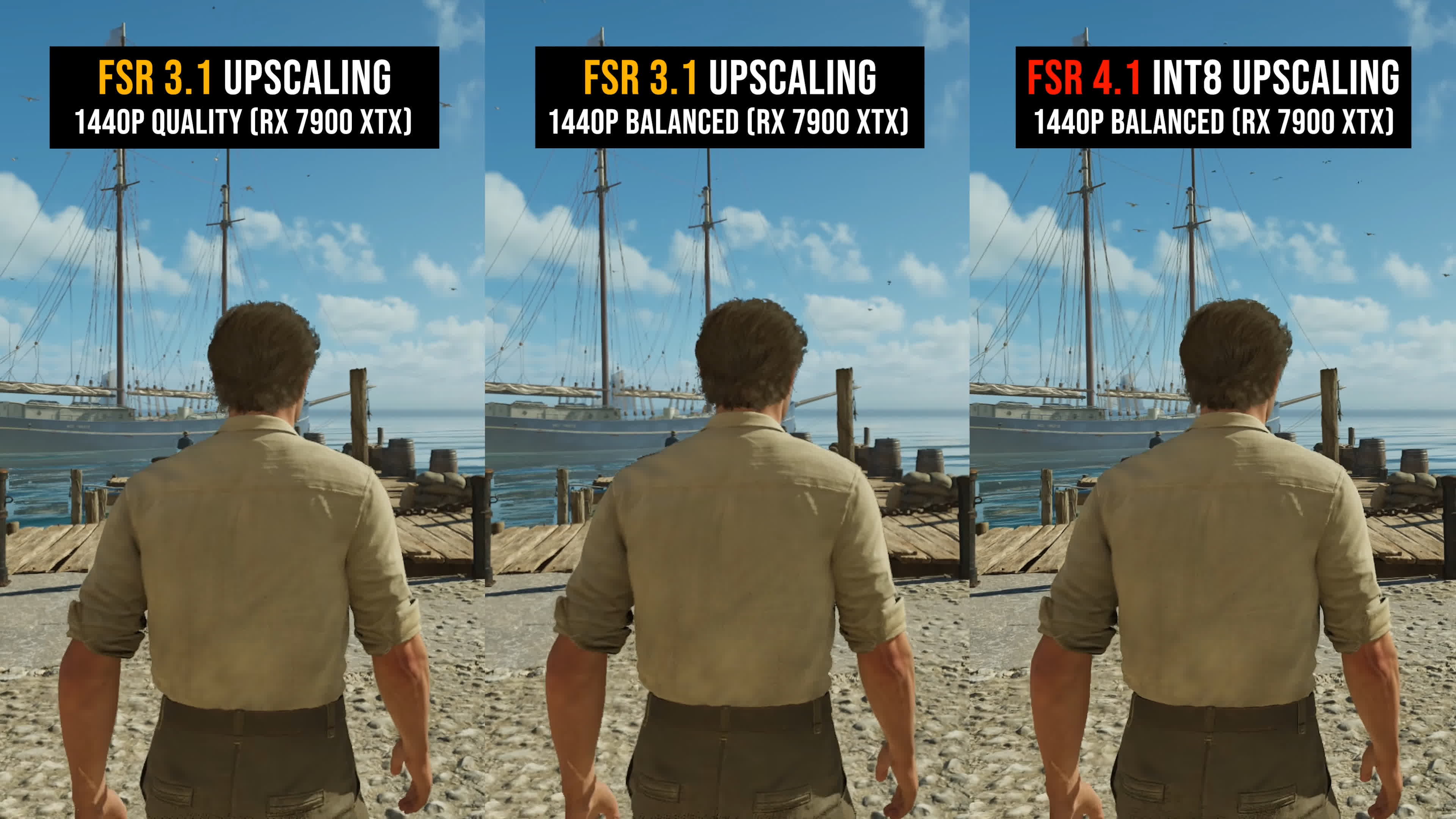
Here are a few more examples of what FSR 4.1 can do at 1440p. We don't even feel the need to show Quality mode, which we suspect most people will use instead of Balanced, because the lower mode already delivers such a clear victory.
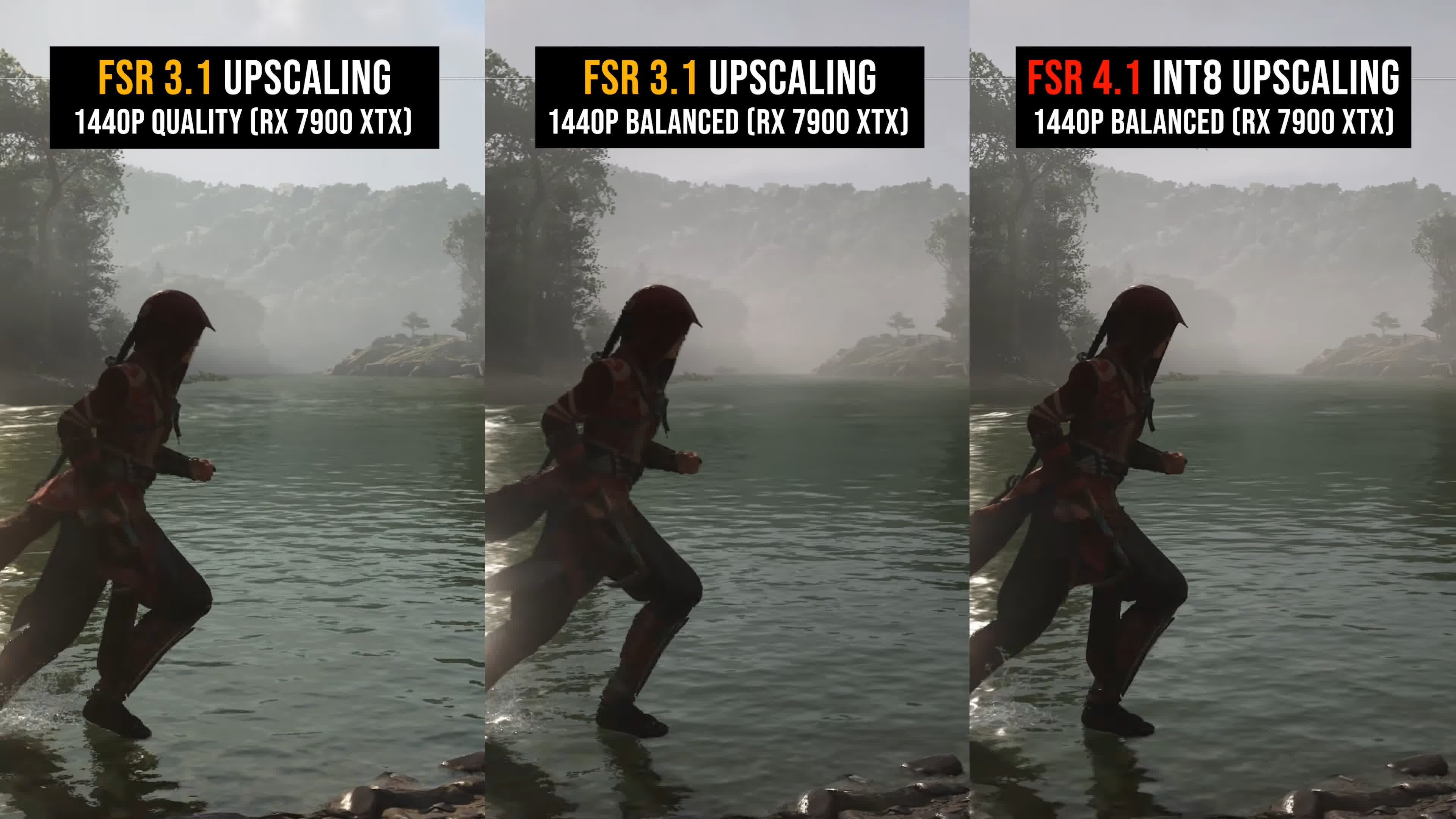
For those who don't own an RDNA 3 GPU and won't experience the transformation from FSR 3.1 to FSR 4.1 firsthand, we hope these examples at least demonstrate why we have been so adamant that AMD needed to release this feature.
FSR 4 on RDNA 3 vs. RDNA 4
The second major question concerns FSR 4.1 on RDNA 3 compared with FSR 4.1 on RDNA 4. How close does the INT8 version come to the original FP8 implementation? Are there any noticeable cutbacks or changes in image quality?
To answer that, we'll compare both versions using the 4K Performance mode. We've also included DLSS 4.5 Preset L in Performance mode so you can see how Nvidia's upscaler compares.
For a better representation of image quality comparisons, check out the HUB video below:

With a 1080p render resolution and 4K output, we think the two versions of FSR 4.1 are virtually identical. We closely examined 21 examples across nine games and found it extremely difficult to distinguish between the INT8 and FP8 implementations. Whether standing still, moving, or displaying different types of on-screen effects, they essentially look the same.
I'm very sensitive to differences in image quality. As you know, we've already tested upscalers dozens of times, and I love zooming in to nitpick the smallest details. As far as we can tell, FSR 4.1 produces the same image at 4K whether you're using the RDNA 4 or RDNA 3 version, at least in Performance mode or above.
After testing many upscalers, you gradually develop a sense of how each technology works and the types of output and artifacts it produces. It was immediately clear from testing FSR 4.1 INT8 that AMD is using the same AI upscaling model as the FP8 version, or one that is virtually identical.
This is not a situation like Intel XeSS, where a higher-quality model is used for the XMX implementation running on Intel GPUs, while a lower-quality DP4a version runs on other hardware. RDNA 3 owners appear to be getting the full FSR 4.1 experience.
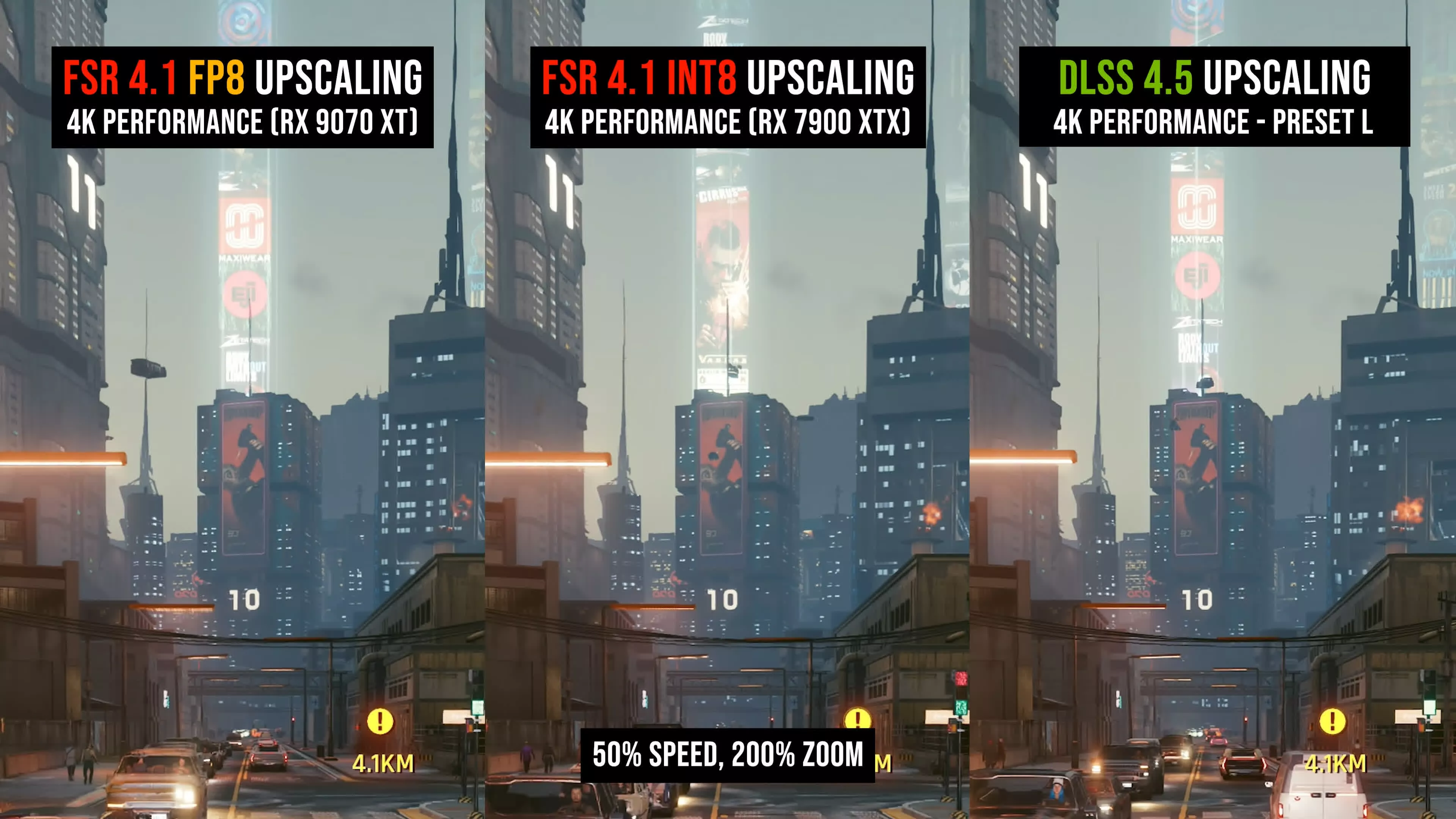
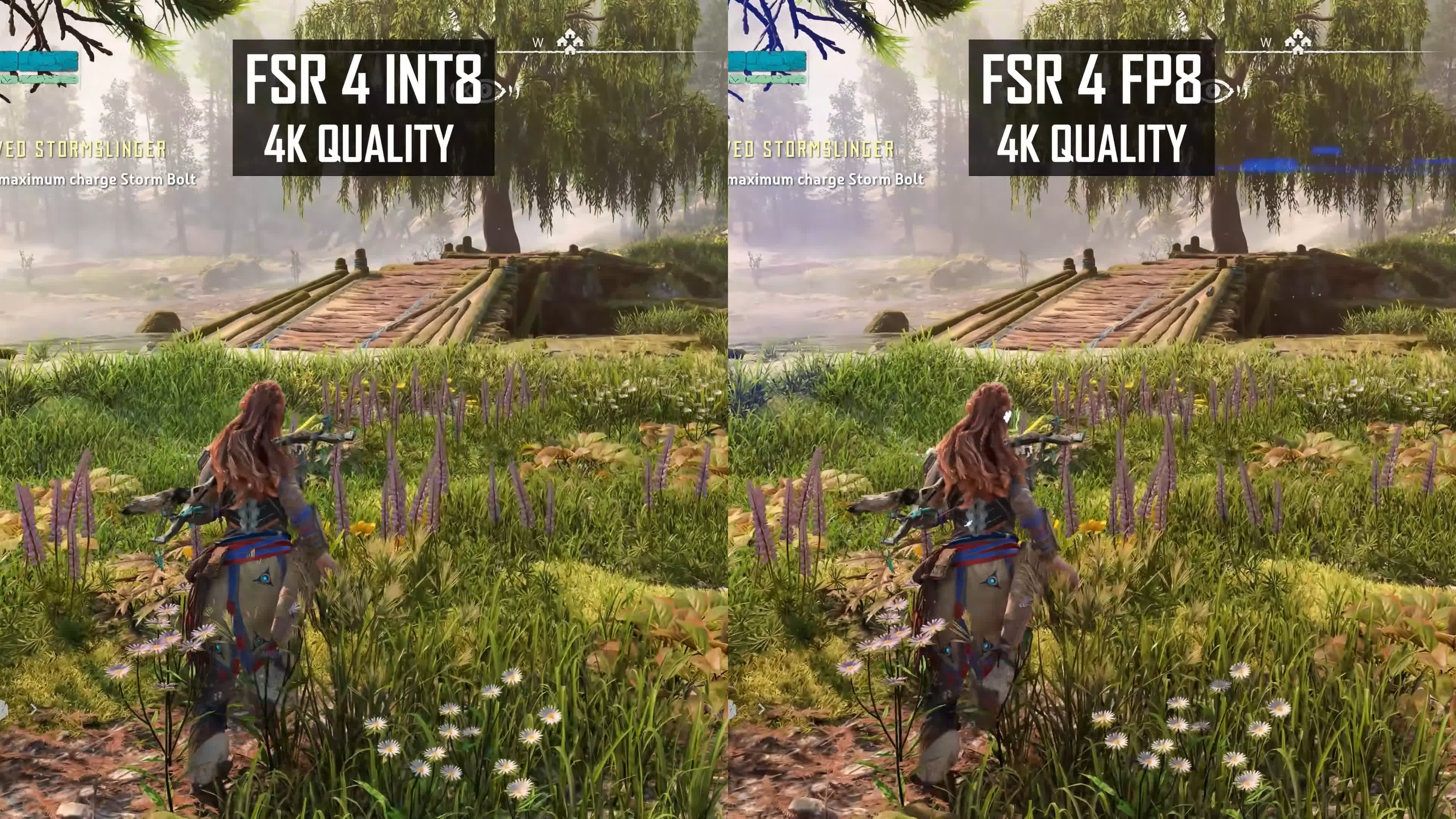
We can see this when focusing on specific artifacts. Here in Cyberpunk 2077, there's a thin spire at the top of the screen that flickers in exactly the same way with the INT8 and FP8 versions. In Ratchet & Clank, the ground textures show identical sharpness and detail. In Horizon Zero Dawn, both upscalers handle Aloy's hair in the same way and produce the same level of quality in the surrounding grass.
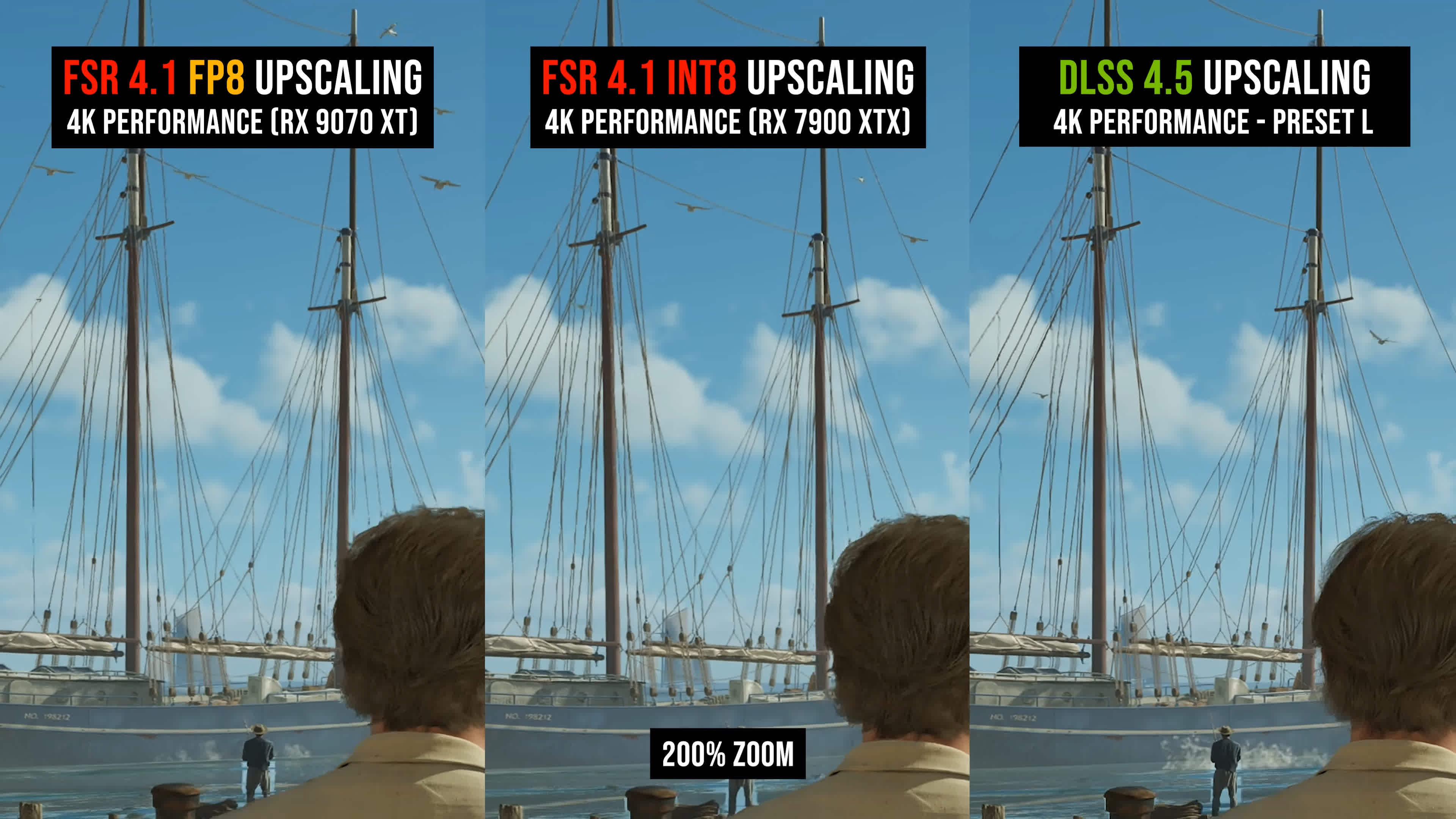
We also saw no notable differences in Mafia's boat rigging test. This is a particularly challenging scenario for upscalers, yet the sizzling and flickering produced by both FSR 4.1 versions are nearly identical.
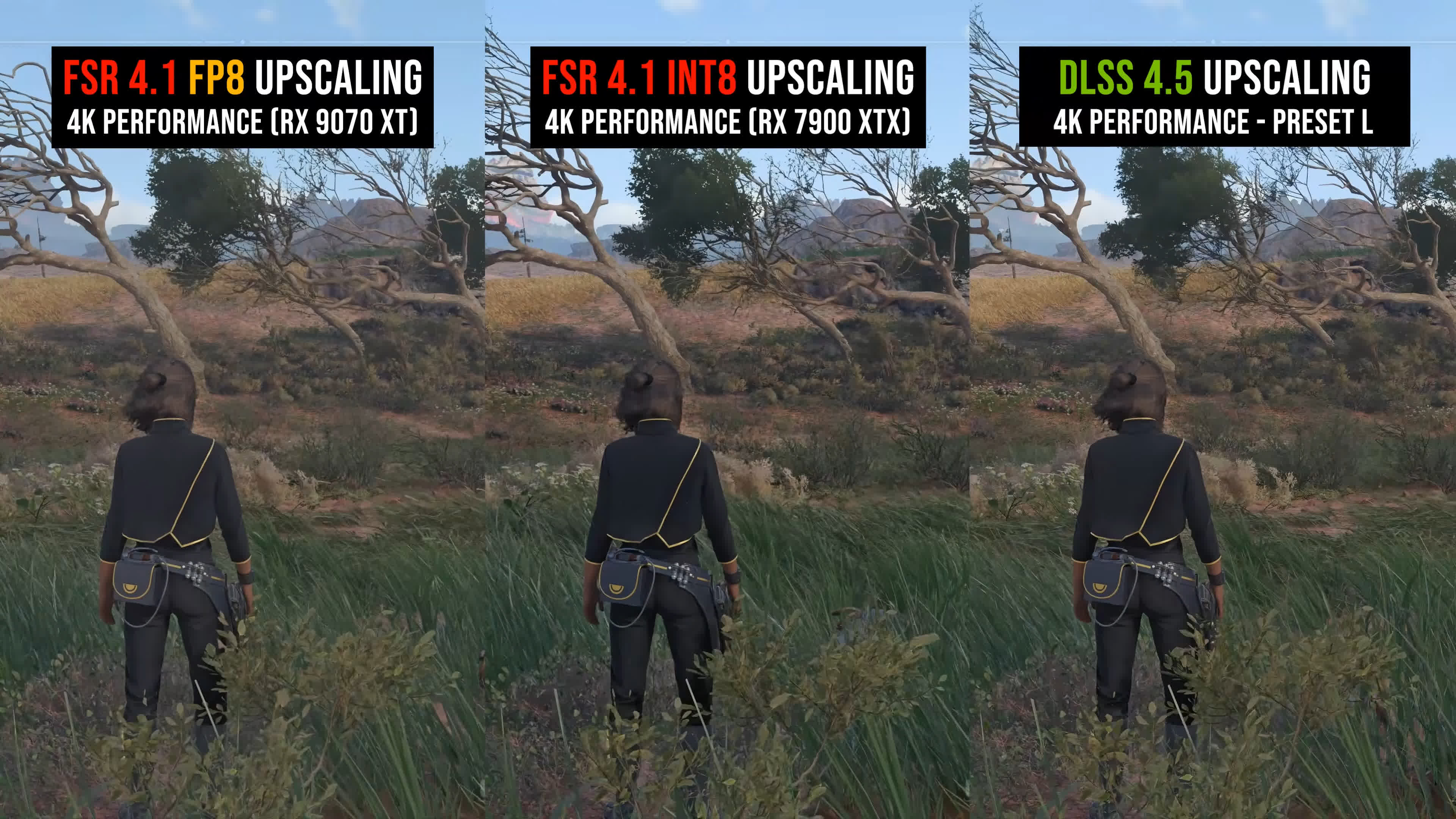
The trees and grass in Star Wars Outlaws also look very similar, with effectively identical clarity in moving foliage, comparable levels of grain, and similar reconstruction quality.
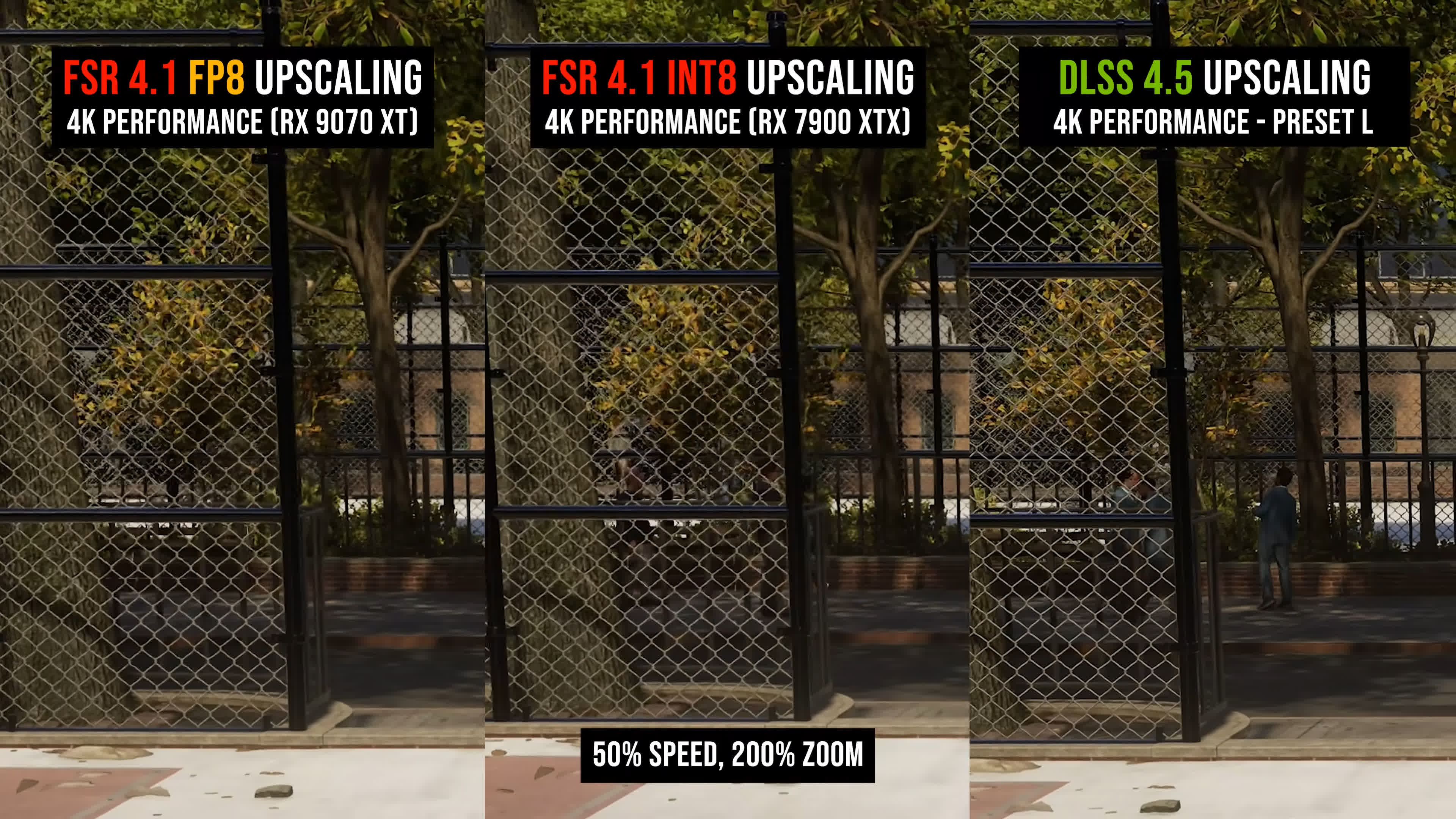
In Spider-Man 2's overlapping fence test, there is no clear winner and no obvious difference. Both FSR 4.1 versions handle the scene in the same way. Disocclusion also appears to be managed identically in The Last of Us Part I, with no major differences between the two implementations.
For a better representation of image quality comparisons, check out the HUB video below:

We also tested 1440p using Balanced mode, which has an even lower render resolution and is typically more challenging for upscalers than Performance mode at 4K. Here, we're looking at a render resolution of roughly 850p compared with 1080p at 4K Performance.
Broadly speaking, we saw the same result: FSR 4.1 INT8 vs FSR 4.1 FP8 look essentially identical.
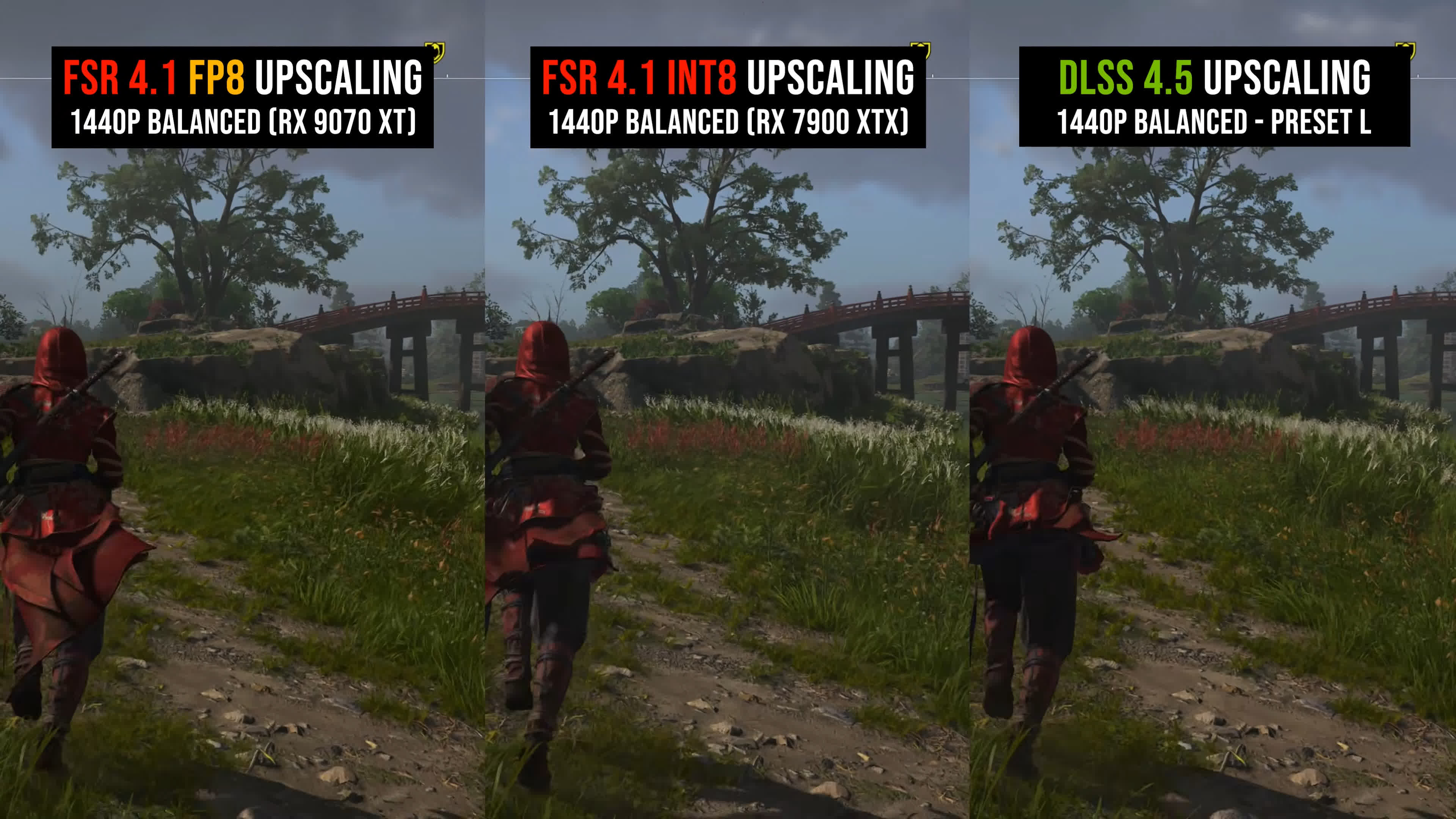
At worst, based on all the examples we examined, the INT8 version may be slightly worse in a handful of edge cases at low render resolutions. Broadly speaking, however, the two versions are effectively the same, and we don't think most people will be able to tell them apart during normal gameplay.
The differences are certainly smaller and more difficult to notice than those between the two DLSS 4.5 models, Presets L and M.
Performance
Now let's talk performance. We're only going to look at a few games here, the first of which is by far the most demanding: Cyberpunk 2077 at 4K using the Ray Tracing Ultra preset.
In this configuration, which runs at a relatively low frame rate, FSR 4.1 INT8 on the Radeon RX 7900 XTX is slightly more demanding than FSR 3.1. Quality mode delivers an 82% performance uplift over native rendering with FSR 4.1, compared with 92% using FSR 3.1.
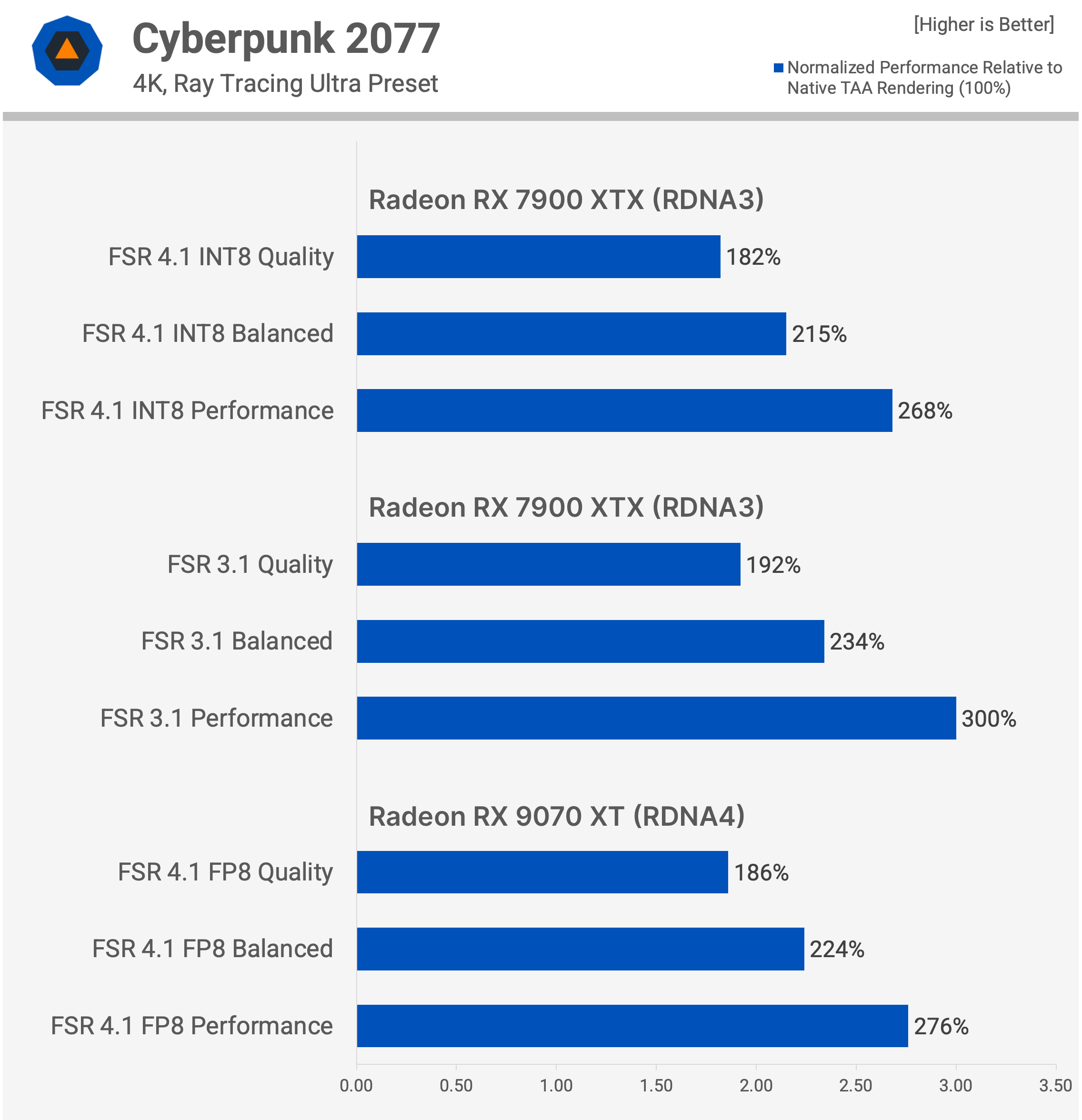
In Performance mode, FSR 4.1 is 168% faster than native, compared with a 200% uplift using FSR 3.1. Essentially, using the newer and much better upscaler costs a few extra frames.
In the same game running on the RX 9070 XT with the full FP8 version of FSR 4.1, the performance uplift is slightly greater: 86% in Quality mode and 176% in Performance mode. However, this comes from a higher baseline frame rate, as the RX 9070 XT is faster than the RX 7900 XTX in this title.
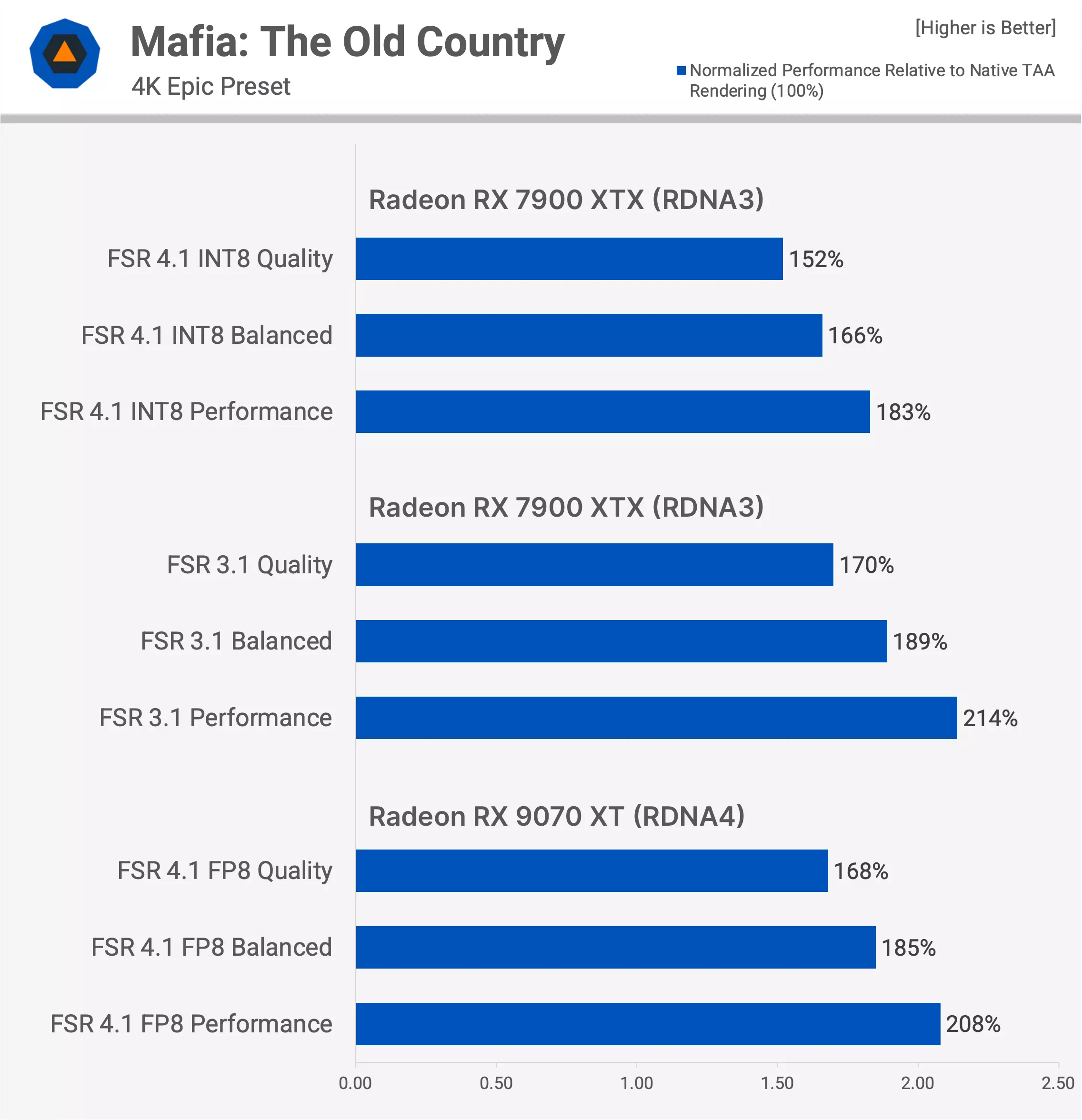
In Mafia: The Old Country, we get a better look at upscaling under more typical conditions. On both the RX 7900 XTX and RX 9070 XT, the baseline frame rate with native TAA is around 36 FPS at 4K, which is exactly the sort of result where you would want to use upscaling.
In Quality mode, FSR 4.1 increases performance by 52% on the RX 7900 XTX, compared with 70% using FSR 3.1. The RX 9070 XT sees a 68% boost from FSR 4.1, which is more in line with FSR 3.1 on the RX 7900 XTX, so the upscaler is clearly running faster on the newer architecture.
In Performance mode, we see an 83% uplift with FSR 4.1 on the RX 7900 XTX, 114% with FSR 3.1, and 108% with FSR 4.1 on RDNA 4. Although FSR 4.1 INT8 does not deliver the same performance uplift as FSR 3.1 on RDNA 3, it is still a significant overall win given the difference in image quality. In our opinion, FSR 4.1 Performance mode typically looks much better than FSR 3.1 Quality mode.
In this case, FSR 4.1 Performance delivers 66 FPS, compared with 61 FPS using FSR 3.1 Quality, while also providing a substantial improvement in image quality. That is a clear net win for FSR 4.1. However, it is not quite as strong as the result on the RX 9070 XT, where FSR 4.1 Performance runs at an average of 73 FPS.
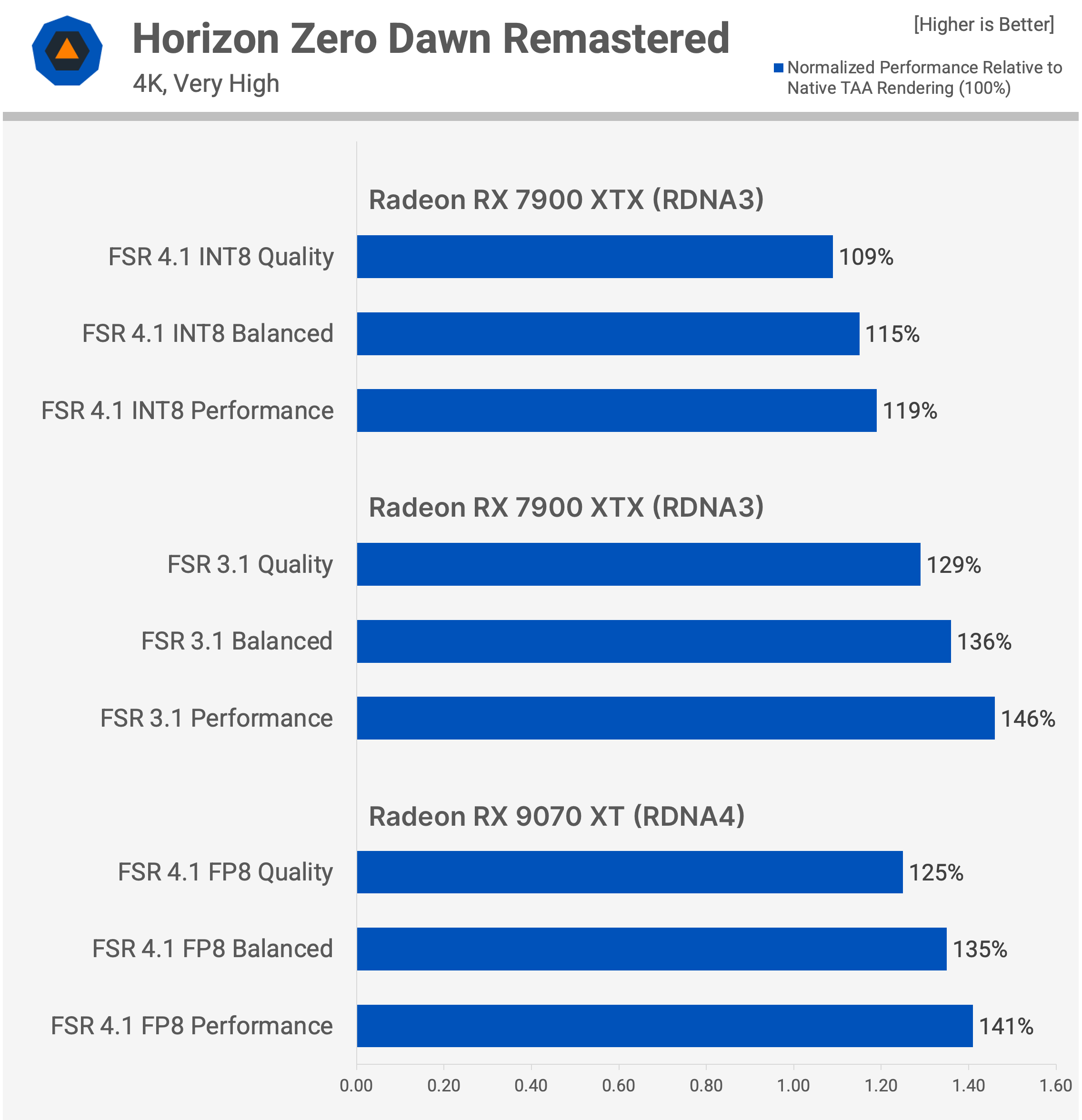
Then we have Horizon Zero Dawn Remastered, a game that does not benefit as much from upscaling. Here, the performance overhead of FSR 4.1 is more noticeable. On the RX 7900 XTX, Quality mode provides only a 9% performance increase over native rendering, whereas FSR 3.1 is 29% faster.
FSR 4.1 Performance mode also runs slower than FSR 3.1 Quality mode in this game, and once again, we see the RX 9070 XT running the FP8 version of FSR 4.1 more efficiently.
Even in this worst-case performance scenario, however, we would still use FSR 4.1 on the RDNA 3 card. The additional frame rate simply is not worth dealing with FSR 3.1's image quality artifacts.
A Big Win for RDNA 3, but AMD Took Too Long
All in all, this is a massive win for RDNA 3 gamers. FSR 4.1 transforms the upscaling experience for Radeon RX 7000 owners, breathing new life into products that are now 3.5 years old. It becomes even more important in a market where graphics card upgrades have become unreasonably expensive.
FSR 4.1 should help these older Radeon GPUs run games at acceptable image quality and frame rates for longer. FSR 4.1 delivers much better image quality than FSR 3.1 while keeping decent frame rates. Just as importantly, the INT8 implementation looks almost identical to the FP8 version available on RDNA 4.
Granted, FSR 4.1 INT8 is more demanding to run on RDNA 3 than FSR 4.1 FP8 is on RDNA 4, so it doesn't provide as large a performance uplift when upscaling. However, AMD has not downgraded the upscaling model to make it work on RDNA 3. This keeps output quality at a high level and makes FSR 4.1 a clear net win. At comparable performance levels, it simply looks much better than FSR 3.1.
Because FSR 4.1 INT8 looks so similar to the FP8 version, you can check out our previous coverage to learn more about how the upscaler compares with DLSS. I think the latest DLSS 4.5 models are still superior, but FSR 4.1 is reasonably competitive and remains quite usable at lower quality modes unlike FSR 3.1.
This significantly closes the gap in upscaling capabilities between the Radeon RX 7000 series and Nvidia's GeForce RTX 40 series, which launched around the same time.
And while this release is undoubtedly a good thing, we once again have to point out that AMD took far too long to bring FSR 4 to RDNA 3 owners. In fact, the delay looks embarrassing when you compare AMD's approach to Nvidia's.
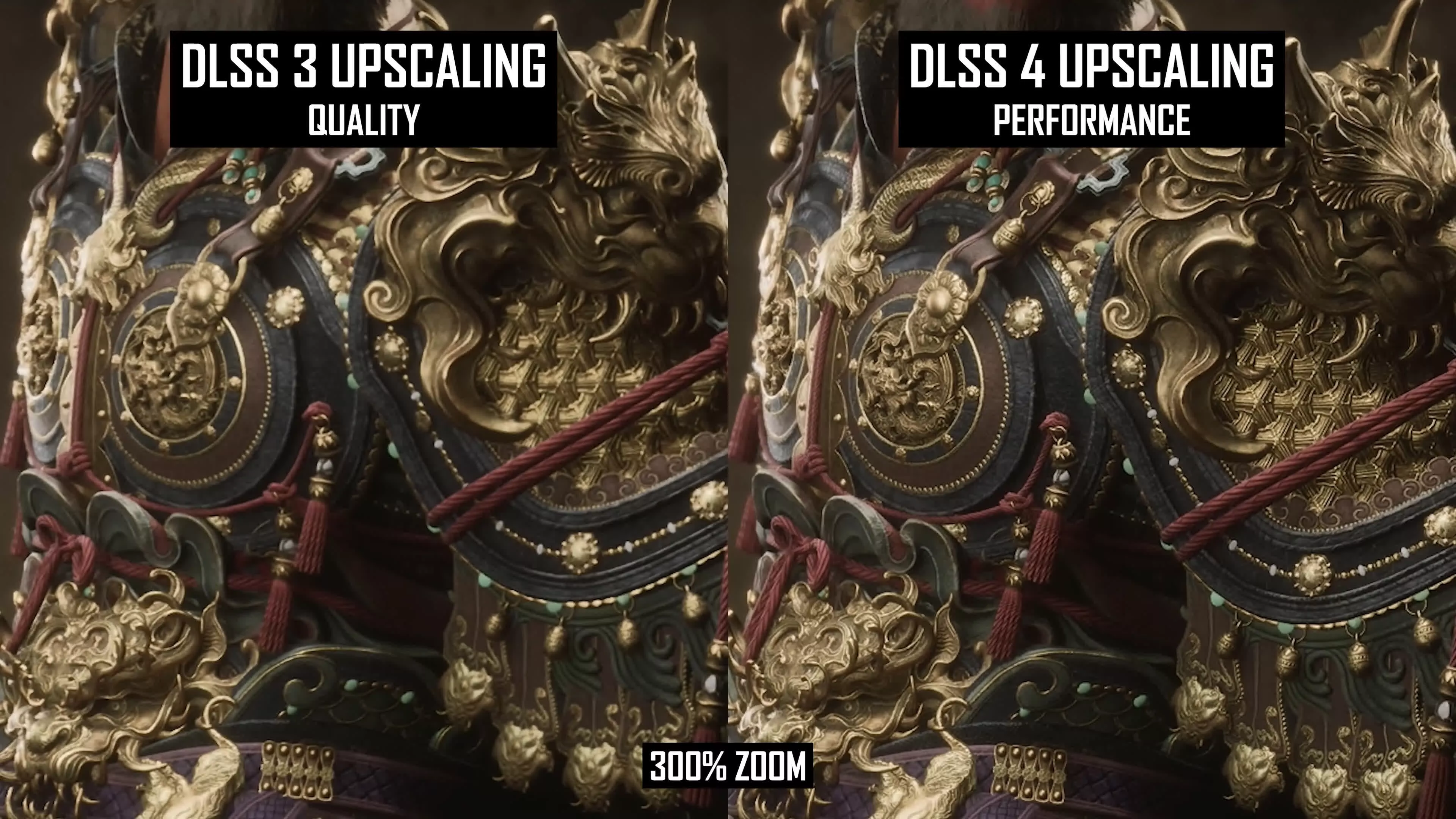
Nvidia launched RTX 40 GPUs in October 2022, shortly before AMD introduced the RX 7000 series. At launch, RTX 40 owners already had access to DLSS upscaling based on Nvidia's original convolutional neural network model. Nvidia continued improving DLSS over time, with newer releases and DLLs providing incremental image quality enhancements.
Then, alongside the RTX 50 series in early 2025, Nvidia released DLSS 4 with its first-gen transformer upscaling model. It was made available on day one not only for the RTX 50 series, but also for the RTX 40, 30, and 20 series. Nvidia repeated that approach when it released DLSS 4.5 in early 2026. Essentially, RTX 40 series owners have received every major DLSS upscaling improvement on the day it became available.
The experience for Radeon RX 7000 owners has been very different. At launch, they didn't have access to an upscaling solution comparable to DLSS 2 or DLSS 3. Instead, they were limited to FSR 2, which saw incremental updates before eventually becoming FSR 3.1 in 2024. Then, when AMD launched FSR 4 in early 2025, it remained exclusive to RDNA 4 GPUs. It took another 15 months before AMD released a version compatible with graphics cards that were only a few years old.
AMD simply hasn't done a good enough job of supporting existing Radeon customers with software updates and new features. Gamers care about this. They want reliable and consistent driver updates, along with support for new features wherever technically feasible. In comparison, Nvidia has supported its GeForce customers quite well through the expanding DLSS feature stack (not the same opinion we have about ray tracing, which is a related but different matter).
Hopefully AMD has finally recognized the importance of supporting older architectures over the long term, and we'll see a stronger commitment to software support going forward. I'm not holding my breath, but the long-awaited release of FSR 4.1 INT8, which for a while looked like it might never arrive, is at least a step in the right direction.