
Nvidia's first DLSS 5 benchmarks left out the one number we actually wanted to see: how much performance you lose by enabling the technology. Those "official" NBA 2K27 results leaned heavily on 6X Frame Generation to inflate the output frame rates, a laughable attempt at benchmarking with frame gen enabled in every chart and every configuration.
What we didn't get were proper before-and-after figures showing how much performance is lost simply by turning DLSS 5 on. So we're fixing that today. No 6X Frame Gen, proper on vs. off testing, and results across the full RTX 50 series lineup. Even the RTX 5050.

We've only had a day to test this first official implementation of DLSS 5, using an early access copy of NBA 2K27 and Nvidia's supported driver. That's why this article is focused exclusively on performance.
For now, there's plenty to dig into. DLSS 5 is available in NBA 2K27 as this article goes live, so it's worth exploring its performance and, more importantly, why DLSS 5 performs the way it does. Because there are some quirks here.
DLSS 5 Has a Huge Fixed Performance Cost
DLSS 5 performance appears to be largely dictated by two key factors: the first is that DLSS 5 is extremely performance-intensive. The neural network pass, which post-processes the final rendered frame, takes a very long time to complete relative to other effects and shaders you might be familiar with.

Crucially, this is largely a fixed cost based on the output resolution. Lowering in-game settings does not make the DLSS 5 portion of the render time faster. What this means in practice is that when you enable DLSS 5, performance is capped by the time required to run this intensive effect, and changing game settings doesn't have a significant impact.
On an RTX 5090 running NBA 2K27 using DLAA and max settings, we achieved just 76 FPS with DLSS 5 enabled. Dropping the preset to High increased performance by only 2 FPS, less than a 3% gain. This is despite a 5% increase in performance when DLSS 5 is disabled.

Dropping all the way to the Low preset runs directly into what appears to be a 240 FPS engine cap when DLSS 5 is disabled. But with DLSS 5 enabled, performance improves by only 9 FPS compared to max settings, just a 12% increase.
There's very little scalability here. It's pretty much a case where the performance you get with DLSS 5 enabled is what it is.
Upscaling Barely Helps
The second factor is that DLSS 5's performance is tied directly to the output resolution, not the render resolution. That's because DLSS 5 processes the final rendered frame after upscaling, rather than before it.
There have been some modded implementations that move the DLSS 5 pass before upscaling, but in the official implementation it runs afterward. Therefore, enabling upscaling has little to no impact on the processing cost of DLSS 5 itself.
Here we have the RTX 5060 Ti 16GB running at 1440p, which we chose to help avoid the 240 FPS cap and potential CPU limitations.

With DLAA enabled, performance drops from 129 FPS without DLSS 5 to just 46 FPS with DLSS 5 enabled. That's a pretty huge performance loss, and normally, if we were getting 46 FPS with DLAA, we'd simply enable DLSS Super Resolution using something like the Quality or Balanced preset to drastically improve performance.
But that's not what happens with DLSS 5 enabled.
Using DLSS Quality upscaling, performance improves to just 50 FPS, a measly 9% increase. We saw no further gains using lower upscaling settings. In this title, 50 FPS is effectively the hard limit for the RTX 5060 Ti 16GB at 1440p with DLSS 5.
We also saw a somewhat strange limit with DLSS 5 disabled, where performance never exceeded 165 FPS, so there was no scaling below Quality upscaling there either. But crucially, without DLSS 5 enabled, we do see a 28% frame rate increase going from DLAA to DLSS Quality.

That sort of gain is heavily reduced with DLSS 5 because its fixed processing cost dominates the total render time. This render time is not reduced through upscaling because DLSS 5 is processed after upscaling. So when using Super Resolution, you're only reducing the non-DLSS 5 portion of the render time, which becomes a smaller part of the total frame time once DLSS 5 is enabled.
Essentially, there is very little you can do to improve DLSS 5 performance on your GPU while maintaining your display's native output resolution.
You can improve performance by outputting a lower non-native resolution, but that's a terrible way to play because it will look very blurry. I'm sure many of you have tried outputting a 1080p game on a 1440p monitor and seen how bad that looks. That sort of thing is currently the only real way to reduce DLSS 5's render time and significantly improve performance.
RTX 5090: The Best-Case Scenario
With all of that in mind, let's look at how DLSS 5 performs across a range of GPUs, starting with Nvidia's flagship GPU, the GeForce RTX 5090. If you happen to own one of these cards for 3D rendering, running local AI models, or simply extreme-end gaming, you can get a reasonably playable experience with DLSS 5 enabled.

At 4K max settings, as we've already seen, we achieved 76 FPS without any Frame Generation enabled. At 1440p, performance improved to 134 FPS, and again to 182 FPS at 1080p. Of course, those results are playable at all resolutions, but DLSS 5 still has a huge performance impact compared to running the game without it.
The RTX 5090 ran NBA 2K27 60% slower at 4K and 40% slower at 1440p. That's especially substantial at 4K, where we're talking about 192 FPS versus 76 FPS, a massive change in latency and smoothness.
But running DLSS 5 on a $5,090 GPU isn't that interesting. At those prices, this really isn't a realistic gaming GPU for most people. It's well out of reach of the vast majority of gamers unless you were lucky enough to purchase one near MSRP well over a year ago.
RTX 5080 and RTX 5070 Ti
So instead, let's look at the RTX 5080. On this GPU, gaming at 4K with DLSS 5 isn't really possible at what we'd consider acceptable frame rates. We achieved just 53 FPS, down from 185 FPS with the feature disabled, a 71% reduction in performance.

This is because DLSS 5 takes quite a while to process a 4K frame on an RTX 5080. In fact, it takes long enough that achieving 60 FPS in any game will be difficult. We'll explore those render times in more detail shortly.
At 1440p, though, DLSS 5 is playable, outputting 102 FPS, which is more than sufficient in a game like NBA 2K27. This is still a 54% reduction in performance, so it's a massive hit, but starting from a baseline of 221 FPS makes it less painful.
At 1080p, DLSS 5 ran at 142 FPS, though we're not sure how many people are pairing an RTX 5080 with a 1080p display. And remember, DLSS 5 performance is tied to output resolution. You can't simply enable upscaling with a 1080p render resolution while outputting at 4K and expect to get anything close to the 1080p result.
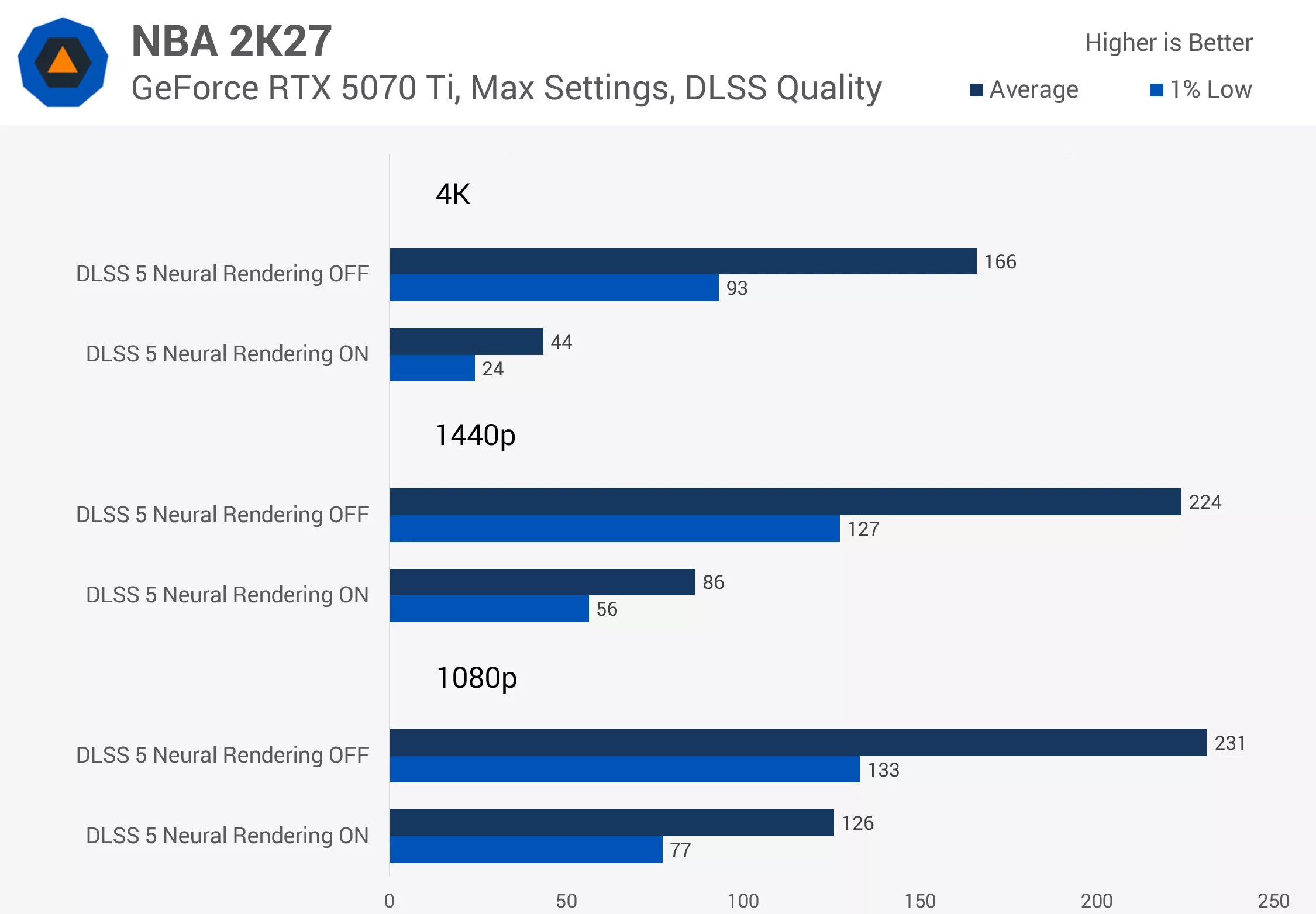
The RTX 5070 Ti struggles even more with 4K DLSS 5 gaming, outputting just 44 FPS. Given the small gains we saw from using lower settings, and considering we're already using DLSS Quality upscaling here, it's pretty much impossible to hit 60 FPS on this card.
The RTX 5070 Ti only becomes usable with DLSS 5 at 1440p, where it renders 86 FPS. That's a 62% decrease compared to DLSS 5 being disabled. It also ran at 126 FPS at 1080p, down 45% compared to running without the feature.
RTX 5070 and Below Struggle Badly
Given the RTX 5070 Ti results, it should come as no surprise that the RTX 5070 is useless at 4K with DLSS 5 enabled. The game is actually quite playable at this resolution without DLSS 5. We were getting 124 FPS using max settings and DLSS Quality upscaling, which is a really enjoyable experience. But 33 FPS with DLSS 5 enabled is a complete no-go.

1440p is also a bit of a stretch, though technically playable, at 67 FPS. That's down from 217 FPS with DLSS 5 disabled, representing a nearly 70% reduction in performance. At 1080p, we scrape past the 100 FPS barrier, but we're still looking at a significant 57% drop in performance.
The RTX 5060 Ti 16GB is again quite usable at 4K in this game when DLSS 5 is disabled, but you can completely rule out DLSS 5 at that resolution. It's a terrible experience.

Even 1440p is a stretch. We go from 165 FPS down to 50 FPS with DLSS Quality enabled, a 70% drop. It is technically possible to get 60 FPS here because the render time of DLSS 5 itself doesn't exceed the 16.7ms frame interval required for 60 FPS. But as we'll see shortly, actually hitting that frame rate is a big ask.
The RTX 5060 Ti 16GB is much better suited to 1080p with DLSS 5, achieving 78 FPS, though that's still a 65% performance reduction compared to running at 1080p without DLSS 5.
Then we get to the 8GB models, starting with the RTX 5060.
We had to turn the game's settings down to Low to avoid a VRAM warning, but even then DLSS 5 was largely unplayable on this GPU. 4K is completely out of the question at just 21 FPS. At 1440p, we achieved only 46 FPS, with no realistic path to 60 FPS gaming given the render time of DLSS 5.

At best, you can use DLSS 5 at 1080p, where the RTX 5060 achieves 73 FPS. But that's a 70% performance reduction compared to not using DLSS 5, and the drop would have been even larger if the game wasn't already maxing out its 240 FPS cap in this configuration.
The RTX 5050 is completely useless for DLSS 5. This is a terrible GPU, and even on Low settings the game failed to achieve 60 FPS with DLSS 5 enabled at 1080p.
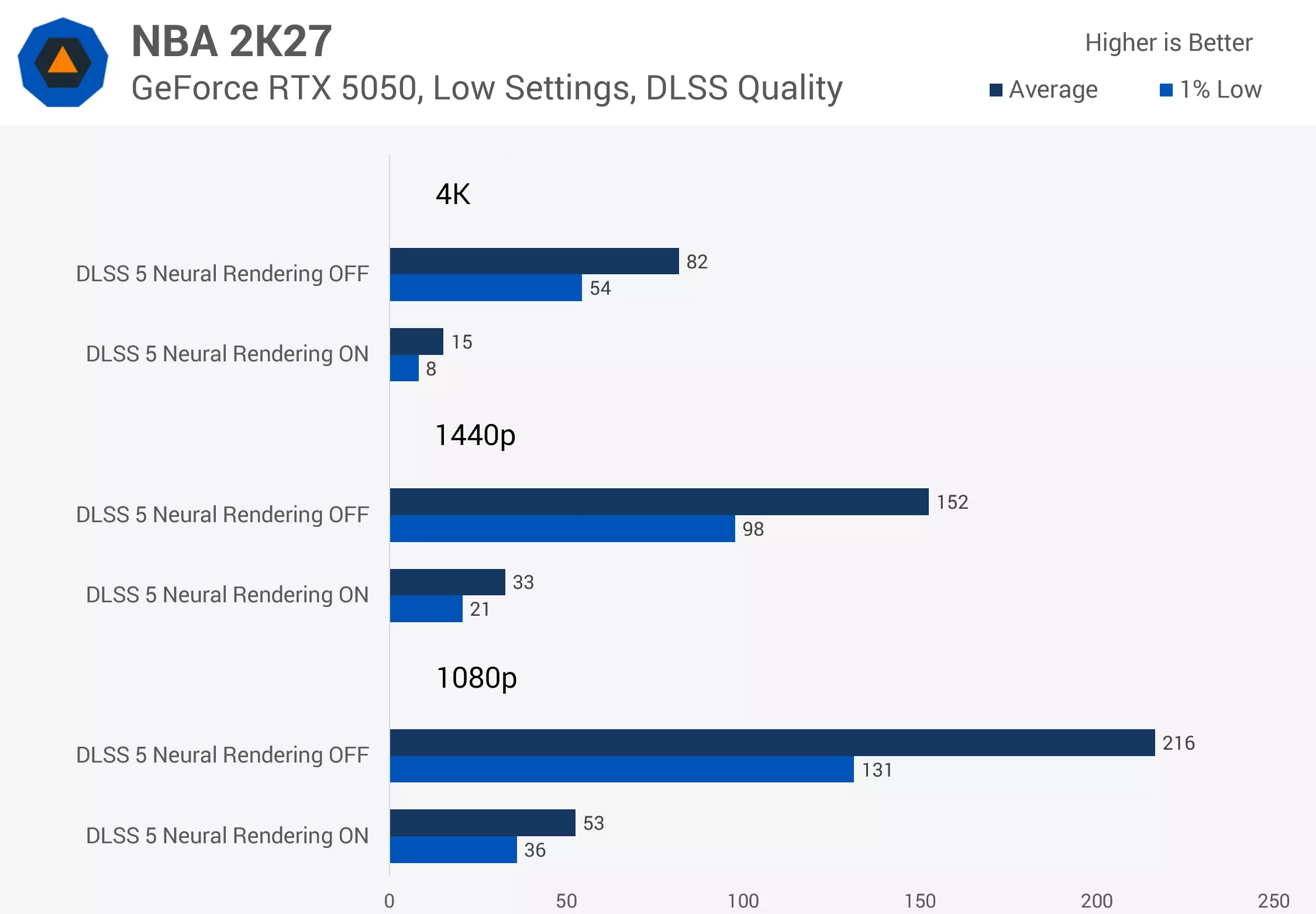
That obviously means it can't achieve playable performance at 1440p or 4K either. In fact, it doesn't even get close, rendering just 33 FPS at 1440p despite outputting 152 FPS with DLSS 5 disabled. Even at 1080p, performance is 75% lower with DLSS 5 enabled. You're getting just one-quarter of the original frame rate.
How Long Does DLSS 5 Actually Take to Render?
With frame rate results from before and after enabling DLSS 5, we can estimate DLSS 5's render time on each GPU. This is calculated by converting frame rates into frame times and then calculating the difference between DLSS 5 being enabled and disabled. This tells us approximately how much additional time it takes to render each frame because of DLSS 5.
Note that for some GPUs we increased settings to DLAA to avoid bottlenecks compared to the previous charts. The RTX 5090 is also bottlenecked at 1440p, so its render time at that resolution is an extrapolated estimate.
Looking at the isolated render times for DLSS 5 reveals something interesting: the feature's cost is almost directly tied to output pixel count and the Tensor performance of the GPU.

On average, DLSS 5 took 2.2 times longer to process at 4K than at 1440p across all GPUs. 4K contains 2.25 times as many pixels as 1440p, so we're seeing near-perfect scaling there.
Nvidia also claims, for example, that the RTX 5080 has 2.4 times the Tensor Core AI TOPS of the RTX 5060 Ti 16GB. At both 1440p and 4K, the RTX 5080 processed DLSS 5 around 2.3 times faster based on our performance testing.
What It Takes to Hit 60 or 80 FPS
With these render-time numbers, we can estimate what sort of performance outcome to expect in different situations. The first number in our table (below) is the estimated DLSS 5 frame rate when a game was previously running at 120 FPS without DLSS 5 enabled.
For example, on an RTX 5090 at 4K, DLSS 5's processing time is about 7.9ms. At 120 FPS, the rest of the game was previously rendering in 8.3ms. Enable DLSS 5 and add that 7.9ms processing time, and the total frame time becomes 16.2ms, which equates to roughly 62 FPS.
Measured DLSS 5 Render Times
| RTX 5090 | RTX 5080 | RTX 5070 Ti | RTX 5070 | RTX 5060 Ti 16GB | RTX 5060 | RTX 5050 | |
|---|---|---|---|---|---|---|---|
| 4K DLSS 5 Render Time | 7.9 | 13.7 | 17.0 | 22.1 | 31.1 | 37.8 | 53.1 |
| DLSS 5 Estimated Frame Rate (120 FPS Game FPS) | 62 | 45 | 40 | 33 | 25 | 22 | 16 |
| DLSS 5 Estimated Frame Rate (80 FPS Game FPS) | 49 | 38 | 34 | 29 | 23 | 20 | 15 |
| Required Game FPS to Hit 60 FPS | 114 | 332 | n/a | n/a | n/a | n/a | n/a |
| Required Game FPS to Hit 80 FPS | 217 | n/a | n/a | n/a | n/a | n/a | n/a |
| 1440p DLSS 5 Render Time | 3.6 | 6.1 | 7.8 | 10.2 | 14.1 | 16.9 | 24.0 |
| DLSS 5 Estimated Frame Rate (120 FPS Game FPS) | 84 | 69 | 62 | 54 | 45 | 40 | 31 |
| DLSS 5 Estimated Frame Rate (80 FPS Game FPS) | 62 | 54 | 49 | 44 | 38 | 34 | 27 |
| Required Game FPS to Hit 60 FPS | 77 | 95 | 113 | 156 | 387 | n/a | n/a |
| Required Game FPS to Hit 80 FPS | 112 | 157 | 213 | 444 | n/a | n/a | n/a |
Across all the GPUs, you can see just how much of a frame rate hit DLSS 5 introduces even in situations where you were previously getting a pretty decent frame rate.
The RTX 5090 holds up reasonably well at 4K, but the rest of the GPUs are pretty useless at that resolution. At 1440p, the RTX 5070 takes a hit of more than 50%, with an even larger penalty on lower-tier cards because DLSS 5 takes longer to process at this resolution on those GPUs.
We've run the same calculations for a game running at 80 FPS before enabling DLSS 5. At 4K, that isn't a high enough starting frame rate for most GPUs. At 1440p, you'll also be on struggle street for the most part. The RTX 5090 just scrapes over the line, but the RTX 5080 won't hit 60 FPS in that configuration, although the performance drop is reduced to around 33%.
The other numbers in this table show the required starting frame rate needed to achieve 60 and 80 FPS with DLSS 5 enabled. In other words, this is how fast the game needs to be running through settings adjustments or upscaling before adding DLSS 5's processing time.
At 4K, you can see that most of these GPUs will simply never hit 60 FPS with DLSS 5 enabled. That's because the DLSS 5 processing time itself exceeds 16.7ms.

The RTX 5080 just scrapes through, meaning 60 FPS is technically possible, but only if the rest of the game renders in around 3ms. That requires a starting frame rate of roughly 330 FPS. At 1440p, playable frame rates become possible on a wider range of graphics cards. The RTX 5080 requires a starting frame rate of 95 FPS to achieve 60 FPS after enabling DLSS 5, and 157 FPS to achieve 80 FPS.
The RTX 5070 Ti is also reasonable here, provided you're okay with 60 FPS and a performance hit of around 50%. Achieving 80 FPS is also possible on that card, although it comes with a 62% performance hit.
Below that, we're getting into the realms of implausibility. The RTX 5070 can sort of handle 1440p 60 FPS at a large performance cost, but anything beyond that will be difficult. The RTX 5060 Ti is pretty much out of the question for DLSS 5 at 1440p.

Nvidia says it is continuing to work on DLSS 5 performance, so it's possible these render times could be reduced through further optimization (the model, on software, and perhaps in hardware with future-gen GPUs). We'll have to wait and see.
With the launch version, though, there are simply some GPUs where no matter what combination of in-game settings you use, you will never achieve a playable frame rate with DLSS 5 at your display's native resolution.
RTX 40 Series Support Could Be Coming
One contentious issue at launch is that DLSS 5 is restricted to the RTX 50 series, even though modders have already gotten the feature working on every generation of RTX GPU, right down to the RTX 20 series.
The RTX 40 series restriction is especially painful because those GPUs appear powerful enough to run DLSS 5. The RTX 4090, for example, is faster than the RTX 5080 in many gaming workloads, and the RTX 5080 can already run DLSS 5 at playable frame rates in some configurations.

Nvidia tells us that it plans to work on expanding official support to the GeForce RTX 40 series once RTX 50 series performance is better tuned, whatever that means. But it does sound like Nvidia plans to bring the feature to at least the RTX 40 series at some point.
I'm not sure whether Nvidia intended to support the RTX 40 series from the beginning. Based on how the company typically operates, I suspect DLSS 5 was originally designed as an RTX 50 series exclusive to help sell those GPUs (or maybe even a feature to headline the "Super" refresh that never arrived), but that's purely speculation on my part.
In any case, plans for strict RTX 50 exclusivity would have become much harder to justify once modders got DLSS 5 working on RTX 40 series hardware and showing there's no true technical limitation. Of course, Nvidia has not confirmed official support for the RTX 30 or RTX 20 series. That makes sense from a couple of perspectives...
First, DLSS 5 is designed to use FP8 instructions, which are hardware-accelerated on Blackwell and Ada architectures. The RTX 30 and RTX 20 series lack hardware FP8 support, so modders had to switch DLSS 5 over to FP16 to get it running at more than just a few FPS.

But even then, an RTX 3090 is only around the performance class of an RTX 5070 in many modern workloads, and the RTX 5070 can barely run DLSS 5 at acceptable frame rates using the current model with native FP8 acceleration. Not providing DLSS 5 support on older cards makes sense if the feature simply won't run well regardless.
This Still Feels Like Tech Demo Territory
The performance we're seeing here is pretty much in tech demo territory. Sure, if you have a $5,000 GPU, you can get a playable experience at 4K and 1440p with DLSS 5 enabled. Outside of that, it's a bleak scenario. The RTX 5080 struggles at 4K, while the RTX 5070 is only borderline usable at 1440p.
Based on the performance we're seeing across GPUs, it's hard to imagine most gamers will use DLSS 5 to actually play games. Maybe they'll enable it for screenshots or just to check it out, but for normal gameplay, the performance cost is enormous.

And that's not just because of the low frame rates. It's also because improving performance with DLSS 5 is really difficult. DLSS 5's processing time dominates overall frame times, so lowering in-game settings and using upscaling has relatively little impact. This is where DLSS 5 differs substantially from a technology like path tracing, which is also extremely demanding.
Upscaling works wonders for improving path tracing performance because enabling Super Resolution reduces the render resolution at which path tracing is performed, delivering a substantial performance boost. You won't always get playable frame rates, but there's some flexibility to take, say, a 40 FPS experience and push it above 60 FPS depending on your hardware. With DLSS 5, there is little to no flexibility with the current implementation.
If you're only getting 40 FPS with DLSS 5 enabled at max settings, it's impossible to achieve 60 FPS regardless of which settings you adjust.
I personally love practical features that everyday gamers can use to improve the gaming experience. DLSS Super Resolution is one such example, and it works well across both high-end and lower-end hardware. But DLSS 5 doesn't fall into that category right now.

We've yet to dive into the image quality benefits DLSS 5 brings or conduct any detailed visual comparisons, and ultimately that's the other half of the equation here. There's also an awkward possibility that, for some gamers, this entire performance discussion is moot. DLSS 5 remains hugely controversial because plenty of people simply don't like what it does to a game's visuals. If you don't like those changes in the first place, it hardly matters whether DLSS 5 costs you 20%, 50%, or 70% of your performance.

That said, the flood of DLSS 5 mods we've seen over the past week shouldn't necessarily be treated as representative of what the technology can achieve. NBA 2K27 is our first opportunity to see what DLSS 5 looks like when those decisions have been made by the game's developers.
Whether the visual improvement is substantial enough to justify the enormous performance cost is the question that still needs an answer, but for now we've established just how expensive DLSS 5 is to run in current-gen hardware.